Insignia™ - USB-C to USB Adapter - Black
Insignia™ - USB-C to USB Adapter - Black
More Buying Options
Related Item

About This Item
- Key Specs
- Cable Length: 0.49 feet
- Connector Type (End 1): USB-C
- Gender (End 1): Male
- Connector Type (End 2): USB-A
- Gender (End 2): Female
- Maximum Data Transfer Rate: 5000 megabits per second (The fastest data can be moved between devices.)
- General
- Brand: Insignia™
- Model Number: NS-PA3C3A
- Product Name: USB-C to USB Adapter
- Color: Black
- Quantity: 1
- Compatibility: USB to USB-C enabled devices
- Connectivity
- Cable Type: USB
- Cable Length: 0.49 feet
- Product Type: Adapter, Cable
- Connector Type (End 1): USB-C
- Gender (End 1): Male
- Connector Type (End 2): USB-A
- Gender (End 2): Female
- Maximum Data Transfer Rate: 5000 megabits per second (The fastest data can be moved between devices.)
- Environmental
- Indoor Or Outdoor Use: Indoor (Indicates the appropriate environment product was designed to be used in.)
- Certifications Listings & Approvals
- Certifications and Standards: Certified USB
- Warranty
- Warranty - Parts: 1 year limited
- Warranty - Labor: 1 year limited
- Other
- UPC: 600603303777
The Insignia USB-C to USB Adapter lets you connect standard USB products to your Mac, iPad and other USB-C enabled products. It supports up to 5 Gbps of high-speed data transfer between devices, saving you time. The attached, short, braided cable is durable with a compact design.
- USB-C to USB conversion: Connects a USB device to your Apple MacBook or other USB-C enabled devices.
- Data transfer speed up to 5 Gbps: Grants a high-speed data transfer between your devices.
- Plug-and-play design: Requires no additional software for an easy setup.
- Short, braided cable: Gives you flexible placement options.
- System requirements: Works with Windows 10 32-bit & 64-bit, macOS 10.2 through 11.4 and Chrome OS 67 through 90.
- Compact design: Easily fits into a pocket, backpack or purse for easy transportation.
- USB-IF certified: Officially certified for compatibility across a wide range of devices.
- Brought to you by Best Buy: Insignia brings you affordable, dependable products with all the features you need.
Whats Included
- Insignia USB-C to USB Adapter
Product Manuals
Q: What operating systems are compatible with this adapter?
A: This adapter is compatible with Windows 10 32-bit & 64-bit, macOS 10.2 through 11.4 and Chrome OS 67 through 90.
Q: Is this USB adapter compatible with a MacBook?
A: Yes, this adapter is compatible with Apple MacBooks and other USB-C enabled devices.
Q: What is the maximum data transfer speed of this adapter?
A: This adapter supports data transfer speeds up to 5 Gbps.
Q: Does this Insignia adapter require any additional software for setup?
A: No, this adapter has a plug-and-play design and does not require any additional software for setup.
Q: Why should I choose this Insignia adapter?
A: This adapter is officially certified for compatibility across a wide range of devices.
Q: How long is the cable on this adapter?
A: The cable on this adapter is 0.49 feet long.
Q: Will this work on Apple MacBooks !?
A: This USB-C to USB Adapter lets you connect standard USB products to your Mac, iPad and other USB-C enabled products.
Q: I don't see a spec anywhere. Is this USB 3.1 Gen 1 or Gen 2? Thanks,
A: I connected an external harddrive using this cable. It transferred at least 100 MBps
Reviews
Customers are saying
Customers are satisfied with the USB-C to USB Adapter, especially its compatibility, quality, and ease of use. Users appreciate the reliable data transfer speeds and perfect size. The main concern mentioned by a few customers is that the connection could be tighter. Overall, the adapter seems to be well-received for its functionality and convenience.
Customer Images
The vast majority of our reviews come from verified purchases. Reviews from customers may include My Best Buy members, employees, and Tech Insider Network members (as tagged). Select reviewers may receive discounted products, promotional considerations or entries into drawings for honest, helpful reviews.
Compare similar products

The Insignia USB-C to USB Adapter lets you connect standard USB products to your Mac, iPad and other USB-C enabled products. It supports up to 5 Gbps of high-speed data transfer between devices, saving you time. The attached, short, braided cable is durable with a compact design.
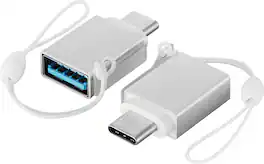
The Best Buy Essentials Female USB to Male USB-C Adapter (2-Pack) ensures you can use your USB devices with the USB-C ports on your new laptop. The compact adapters fits side-by-side on your device to be used simultaneously, or you can keep one from the 2-pack tucked away as a backup. Designed for both charging and data transfer, the adapter handles up to 15W of power when charging and syncs data at transfer speeds up to 5 Gbps. These adapters are backed by Best Buy to guarantee that they are just what you need.
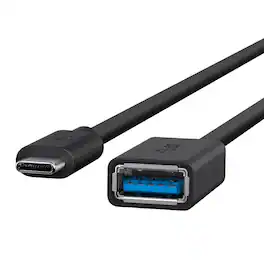
USB 3.1 SuperSpeed+ is the new standard for connectivity. The Belkin USB-C to USB-A adapter allows your favorite USB-A devices to connect effortlessly to any new USB-C port, so investing in a new laptop doesn’t have to mean the end of the road for your keyboard, printer and mouse too. Not only is the adapter a safe, efficient and cost-saving alternative to replacing all your peripheral devices, the cable also supports 1.5 Amps of power output for charging, and rapid data transfer speeds of 5 Gbps.

The Apple USB-C-to-USB Adapter lets you connect iOS devices and many of your USB accessories to a MacBook with a USB-C port. Plug the USB-C end of the adapter into the USB-C port on your MacBook, and then connect your flash drive, camera or other standard USB device.
| Pros for Insignia™ - USB-C to USB Adapter - Black | |||
|---|---|---|---|
| Compatibility, Quality, Ease of use, USB, Data Transfer | Compatibility, Size, Overall Performance, Portability, USB-C | Data Transfer, Compatibility, Quality, USB, Ease of use | Compatibility, USB, Ease of use, Quality, Size |
| Cons for Insignia™ - USB-C to USB Adapter - Black | |||
| Connection | There were no cons for this product— | Cord Length | Cord Length |