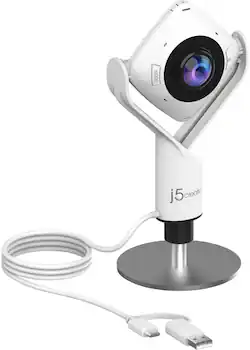
j5create - 360° All Around Webcam - White
Model: JVCU360
SKU: 6434106
This item is no longer available in new condition. See similar items below
Customers are pleased with the 360° All Around Webcam's wide field of view, finding it ideal for group video calls and appreciating the ability to easily adjust the viewing angle. However, some customers noted that the image quality could be improved, citing concerns about sharpness and graininess in the video. The larger size of the webcam was also mentioned as a drawback by some users.
This is great webcam that gives a 360 degree view of a conference room for the Zoom attendees. I didn’t have the budget for an “Owl”, but this is a great, lower cost alternative.
Posted by TaraE
Remote meetings can suck less when you can see everyone who’s there. J5 Create specializes in innovative products that meet real world needs. My first device from them was to connect a 2nd monitor to my laptop which only has one HDMI port. The 360 camera follows the same tradition of doing a nice job for a niche need: fitting a group together to meet with other people. What I first noticed about this camera was its versatility. It has a USB-C connector, but also includes an adapter for use with USB-A ports. I used the camera on both types of ports that found it to be equally reliable. There are several modes the camera can be switched to. These include a full view of everyone around the camera as well as several options to go close on only a portion. A touch sensitive ring around the lens allows users to virtually reposition the close up image so that remote viewers can easily see who is talking. If there’s only one person, the camera can also be used like a traditional Web Cam. It’s worth noting the base can be detached from the camera so that the camera can screw into a tripod mount. Despite the versatility, the camera is relatively easy to use. It was recognized instantly by all three of the PCs I tried it with. Each ran Windows 10 and is less than three years old. A mode button next to the lens switches between the different options. Your local camera image graphically displays the mode you are switching to. If you miss it as you are going through, you have to circle around all of the modes to get back to the one you want. Image quality is on par with other moderately priced WebCams. The all-around camera does a nice job maintaining resolution even in the close up modes. In the full all-around mode, this means that everyone sitting around your table can be seen at the same time. Remote users will know who is in the room and local users will not have to play “pass the camera.” The only difficulty I found was when local users needed to see what was happening in the remote tiles. I solved this by having my laptop on the table facing half the users and connecting it to an external monitor which faced the other half of the users. In this way, everyone around my table could see what was going on without having to move around. There are microphones all around the camera which helped to pick up sound regardless of where folks are located around the table. In my usage, the microphone picked up as well as any other WebCam. Overall, this all around camera provides a great opportunity for families or other small groups To all get together on the same conference call without having to sit in front of separate offices, laptops, or web cams. The field-of-view is large enough that people can maintain some distance from each other while still being recognizable in the shot. I would definitely recommend it for those in need of such a tool.
Posted by Dan0Sterling
This webcam is very easy to use. You plug it in at it works. If you desire you point it straight up and push one button at it becomes a 360 degrees room cam.
Posted by Mandalorian
The vast majority of our reviews come from verified purchases. Reviews from customers may include My Best Buy members, employees, and Tech Insider Network members (as tagged). Select reviewers may receive discounted products, promotional considerations or entries into drawings for honest, helpful reviews.