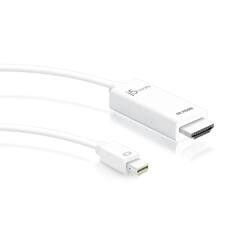
j5create - Mini DisplayPort to 4K HDMI Cable - White
- Key Specs
- Cable Length: 6 feet
- Connector Type (End 1): Mini DisplayPort
- Gender (End 1): Male
- Connector Type (End 2): HDMI Type A
- Gender (End 2): Male
- General
- Product Name: Mini DisplayPort to 4K HDMI Cable
- Brand: j5create
- Compatibility: Works with devices with mini DisplayPort, including Windows, macOS, Ubuntu, and Thunderbolt 1 & 2.
- Model Number: JDC159
- Color: White
- Connectivity
- Cable Type: Monitor
- Cable Length: 6 feet
- Product Type: Cable
- Connector Type (End 1): Mini DisplayPort
- Gender (End 1): Male
- Connector Type (End 2): HDMI Type A
- Gender (End 2): Male
- Other
- UPC: 847626002052
The Mini DisplayPort to 4K HDMI Cable allows you to quickly and easily connect your Mini DisplayPort supported Mac or PC to a 4K HDTV or other display device using an HDMI input. Simply connect the Mini DisplayPort end of the connector to your computer and HDMI display. The video cable seamlessly converts the DisplayPort video signal into an HDMI signal for a fast plug-and-play setup. Fully DisplayPort 1.2 compliant, and backwards compatible with DisplayPort 1.1.
- Optimal Viewing Experience: Transmit both video and audio from your computer to an Ultra HD 4K display.
- True 4K Resolution: Supports Ultra HD video resolution up to 4096 x 2160 and 3D video formats.
- Supports High Definition Audio: Plays digital audio through an HDMI display, (audio is supported when provided by the video source).
- Ready to use simplicity: Plug-and-play with DP 1.2 and HDMI 1.4 compliance. No driver, software, or separate cable is required.
Whats Included
- Mini DisplayPort to 4K HDMI Cable (JDC159)
- Quick Installation Guid
Q: Is this cable support 4K@60hz?
A: This adapter will support 4K@30hz.
A: Yes, the JDC159 will work for this setup.
A: If your computer only has micro USB, no, the JDC158 will not work. If your computer has Mini DisplayPort, and the display has HDMI support, then yes, that should work for you.
A: No, the JDC159 connects via Mini DisplayPort and will not work with your Samsung Galaxy J7. Alternatively, the JUA165C will work for your intentions.
A: Imac computer can only be used as displays with other Mac computers using some specific setups. I would recommend contacting Apple for more information on this.
Q: Will this connect a Dell laptop to an iMac for an extended desktop?
A: No, this would not work with this adapter.
Q: Does this work with an iMac 2?
A: Yes, the JDC159 cable will connect an additional monitor to an iMac.
Q: Does this work with Macbook Pro and monitors with resolution up to 2560x1440?
A: Yes, it supports up to 4k at 30 Hertz. ** Feel free to contact the Technical Support team mentioned on the packaging for further assistance or if you have any other questions and someone will be glad to assist you.