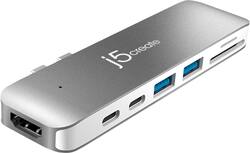
j5create - Ultra Drive Mini Dock for Select Apple MacBook Laptops - silver
Model: JCD382
SKU: 6115810
This item is no longer available in new condition. See similar items below
Customers have good things to say about the Ultra Drive Mini Dock's ease of use, plentiful ports, compact size, and generally good performance. Many appreciate the additional USB ports it provides for their MacBooks. However, some customers experienced issues with compatibility, connection stability, and the device's tendency to overheat. A few also felt the price was a bit high.
This is a good usb hub if you don't have a case cover. In my case I have a case cover so I'll have to look for a different option. Pros Conveniently small hub pack with essentials ports like 2 USB port, 1 HDMI, 2 thunderbolts, its snaps in place Cons No case cover can be used The price is a little higher than other brands its kind of difficult to take off.
Posted by Velez379
For on the go or stationary use the j5create has 2 Thunderbolt ports (male) that plug into the side of a MacBookPro replicating the 2 Thunderbolt ports of the Mac and adding 2 USB3, 2 cardslots (which I have not used) and an HDMI port (full-size) on the back of the product. I mainly needed some normal rectangle size USB3 ports for external hard drives and the Thunderbolt ports for the Power Cord and a Thunderbolt monitor (which needed a thunderbolt3 to thunderbolt2 adaptor). I plugged a 4 port USB3 hub into one of the USB3 ports on the j5 giving additional flexibility. I could not use the thunderbolt3 power cord and my Thunderbolt Display on the j5’s thunderbolt3 ports and I am not sure if one of the ports acts as a USB port as opposed to both as thunderbolt3 but my Mac has 2 ports on the other side of the computer too so I just power on the port closest to the mini headphone jack on the right side of the computer. I do not think the monitor/Power issue is a j5 issue but an Apple one. Or I may have just not given it enough time to sense the connections. But through the j5 I am able to power the Thunderbolt monitor (port furtherest back on the unit), an external Thunderbolt SSD on the next thunderbolt3 port and the usb hub (where there is an external Blu-ray writer as well as usb mouse and one more USB port for another external harddrive) on the first USB3 port of the unit. All work without a hitch and required no drivers to use the j5. It seems the j5 can also be flipped and attached to the right side of the MacBookPro but this would cover the mini headphone jack so I did not try it. I also did not try the hdmi port as of yet but I should be able to drive an hdmi monitor alongside the thunderbolt monitor and the laptops screen so 3 desktops would be available. The j5 has operated without a hitch allowing me to copy files to and from harddrives, write cd’s and dvd’s And have on the go convince if I just need the laptop when traveling. I would be cautious because the j5 hangs off the side of the Mac only connected by the 2 thunderbolt3 ports and is a target for hitting and knocking it senseless but this would be an issue with any one of the several j5-like products out there. If this is a fear for you there are products which have relatively the same expansion possibility as the j5 but are attached to the Mac via thunderbolt3 cable.
Posted by Vman
I have a MacBook Pro (15", 2018) that was assigned to me for work. (I am a Mac person, so this was not a burden!) I had previously had a 2015 model with Thunderbolt 2 ports and had purchased expensive docks to attach to my peripherals at the 3 offices that I work out of. When I got this newer laptop, I bought some usb-c docks that attached with a short 6" cable to the MBP. I still had to attached the power cable also. When I started having issues with one of those, I picked up this j5create dock in hopes that I could get back up and running. The really cool part is that I could plug the MBP usb-c power supply into the j5create and now it is just a matter of plugging in the j5create and I am ready to go. In terms of video support, it is driving a 34" ultra wide AOC monitor with 3440x1440 resolution with no problem using the HDMI port. I also have a webcam and Time Machine backup drive attached to the usb 3.1 type A ports and I am plugging in my iPad (via a usb-c to lightning cable) on the usb-c port. With all the ports occupied, it gets warm, but not hot. While I generally don't use the sd card reader, it is a nice to have feature if I were importing photos, etc. The 4 stars instead of 5 is that I would have liked to have one more usb 3.1 A port to attach the occasional external data drive that I use.
Posted by GeooeG
The vast majority of our reviews come from verified purchases. Reviews from customers may include My Best Buy members, employees, and Tech Insider Network members (as tagged). Select reviewers may receive discounted products, promotional considerations or entries into drawings for honest, helpful reviews.