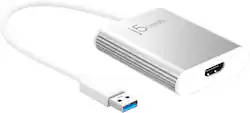
j5create - USB 3.0 to 4K HDMI Display Adapter - Silver
- Key Specs
- Connector Type (End 1): USB Type A
- Gender (End 1): Male
- Connector Type (End 2): HDMI Type A
- Gender (End 2): Female
- General
- Product Name: USB 3.0 to 4K HDMI Display Adapter
- Brand: j5create
- Compatibility: Windows 10 or later. macOS 10.9 or later. Available USB Type-A port. USB 3.1 / 3.0 is required for 4K resolutions.
- Model Number: JUA354
- Color: Silver
- Connectivity
- Cable Type: USB, HDMI
- Product Type: Adapter
- Connector Type (End 1): USB Type A
- Gender (End 1): Male
- Connector Type (End 2): HDMI Type A
- Gender (End 2): Female
- Other
- UPC: 847626001888
The USB 3.0 to 4K HDMI Display Adapter acts as an external video card for your MacBook or Windows computers. It allows you to add an Ultra HD 4K display through your USB 3.0 port, boosting your productivity by giving you more screen space to work from. With this USB 3.0 Multi-Monitor Adapter, you can quickly install the driver with a simple USB plug-in. Afterwards, connect the device to your monitors using an HDMI cable and enjoy the picture quality of Ultra HD video.
- 4K Ultra HD: High definition HDMI 2.0 output with 3840 x 2160 @ 30 Hz max resolution. Extend your visual workplace with excellent dual-video HDMI.
- Increase Efficiency: The easiest way to add a second display. Use up to 4 adapters simultaneously per Windows computer.
- Universal Compatibility: Compatible with both Mac & Windows. Backwards compatible with USB 2.0.
Whats Included
- 1 - JUA354 USB 3.0 to 4K HDMI Display Adapter
- 1 - Quick Installation Guide
A: Really great support through Best Buy AND the manufacturer. I'm going to try and buy more stuff from both of you. Thank you very much
Q: Will this work with a Chromebook? I'm trying to connect a Chromebook to a TV.
A: The JUA354 is only compatible with Mac and Windows computers. Unfortunatley it will not work with Chrome OS.
A: This will likely depend on the OS on your computer. In my experience, I plugged it into my laptop, and it worked. I believe the "drivers" all downloaded automatically but it was seamless for me. No searching for drivers and downloading. Within minutes, I was using the monitor through my j5create - Male USB 3.0 to Female HDMI 4K UHD Adapter connector.
Q: is 3.0 usb standard usb size
A: That's just a data transfer designation. Much faster than the older 2.0 The USB plug we're used to seeing, rectangle, is called a type A. The specs say you need a USB 3.0 plug on your device to transfer 4k, but I had no issues with HD out of an older 2.0 plug,and 4k for a little while, but didn't want to push it.
A: Technically yes, but there is a chance that you will not get video because of video copyright protection laws called HDCP
A: I am using one of these devices to provide signal to a third display (Stage Display) Via a laptop using Propresenter 6 software at our church. We've been using this device ever since this Covid-19 Pandemic caused us to resort to video streaming of our Sunday services. So far we've experienced no delays in signalling when running slide presentations as well as video. Whatever latency there may be in processing the video signal, I don't think you'll be able to notice it as it is that small. Hope this info helps.
Q: can this be used on MacBook without downloading any software?
A: No, a display driver would need to be installed before use, which can be obtained at j5create.com.
Q: Can I used this to connect a gaming console to a hdtv, the hdmi ports in my tv are broken
A: Unfortunately this device will not work with a gaming console, as this device requires drivers in order for it to work. Unfortunately there is no way to implement our drivers onto a gaming console.


















