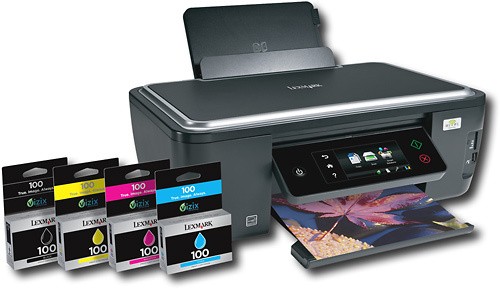
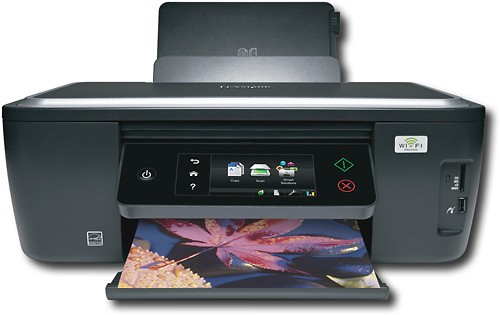
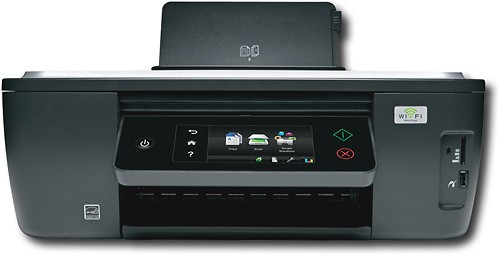
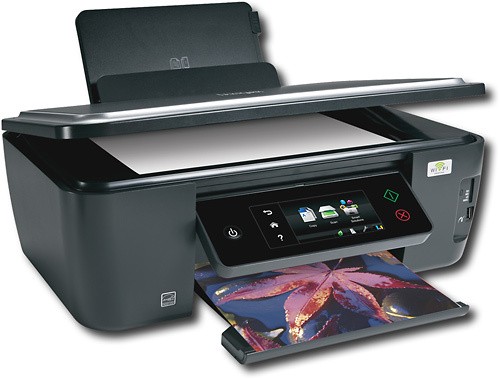
Lexmark - Interact Wireless Multifunction Printer/ Copier/ Scanner - Dark Gray
This item is no longer available in new condition.
See similar items below.
Description
Features
From our expanded online assortment; not available in all Best Buy stores
Fast print speeds up to 33 ppm* in black, up to 30 ppm* in color
To quickly generate the documents you need.
3-in-1 functionality
Prints, copies and scans for convenience.
Built-in wireless networking
With 802.11b/g/n support for simple Internet connection.
High print resolution up to 4800 x 1200 dpi in color
Up to 2400 x 1200 dpi in black for rich documents and graphics.
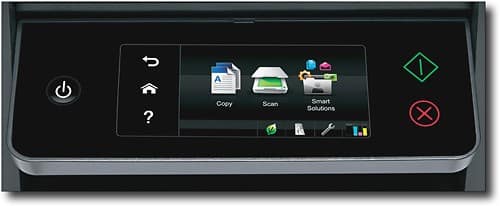
4.3" Web-enabled LCD touch screen
Lets you preview and monitor your photos before you print them.
Memory card slots
Support Memory Stick, Memory Stick Pro, Memory Stick Duo, Secure Digital, Secure Digital High Capacity, MultiMediaCard, Microdrive, xD-Picture Card, miniSD and microSD media for easy image transfer.
PictBridge-compatible
For direct printing from your compatible digital camera.
Copies up to 25 cpm* in black, up to 21 cpm* in color
For rapid copy generation.
Flatbed scanner with 48-bit color
Provides up to 1200 x 2400 dpi optical resolution for optimal scans. Flatbed design easily handles thick books, reports and more.
PC-free printing
For easy direct printing of photographs from your digital camera without the need to connect to a PC.
PC and Mac compatible
With convenient USB connectivity.
*Note: Print speeds vary with use. See manufacturer for info on print speeds.
What's Included
Lexmark Intersect Wireless Multifunction Printer/ Copier/ Scanner
#100 cyan, #100 magenta, #100 yellow and #100 black print cartridges
Software CD-ROM
Owner's manual
Other
- Assembly RequiredNo
- Energy Star CompatibleYes
- <a href="javascript:winopengld('1087340571468','pcmcat38200050027','cat12080')">Print Speed (B&W)</a>Up to 33 ppm (Print speeds vary with use. See manufacturer for info on print speeds.)
- <a href="javascript:winopengld('1087340571541','pcmcat38200050027','cat12080')">Print Speed (Color)</a>Up to 30 ppm (Print speeds vary with use. See manufacturer for info on print speeds.)
- Print Speed (Photo)24Second
- <a href="javascript:winopengld('1087340571577','pcmcat38200050027','cat12080')">Black Printer Resolution</a>Up to 2400 x 1200 dpi
- <a href="javascript:winopengld('1087340571611','pcmcat38200050027','cat12080')">Color Printer Resolution</a>Up to 2400 x 1200 dpi
- <a href="javascript:winopengld('1087340571658','pcmcat38200050027','cat12080')">Media Types</a>Plain paper, card stock, envelopes, labels, transparencies, banner, photo paper, iron transfers, heavy weight matte paper
- <a href="javascript:winopengld('1087340571708','pcmcat38200050027','cat12080')">Media Sizes</a>Envelopes (10, 9, 7-3/4, A4, A5, B5, C5), index cards, executive, legal, letter
- <a href="javascript:winopengld('1087340571743','pcmcat38200050027','cat12080')">Input Paper Capacity</a>Up to 100 sheets
- <a href="javascript:winopengld('1087340571783','pcmcat38200050027','cat12080')">Output Paper Capacity</a>Up to 25 sheets
- <a href="javascript:winopengld('1087340571817','pcmcat38200050027','cat12080')">Memory</a>64MB
- <a href="javascript:winopengld('1087340571851','pcmcat38200050027','cat12080')">Type of Interface</a>USB 2.0
- <a href="javascript:winopengld('1087340572115','pcmcat38200050027','cat12080')">Total Ink Tanks/Cartridge</a>1 black, 1 cyan, 1 magenta, 1 yellow (included)
- <a href="javascript:winopengld('1087340572271','pcmcat38200050027','cat12080')">Print Quality</a>For photos and documents
- PC-Free PrintingYes
- Two-Sided PrinterYes
- <a href="javascript:winopengld('1087340809392','pcmcat38200050027','cat12080')">Total Print Heads</a>1
- <a href="javascript:winopengld('1087340809469','pcmcat38200050027','cat12080')">Duty Cycle</a>Up to 5,000 pages/mo.
- Paper FeederTop loader
- <a href="javascript:winopengld('1087340809515','pcmcat38200050027','cat12080')">Networking Capabilities</a>802.11b/g/n
- <a href="javascript:winopengld('1087340809619','pcmcat38200050027','cat12080')">Scanner Resolution (dpi)</a>Up to 1200 x 2400 dpi
- <a href="javascript:winopengld('1087340809653','pcmcat38200050027','cat12080')">Bit Depth</a>48
- Scanner TypeFlatbed
- <a href="javascript:winopengld('1087340809730','pcmcat38200050027','cat12080')">Copier Resolution (dpi)</a>Up to 2400 x 1200 dpi black; up to 4800 x 1200 dpi color
- <a href="javascript:winopengld('1087340809772','pcmcat38200050027','cat12080')">Copier Speed (B&W)</a>Up to 25 cpm (Copier speeds vary with use. See manufacturer for info on copier speeds.)
- <a href="javascript:winopengld('1087340809806','pcmcat38200050027','cat12080')">Copier Speed (Color)</a>Up to 21 cpm (Copier speeds vary with use. See manufacturer for info on copier speeds.)
- <a href="javascript:winopengld('1087340809851','pcmcat38200050027','cat12080')">Multiple Copies</a>Up to 99
- <a href="javascript:winopengld('1087340809918','pcmcat38200050027','cat12080')">Reduction/ Enlargement</a>25-400%
- Software IncludedYes
- Minimum System RequirementsMicrosoft Windows 2000, XP, XP Professional x64, Vista; Mac OS X (10.4.4-10.5.x or 10.3.9)
- Wireless NetworkingYes
- UPC734646275545
Customer reviews
Rating 3.7 out of 5 stars with 51 reviews
(51 customer reviews)to a friend
Customers are saying
Customers value the excellent print quality and ease of use of this printer. Many appreciate the wireless functionality and the intuitive touch screen interface, which simplifies setup and operation. Positive feedback highlights the user-friendly design and the printer's ability to seamlessly integrate into various home and office environments. The overall experience is described as positive and efficient.
This summary was generated by AI based on customer reviews.
- Pros mentioned:Ease of use, Print quality, Touch screen
Rated 5 out of 5 stars
first printer all-in-one purchase
Posted .This reviewer received promo considerations or sweepstakes entry for writing a review.Set up was very easy because the disk gives you step by step instructions. Although not listed in the OS requirements, this printer is compatible with Windows 7. Prints turned out great. I have not tried printing pictures from my camera yet. I love the touch screen. It is easy to read and print. Speed is somewhat fast. I do not care much for noise. It is a printer after all. The mechanism parts will make noise. Wireless printing is amazing. I use it for home and school purposes. Quality is awesome. Overall, great product.
I would recommend this to a friend - Pros mentioned:Print quality, Touch screen, Wireless
Rated 5 out of 5 stars
Fantastic quality at great price
Posted .This reviewer received promo considerations or sweepstakes entry for writing a review.There are so many things I love about this printer. First--it's wireless. If I'm in the living room on the laptop and press print, the printer powers on and starts printing. Second, the print quality is very impressive considering the price point. I printed pictures off on glossy paper and was knocked over by the quality. Sure the photo lab prints look better, but this printer does a very decent job. Third, the color ink cartridges are all separate. My old Lexmark printer had one black cartridge and one color one. Every time the color cartridge would run out of blue ink, but have plenty of red and yellow--I hated paying darned near $80 to replace it when all I needed was one color. This printer solves that problem--now, when I run out of blue, I spend $9.99 and only replace the blue--what a concept! The touchscreen is glitzy and pretty, but a bit unnecessary, but it does round out the high-tech look. Overall, I am very happy with this printer. It's fair to say it has exceeded my expectations.
I would recommend this to a friend - Pros mentioned:Print quality, Wireless
Rated 5 out of 5 stars
Excellent printer after 8 months & new Smart Apps
Posted .This reviewer received promo considerations or sweepstakes entry for writing a review.I thought it might be useful to review the Lexmark S605 which I have used for 8 months. The printer has held up well, with no mechanical or jamming problems in my home office. My average weekly printouts are about 50 black, 20 color pages along with ten 4 x 6 color photos. I print via wireless from 4 different computers and had no problems adding the additional Pcs running XP, Vista and Windows 7. The original shipped four 100 ink cartridges seemed to have had about a 20% lower yield than the next set of 100 replacements. This might be due to the separate print head which needed to be primed before first use. After about 3 sets of the Lexmark 100 cartridges I was disappointed with the low yields and from then on only purchased the Lexmark 100XL cartridges for the printer. With a cost of the 100XLs only about 60% more than 100s I was getting about 2.5 times the yield in both black and color output. Over the last 8 months there have been 3 or 4 S605 printer firmware updates and 2 software updates which I installed from the “Lexmark Printer Home” application “support” tab of the Lexmark installed software. Some of those updates, according to Lexmark, addressed print head/ink usage issues. A very useful feature I use, of the Lexmark S605 is the “Lexmark SmartSolutions”. There have been several updates and it is very similar to HP's “e-web applications” on their latest web connected printers. For example, you can easily set up a maximum of 18 one button applications such as print graph paper, calendars, monthly day planners, blank sheet music, sudoku puzzles, view and print facebook photos and twitter and scan to PDF. The list of the applications has grown, with the latest apps added Jan. 2011. All in all, other than the low page yield of the 100 cartridges before switching to the 100XLs, I am very satisfied with the S605.
I would recommend this to a friend - Pros mentioned:Ease of use, Print quality, Wireless
Rated 5 out of 5 stars
Great Printer
Posted .This reviewer received promo considerations or sweepstakes entry for writing a review.I hadn't replaced my printer in a number of years and was happy to get this quick and sleek looking printer. It is a little larger/bulkier than I thought, however it still fits in my desk hutch (just can't close the doors all the way) but the print quality and speed, ease of use are great- I haven't tried scanning, but everything else is great especially the WIRELESS you can print from anywhere in your house and it goes into powersave mode when not using
I would recommend this to a friend - Pros mentioned:Print quality, Touch screen
Rated 5 out of 5 stars
Great Printer for a Great Price!
Posted .This reviewer received promo considerations or sweepstakes entry for writing a review.My girlfriend and I were looking for a wireless color inkjet printer for around $100. We saw the HP 3050 on sale for $69.99 at our local BB. I saw this Lexmark at BB online and the stellar reviews it already had so I thought it was worth checking out while we there. The quality of materials, fit and finish, and the touch screen were much better on the Lexmark than the HP. Better yet the Lexmark was on sale for $119, regularly $199. Plus it has a 3 year warranty so we agreed to give it a chance. Once home, setup was a breeze, both the manual and the printer's touch screen will guide you through the setup. We had it on our wireless network and printing documents from our laptops in only a few minutes. On good quality plain paper it prints beautiful color graphics and even photos on plain paper looked really good. If we used photo paper they would probably be even sharper. The big plus I see with this printer is that it not only has the 1 black/3 color cartridge system so you only replace what colors you need to. However the best part is the print head itself is a separate component that can be removed for cleaning and replacement down the road if needed. I had a great HP printer with the multi-cartridge setup but the print head was not removable. It finally clogged up to the point where it would not print and sent ink leaking out of the printer and on to my desk when trying to perform the head cleaning operation. All in all with just one night of use we are very happy so far. Plus the printer actually looks nice as it sits in our living room along side our TV other A/V components. Grab this one at $119 while you can, you won't be sorry. As for the comments below from UNCSux, do not give them any credit as this printer was very easy to setup as many others mentioned as well. He must have problems with his network or other technical issues.
I would recommend this to a friend - Pros mentioned:Ease of use, Print quality, Touch screen
Rated 5 out of 5 stars
Great printer!
Posted .This reviewer received promo considerations or sweepstakes entry for writing a review.I purchased this printer a couple of weeks ago on sale for $69.99. What a great deal! It was very easy to set up on my wireless network and it has worked great so far. I really like the the touch screen too. Print quality has been excellent! The ink is spendy---but all ink is spendy.
I would recommend this to a friend - Pros mentioned:Ease of use, Print quality
Rated 4 out of 5 stars
Great value for the quality
Posted .This reviewer received promo considerations or sweepstakes entry for writing a review.This printer works very well. It is our first printer upgrade since about 1999! I have had it for 2 weeks and already there was a problem with the print head, BUT Lexmark has been more than compensating for this problem so I guess I can't complain. It's fast and easy to use. The Wi-fi is such a cool feature and we can print from anywhere in the house with our laptops..
I would recommend this to a friend - Pros mentioned:Ease of use, Print quality
Rated 5 out of 5 stars
AMAZING!!!!
Posted .This reviewer received promo considerations or sweepstakes entry for writing a review.Lexmark has done it again! This is by far the easiest printer to use. We love the fact that it's web-enabled. We set up our work email addresses so that our 7 yr old son can come home from school, scan his artwork for the day and email to us directly from the printer. All of this only a couple of steps and you don't need your computer at all. No more attaching photos to computer based emails...just scan and select an address from your address book and off it goes. Easy, easy! Print quality and speed are perfect. You only have to replace the ink color that is low instead of replacing the entire color cartridge. By far THE BEST printer we've ever owned. If you already have a printer, donate it to your local school and treat yourself to this one. You won't be sorry.
I would recommend this to a friend
Be the first to ask a question.
We’ll try to get your question answered within 24 hours by a Best Buy customer or brand representative.
Ask a QuestionMost viewed
- $999.99Your price for this item is $999.99
- $684.99Your price for this item is $684.99$799.99The comparable value for this item is $799.99
- $129.99Your price for this item is $129.99$229.99The comparable value for this item is $229.99
- $229.99Your price for this item is $229.99
- $249.99Your price for this item is $249.99
- $699.00Your price for this item is $699.00$799.00The comparable value for this item is $799.00
- $499.99Your price for this item is $499.99
- $69.99Your price for this item is $69.99$449.99The comparable value for this item is $449.99
- $1,199.99Your price for this item is $1,199.99$1,499.99The comparable value for this item is $1,499.99
- $499.00Your price for this item is $499.00
- $899.99Your price for this item is $899.99$1,099.99The comparable value for this item is $1,099.99
- $347.09Your price for this item is $347.09$349.00The comparable value for this item is $349.00
- $13.99Your price for this item is $13.99
- $59.99Your price for this item is $59.99$109.99The comparable value for this item is $109.99
- $499.99Your price for this item is $499.99
- $99.99Your price for this item is $99.99$149.99The comparable value for this item is $149.99
- $139.00Your price for this item is $139.00$319.00The comparable value for this item is $319.00
- $33.34Your price for this item is $33.34/mo.per monthfor 36 mos.; 0% APR
- $89.99Your price for this item is $89.99$119.99The comparable value for this item is $119.99
- $999.00Your price for this item is $999.00