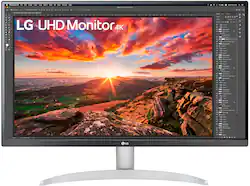
LG - 27” IPS LED 4K UHD AMD FreeSync Monitor with HDR (HDMI, DisplayPort, USB) - White
Model: 27UP80B-W
SKU: 6505060
This item is no longer available in new condition. See similar items below
The vast majority of our reviews come from verified purchases. Reviews from customers may include My Best Buy members, employees, and Tech Insider Network members (as tagged). Select reviewers may receive discounted products, promotional considerations or entries into drawings for honest, helpful reviews.
For those looking for other reviews online for this monitor (27UP80B-W), just note that this is the retail version of the 27UP850. The main difference is the stand included on this version is not adjustable. I bought this LG and the Dell 2720Q. Both were very comparable in terms of specs. I was super torn because I liked the build quality (plus the lack of bottom bezel) of the dell better, but the LG was ultimately brighter. I ended up returning the dell and purchasing this monitor again thanks to the sale price. I figured I could buy two of these monitors for just a little over the price of one Dell monitor. Overall, I'm a big fan of this monitor. I'm using both of them with my Mac Studio and the colors are solid out of the box. It's even better once you calibrate it. I'm loving that it uses USB-C and has PD when I decide to plug my MacBook in it. It's also super bright and has decent contrast for an IPS display. The build quality is decent for the price, but I wish it felt as solid as the Dell 2720. The bottom bezel sort of bothered me in the beginning, but I've noticed it less in the weeks I've used it. The stand it comes with is trash. It's not adjustable at all and it's a bit wobbly, but it is VESA mountable and would highly recommend mounting this monitor on a monitor arm. One thing to mention if you go with this monitor is to turn off the power saving function inside the OSD. With it in on, it automatically turns the brightness down and it caused me about 10 minutes of frustration in the beginning. Once I turned it off, it was smooth sailing. For the quality and features it comes, you can't beat it at this price. Highly recommended.
Posted by Eric
I have this screen connected to MacBook pro. The screen from my MacBook isn't just big enough to see small stuff. I'm impressed of how the color comes out what isn't 100% but it's good enough to do Lightroom and Photoshop. If I needed perfect color than I wouldn't use it but for everything else it's great. Wasn't that expensive. Thank you to the young man who pointed me to this monitor.
Posted by Uhaas
I was looking to upgrade from an LG 27UD58-B, something with a wide color gamut and basic support for HDR gaming on PS5. Was able to get this monitor at an amazing discount for $299 and it's a heck of a value at that price. I use this primarily for programming and web development work on a MacBook Pro. The USB C port on the back works perfect for charging and displaying content while the MacBook is in clamshell mode. I would not recommend enabling HDR mode in MacOS as it tends to wash everything out and most websites only operate in the standard sRGB color space anyhow. Even running this monitor at a scaled resolution within MacOS ("looks like 2560x1440") the text is incredibly sharp and the colors are vibrant without any noticeable color shift. The stand for the monitor, while it is an improvement on the LG 27UD58-B I was using previously, is just okay. There is some wobble while typing, but nothing too bad. It's not a height adjustable stand so if you need that, I would recommend picking up a 100x100 VESA monitor stand or arm on Amazon. The speakers on this monitor are unremarkable as expected, but if you're just looking to have some background noise while working or listening to podcasts, it's perfect for that and does the job nicely. For watching movies or gaming , you'd be better served with a set of dedicated speakers or headphones. If you're on MacOS, you can install the app called "Monitor Control" and it will allow you to configure screen brightness and volume via the standard media keys on your keyboard. I'm not a PC gamer nor do I play anything competitive, so this monitor performs well for me just playing on a PS5. While this monitor doesn't have any local dimming or high contrast levels to really make HDR pop, it does include the wide color gamut and a global dimming solution that looks pretty good by my standards. With this being an IPS panel, the contrast ratios are not going to be as good as something like a VA panel, so to make up for this I'd recommend installing a simple LED back light behind the monitor and setting it as close to 6500K white as you can. It dramatically improves the perceived contrast ratios when playing games, especially in a dark or dimly lit room. All in all, this is a fantastic monitor, even at the regular price. But if you can get this on sale you're getting a steal of a monitor. Cheers.
Posted by buddycricket
Customers admire the picture quality, USB-C connectivity, and vibrant colors of the 27” IPS LED 4K UHD AMD FreeSync monitor. Many found it easy to set up and appreciate the included speakers. However, some customers expressed concerns about the monitor stand's stability and adjustability. A few also mentioned the price point as a potential drawback.