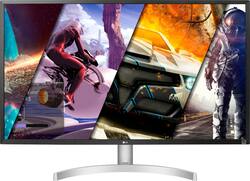
LG - 32” UHD (3840 x 2160) HDR Monitor with AMD FreeSync - (DisplayPort, HDMI) - White
Model: 32UL500-W
SKU: 6419390
This item is no longer available in new condition. See similar items below
Customers are positive about the picture quality, HDR capabilities, and built-in speakers of this 32” UHD monitor. Many appreciate the vibrant colors and find the monitor to be a good value for its price. However, some customers are negative about the 60Hz refresh rate and the lack of height adjustment on the stand. The stand itself also received some criticism.
The vast majority of our reviews come from verified purchases. Reviews from customers may include My Best Buy members, employees, and Tech Insider Network members (as tagged). Select reviewers may receive discounted products, promotional considerations or entries into drawings for honest, helpful reviews.
Coming from a 27" 1080p monitor, an upgrade to a 4k display 32" still makes a huge difference! It took me some time to get used to the even larger display. Pros: it's got a consistent display, I checked with the DispplayHDR app and the results bode well. Cons: If you like to adjust the height on the monitor, you're out of luck with this model, it only swivels so only angles can be adjusted at one pivot. Build quality is quite good, my previous monitor was very wobbly and felt plastic all round, this LG monitor looks a bit better and while still a bit wobbly is fine if you have a firm desk. I went through all the settings and they are a ton of them! I had to get used to setting them up for different scenarios. The HDR effect is quite good when watching movies and playing games at 4k. Though I mostly play older games they look amazing at 4k and the monitor HDR effect on. It is a chore to switch back and forth but with the joystick control, it makes it quite straight forward to make these adjustments. I personally think it's worth the effort everytime. I had to scale the DPI to 175% rather than the recommended 150% since I sit much farther from the screen (almost 3 feet). Text is sharper at that level and almost all the programs I use scale quite well, there are exceptions but not too bad. I usually put the "Dark Room 2" setting for normal usage and "HDR effect" for 4k movie viewing and 4k gaming. I tried using the windows 10 HDR mode and it's a mixed bag, I think the HDR effect of the monitor is enough For me, the best part of this monitor (apart from size and resolution) is the color depth. The 10-bit color display makes a big difference when you compare it with an 8-bit monitor. I have an older 27" 1080p to the right and can easily make out how much better and natural looking the colors are on the LG 4k monitor. I feel it's not something you can describe easily, I just compared how a red button looks on the 4k monitor vs how it looks on the 1080p one. The 4k one is rich and deep red with great definition while on the 1080p it looks almost orange in comparison, your mind just tells you it's red. I'm excited to jump into the world of 4k and as this monitor is considered a "budget" monitor you really can't go wrong. There are definitely higher specced 4k monitors out there, but I am very happy with mine so far. I like how the HDMI and DP cables are provided. I use DP as it gives me the full 10 bit color depth due to me using an old Radeon RX 580. I can't get the same 10 bit depth with an HDMI cable due to my video card from what I read. My next 4k monitor will probably be something with higher specs like HDMI 2.1 & DP 1.4a, higher refresh rate >120Hz and higher HDR rating. But those usually cost in the thousand range and not worth it unless you need it for professional usage. For everyday usage for work and media usage, and gaming and browsing this monitor has been a treat so far.
Posted by 4kUpgrade
I needed an Ultra wide monitor for some light gaming and for my son's school with Zoom and Google Classroom work. I had bought a Viotek 35 inch Ultra wide screen monitor for $350 at Walmart, specs were 2560x1080p, 144hz. However the colors were a little washed out and resolution didn't seem very good for some text reading, so I looked online to see if I could find a better monitor, so I decided to try a 4k monitor. For the price the LG at $329 sounded pretty reasonable. Once I hooked it up, I was amazed, texts looked way better, colors more natural, youtube videos looked amazing. I realized that since I'm gaming mostly RPG, the 60hz wasn't really that bad. My son even says using this for school work feels better on his eyes. LG 32 inch monitor: Pros: -amazing resolution/colors - nice styling white back plate - DP cable included -toggle settings switch easy to use under monitor Cons- monitor can't move up and down, only tilt
Posted by Nerd24
OMG playing my Xbox series x with this monitor has changed the game for me.... I created a portable gaming station that I even use bring back and forth between my room and the living room so that my wife does not feel alone while she is watching her shows... Beside the image quality, I love that it comes with speakers so I can watch games and TV using my Xbox anywhere in my house.. The saving energy is the best, I have never turned off or on the monitor, it does it all by itself..... you should getter, the best investment I have made so far
Posted by FrankT