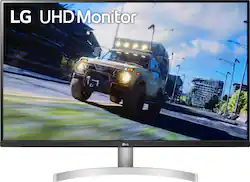
LG - 32” UHD HDR Monitor with FreeSync - White
Model: 32UN500-W.AUS
SKU: 6451067
This item is no longer available in new condition. See similar items below
Customers commend the 32” UHD HDR Monitor's large screen size, decent built-in speakers, and generally good quality. Positive feedback also highlights the resolution and ease of use. However, some users point out limitations in viewing angles and refresh rate, while others express mixed opinions regarding the HDR functionality and stand.
I have many 4k monitors and tvs I have used. interestingly enough, my HISENSE from 2018 has the best HDR colors (not brightness) out of most of them under $800-1000 per example (OLED one 65" $1000+ kills it but... let's be fair). My SEIKI 39" 30fps is amazing, and just wins over all other devices for reading text, programming, effects controls for 1fx, 3ds, etc. Now comes the 32" LG I got OPEN BOX from best buy. I was lucky, it was like new, and nobody stole it out of my hallway before I got home. Heh. The colors are vibrant but skin tones look yellow, orange, and blues need some pumping up. I tried to calibrate this with an hdmi connection, then display port as a test (2.0x and 1.4 respectively) and it was basically the same for what I was doing. 4:4:4 uncompressed from a geforce 1060, I think my 2080 ti might send a better signal (circuitry shouldn't matter in uncompressed rgb (8 or 10 bit) full dynamic range or YCbCr 4:4:4 (8 or 10 bit) limited output in this. Go to your nvidia control panel in windows/apple and set that to USE NVIDIA color settings if you like to test. I suppose AMD is the same, but I don't have a 4gb+ gpu from amd atm to test. You will notice a bit of a pasty white on the display and strange dark but flat blacks (va panel, no glossy going on).. and you can play with brightness and contrast. What you most likely should not do is play with sharpness on a pure digital signal in the lg control panel, it just really wrecks what you are seeing, even 32" at 100% zoom 2840x2160, so remember that unless it fits your eye for text with some higher contrast, you should do that in windows/os x instead of the monitor if you can. I noticed a very strange thing, the contrast and brightness no matter the response speed setting in the lg monitor would flicker the end credits of white text on a black background on both my seiki 30hz and the lg 60z at any none-fast-faster response setting, but my hisense not only showed skin tones better and overall a more film like look, but no flickering of the text scrolling up. There's an antialaising reason in the blu-ray x265 compression of the text for this, but it should be noted some va ips oled etc techs handle this differently, don't be freaked out. If you blow up 1080p (BLU RAY STANDARD) to 4k it doesn't flicker as much in this instance I had. There's almost no heat coming from this,which is great, and it balances very nicely on an old wooden crate my friend gave me years ago before he passed away, sturdy fruit crate, $300+ monitor, seems legit. And as for the speakers, they're small speakers inside of a 32" flat panel, it is what it is. Get a sound bar or a receiver/amplifier and monitors if you want studio sound with it. I would certainly watch films, tv, gaming on the xbox, pc, and effects controls and even small, thin anti aliased lines in 3ds/c4d/blender with this.
Posted by kristoffe
I use this monitor with a LG 4k Blu-ray Player for watching movies. I got rid of my cable bill and this supplements that nicely. It displays crisp colors and images with no fuzzy or blurry delays or spots. I have not played YouTube videos or video games on it, but it does handle moving images very well. 32 inches is the right size for one person to watch or a whole family. Any larger or smaller and it may not be a satisfactory viewing experience. The speakers are good but I would recommend using headphones, such as Sennheiser HD560S (my personal favorite), to have an isolated listening experience as well. Despite the lower price, this monitor from LG delivers a quality display worth much more.
Posted by BattyBelfry
I bought this monitor based on the mass amount of reviews and expert ratings I read through. I got this monitor because of price point but should have gone with an IPS panel instead for about $150 more. Most of the reviews, and yes I know this is a VA panel, stated the viewing angles were decent, not sure what socks they were smoking but they certainly weren't fresh. While the picture is very good, the text crisp, nice colors and a decent brightness, the viewing angles are the very worst I have ever seen in a 32 monitor. Move slightly and colors start to look washed out and also complete different. See the photos of the lovely fillet steak I have included as a comparison. I have included front, side on and up above. While the resolution is crisp, at any other angle that is not head on the colors become washed out and the whole image dull. This may not be an issue for some people but as someone who moves about a bit while working, has multiple monitors and wants a uniform color from all angles, please please go with an IPS panel. If the viewing angles were not so bad and the fact that the HDMI ports are constantly cutting in and out on all 5 of the laptops I have tested it on, this would be a decent monitor.
Posted by PaulSkinback
The vast majority of our reviews come from verified purchases. Reviews from customers may include My Best Buy members, employees, and Tech Insider Network members (as tagged). Select reviewers may receive discounted products, promotional considerations or entries into drawings for honest, helpful reviews.