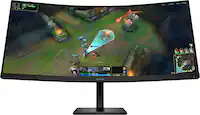
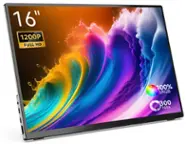
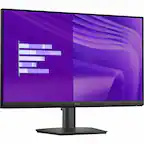
LG - 34" WQHD 100Hz 5ms Smart Monitor with HDR10 (HDMI, USB-A) - Black
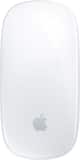 Apple - Magic Mouse - Multi-Touch Surface (USB-C) - Wireless - White Multi-Touch Surface$79.99
More Buying Options
Related Item

Highlights
- Key Specs
- Refresh Rate: 100Hz (The number of frames per second the device can produce natively without enhancement. Higher rates help produce smooth, seamless pictures.)
- Maximum Resolution: 3440 x 1440 (Maximum resolution refers to the highest number of pixels that a screen can process and display. Higher resolution signals produce more detailed images.)
- Response Time: 5 milliseconds (The speed at which pixels can change colors is called response time. It is measured in milliseconds (ms).)
- Panel Type: VA (Technology that affects response time and image quality.)
- Synchronization Technology: Not Applicable, Not Applicable (Generally, these technologies allow syncing between a computer/console game's frame rate and the device's refresh rate for a smoother display without tearing.)
- Screen Size: 34 inches (Size of the screen, measured diagonally from corner to corner.)
- Display Connector(s): 2 x HDMI (The number and type of connectors used to connect to an external display.)
- General
- Brand: LG
- Model Number: 34SR60QC-B
- Product Name: 34" WQHD 100Hz 5ms Smart Monitor with HDR10 (HDMI, USB-A)
- Color: Black
- Operating System Compatibility: Not Applicable, Not Applicable, Not Applicable, Not Applicable, Not Applicable
- Display
- Refresh Rate: 100Hz (The number of frames per second the device can produce natively without enhancement. Higher rates help produce smooth, seamless pictures.)
- Maximum Resolution: 3440 x 1440 (Maximum resolution refers to the highest number of pixels that a screen can process and display. Higher resolution signals produce more detailed images.)
- Native Resolution: 3440 x 1440 (Native resolution of a screen refers to its single, fixed resolution. Sometimes screens must scale an image up or down in order to fit the native resolution. This can cause a loss of resolution or detail.)
- Contrast Ratio: 3000:1 (Measured difference between a displayed image's brightest whites and darkest blacks. The larger the first number, the more detail and color that can be displayed.)
- Response Time: 5 milliseconds (The speed at which pixels can change colors is called response time. It is measured in milliseconds (ms).)
- Display Type: LED
- Panel Type: VA (Technology that affects response time and image quality.)
- Synchronization Technology: Not Applicable, Not Applicable (Generally, these technologies allow syncing between a computer/console game's frame rate and the device's refresh rate for a smoother display without tearing.)
- Aspect Ratio: 21:9 (The measurement of the width of a screen compared to the height of a screen, expressed as a ratio.)
- Curved Screen: true
- Brightness: 300 candela per square meter (A measure of the total light output.)
- Screen Size: 34 inches (Size of the screen, measured diagonally from corner to corner.)
- High Dynamic Range (HDR): true (An HDR-compatible 4K TV or other HDR-compatible product displays HDR video content when it's available from sources like 4K Ultra HD Blu-ray Discs and 4K streaming services.)
- High Dynamic Range Format: HDR 10 (There are a few HDR formats that tell the TV or other HDR-compatible product how to best utilize its capabilities to display HDR content. HDR technology can support one or multiple formats, each with various benefits to picture quality.)
- Horizontal Viewing Angle: 178 degrees (The maximum angle at which the display can be viewed with acceptable visual performance from either side.)
- Vertical Viewing Angle: 178 degrees (The maximum angle at which the display can be viewed with acceptable visual performance from above or below.)
- Touch Screen: false (Touch-screen devices make navigating more intuitive. Using a touch-screen display, you can do things such as tap to select, hold and drag to move items, swipe to scroll, and pinch to zoom.)
- On-Screen Display Languages: English (The available language options for displayed text.)
- Display Surface: Standard glass
- Connectivity
- Number of DisplayPort Inputs (Total): 0
- Number of HDMI Inputs (Total): 2
- Display Connector(s): 2 x HDMI (The number and type of connectors used to connect to an external display.)
- Number of USB Ports (Total): 2
- USB Ports: 2 x USB-A (The number and type of USB ports the product has.)
- Headphone Jack: true (The device features an interface that allows for the connection of headphones.)
- Compatibility
- Wall Mountable: true (The product is able to be secured to a wall. Some products are designed ready to mount, while others may require additional hardware/accessories for installation.)
- VESA Wall Mount Standard: 100mm x 100mm (VESA wall mount standards refer to the spacing of screw holes built into a TV in order to fit with standard TV wall mounts. These standards are implemented into most TVs and monitors.)
- Voice Assistant Built-in: No (A digital assistant built into the device that uses voice commands to answer questions and control smart devices.)
- Features
- Tiltable: true
- Adjustable Stand Height: false
- Anti-Glare: false (Product has features, such as a matte finish, that reduce the likelihood for screen glare.)
- Eye Relief Features: Flicker free, Environment brightness sensor
- Built-In Webcam: false
- Integrated Speaker(s): true
- Dimensions
- Product Height With Stand: 19 inches
- Product Height Without Stand: 14.5 inches
- Product Width: 31.9 inches (The out of box width of the item. Width is measured as the horizontal distance from one side of the item to the other as it would be primarily used or placed.)
- Product Depth (With Stand): 8.8 inches
- Product Depth Without Stand: 3.6 inches
- Product Weight: 13.4 pounds (The out of box weight of the item.)
- Stand Included: true
- Certifications Listings & Approvals
- ENERGY STAR Certified: false (Devices carrying the ENERGY STAR service mark, such as computer products and peripherals, kitchen appliances, and other products, generally use 20% to 30% less energy than required by federal standards.)
- EPEAT Qualified: false (The Electronic Product Environmental Assessment Tool (EPEAT) was designed to provide an environmental assessment tool for purchasers. In order to qualify for EPEAT, a product must meet all 23 required criteria.)
- Warranty
- Warranty - Parts: 1 Year Parts and Labor
- Warranty - Labor: 1 Year Parts and Labor
- Other
- UPC: 195174091234
One screen. Endless possibilities. The 21:9 ultra-wide 34” curved Smart monitor offers stunning widescreen visuals and a sleek design that's perfect for work, play, cinematic viewing, and everything in between. Experience vivid color with up to sRGB 99% coverage, HDR10 support and impeccable clarity with the 21:9 WQHD (3440x1440) screen, bringing every detail to life. Thanks to LG’s streaming platform webOS23¹, find your favorites fast with built-in access to Netflix, Prime Video, the Apple TV app, Disney+, HBO Max and instant access to over 300+ free LG Channels with everything from comedy to movies to sports. Apple AirPlay 2 & HomeKit compatibility² allow you to wirelessly control your monitor plus cast and mirror content from iOS or MacOS devices, no Apple TV necessary. Gaming on the monitor’s wide screen with the 100Hz refresh rate assures ultra-smooth action.
- Work Smart, Play Smart on a 21:9 Smart Screen: LG Smart Monitor is designed for multitasking while you work, play and watch. Connect the 34” 21:9 curved display to a laptop, desktop or gaming console to immerse yourself in your work or games. Or, with the built-in LG webOS, you can watch favorite shows from your favorite streaming apps.¹
- Your Favorite Streaming Services: Thanks to webOS23, find your favorites fast with built-in access to Netflix, Prime Video, the Apple TV app, Disney+, HBO Max and instant access to over 300+ free LG Channels with everything from comedy to movies to sports.³
- 34" Ultra Wide 21:9 Panoramic Cinema: This 34" ultrawide QHD (3440x1440) with a 21:9 aspect ratio offers a 34% wider view than a 16:9 display. And the monitor's sweeping 1800R curve envelops you as if you were at the movies.
- Bold Cold on a 34" Screen: Immerse yourself in a world of brilliant color from HDR10 that helps enhance picture quality and up to 99% sRGB color gamut expression to make games visually pop.
- Home Ready Office: From webOS, access cloud PC services such as Microsoft 365 and Google applications all without a PC.⁴
- Cast on to the Screen: Apple AirPlay 2 & HomeKit compatibility allow you to wirelessly control your monitor plus cast and mirror content from iOS or MacOS devices, no Apple TV necessary.²
- A Gorgeous Desktop Centerpiece: Smart on the inside and smart looking on the outside with a 3-side, virtually frameless design with a sleek profile and flat stand that looks great on virtually any desktop. The screen’s tilt adjustment allows for viewing the screen the way you like it.
- Versatile Connectivity: With two HDMI ports and three USB ports connect with confidence knowing your devices will be compatible with this display.
- Just Say What You Want: This LG Smart Monitor is Magic Remote compatible. Available separately, the LG Magic Remote, can navigate your content easily. You can even control the operation and play your favorite content by voice command.
- Use Your Keyboard and Mouse like a Remote: With a wireles keyboard or mouse⁵, navigate MyView's menus and controls.
Whats Included
- Monitor
- Power Cable
- Remote Controller
- HDMI Cable
Product Manuals
Disclaimers
- ¹Internet connection and subscription to streaming services are required.
- ²Your Apple device must be connected to the same Wi-Fi network as your monitor. Apple, the Apple logo, AirPlay, Apple TV, and HomeKit are trademarks of Apple Inc., registered in the U.S. and other countries. This LG MyView Smart Monitor supports AirPlay 2 and requires iOS 12.3 or later or macOS 10.14.5 or later. Internet connection and subscriptions to streaming services are required for streaming services.
- ³Internet connection and subscriptions to streaming services are required. Amazon, Prime Video and all related logos are trademarks of Amazon.com, Inc. or its affiliates. Amazon Prime membership and/or Prime Video fees apply. See primevideo.com/terms for details. HBO Max 2023 Warner Media, LLC. All Rights Reserved. HBO Max is used under license. Number of LG Channels subject to change.
- ⁴Home Office services support only Microsoft 10 and 11 or higher. Microsoft 365 and Google registration and subscriptions may be required. Separate services may require payment for subscription. Supported service may vary by country.
- ⁵Keyboard and mouse available separately.
Q: What is the refresh rate of this LG monitor?
A: This LG monitor has a refresh rate of 100Hz.
Q: Is this LG MyView Smart Monitor wall mountable?
A: Yes, you can mount this monitor on the wall using a VESA compatible 100mm x 100mm mount.
Q: Does this monitor include a stand?
A: Yes, the LG MyView Smart Monitor comes with a stand.
Q: What is the response time on this monitor?
A: The LG - MyView 34" WQHD monitor has a response time of 5 milliseconds.
Q: How many HDMI ports does this monitor have?
A: This monitor has two HDMI ports for connecting your devices.
Q: Does this monitor have built-in speakers?
A: Yes, the LG MyView Smart Monitor has integrated speakers.
Q: Does this screen offer split screen feature? I need to be able to use such feature.
A: Hello there! Thank you for your question. We understand you're looking for a split screen feature for multitasking with the LG 34SR60QC-B ultrawide monitor. Yes, this monitor offers a split screen feature, which is available through the Screen Split functionality. This feature allows you to divide the screen into multiple sections, making it easier to work with several applications side by side. It is particularly useful on a 21:9 ultrawide display like this one, as it provides ample screen real estate for multitasking. To use this feature, you can access OnScreen Control (which can be downloaded from the LG website) to set up the screen divisions according to your needs. LG Monitor - How to Use On Screen Control - https://www.lg.com/us/support/help-library/lg-monitor-how-to-use-on-screen-control--20153186454352 https://www.lg.com/us/monitors/lg-34sr60qc-b-ultrawide-monitor#pdp_specs If you have any further questions or need assistance with setup, feel free to send us a private message on Social Media @LGUSSupport, and we'll be happy to help you out! We appreciate your patience. —Renzo
Q: Will this work using a Thunderbolt to HDMI cable connecting to an M3 13-Inch MacBook Air?
A: Hi there. Thank you for your interest on our model. The LG 34SR60QC-B Ultrawide Monitor supports HDMI input, so it should work with your M3 13-Inch MacBook Air when using a Thunderbolt (USB-C) to HDMI adapter or cable. However, for the best compatibility and display performance, we recommend using a USB-C to DisplayPort adapter if your MacBook Air supports it, as it can provide better resolution and refresh rate support compared to HDMI adapters. https://www.lg.com/us/monitors/lg-34sr60qc-b-ultrawide-monitor#pdp_specs If you need further assistance, feel free to send us a private message on Social Media @LGUSSupport, and we'd be happy to help! —Renzo
Compare similar products
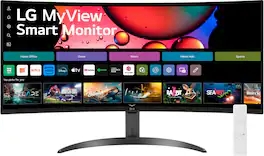
One screen. Endless possibilities. The 21:9 ultra-wide 34” curved Smart monitor offers stunning widescreen visuals and a sleek design that's perfect for work, play, cinematic viewing, and everything in between. Experience vivid color with up to sRGB 99% coverage, HDR10 support and impeccable clarity with the 21:9 WQHD (3440x1440) screen, bringing every detail to life. Thanks to LG’s streaming platform webOS23¹, find your favorites fast with built-in access to Netflix, Prime Video, the Apple TV app, Disney+, HBO Max and instant access to over 300+ free LG Channels with everything from comedy to movies to sports. Apple AirPlay 2 & HomeKit compatibility² allow you to wirelessly control your monitor plus cast and mirror content from iOS or MacOS devices, no Apple TV necessary. Gaming on the monitor’s wide screen with the 100Hz refresh rate assures ultra-smooth action.
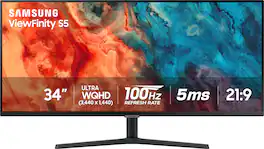
Samsung's 34" ViewFinity S50GC offers a wider workspace featuring a 21:9 ratio and lifelike detail with Ultra-WQHD resolution. AMD FreeSync and 100Hz refresh rate allow an ultra-smooth user experience. Avoid eyestrain with TUV-certified Intelligent Eye Care that automatically adjusts brightness. With HDR10 that displays over 1 billion colors compared to 16.7 million for typical SDR technology, dark colors are darker and the brightest are even brighter.

Odyssey G5’s lightning-fast 165Hz refresh rate ensures flawlessly smooth action scenes even in games with high frame rates. The Odyssey G5 range allows you to make the most out of the games you love to play, at a fantastic price point.

Upgrade your desktop setup with the 34" Full HD (2560 × 1080) IPS UltraWide monitor, designed to give you more room to do more. The expansive 21:9 aspect ratio lets you view multiple windows side by side, cutting down on app switching and boosting productivity. Enjoy smooth visuals with a 100Hz refresh rate and 5ms response time, while VESA DisplayHDR 400 and up to sRGB 99% deliver vibrant, bold color and impressive contrast. A narrow-bezel, virtually borderless design and slim stand helps keep your workspace clutter free and looking good.
| Pros for LG - 34" WQHD 100Hz 5ms Smart Monitor with HDR10 (HDMI, USB-A) - Black | |||
|---|---|---|---|
| Screen Size, Overall Performance, Resolution, Refresh Rate, Smart Features | Screen Size, Overall Performance, Resolution, Ease of use, Price | There were no pros for this product— | There were no pros for this product— |
| Cons for LG - 34" WQHD 100Hz 5ms Smart Monitor with HDR10 (HDMI, USB-A) - Black | |||
| Thunderbolt Port | Speakers, Stand, Curvature | There were no cons for this product— | There were no cons for this product— |
Specs
Reviews
Customers are saying
Customers frequently mention the monitor's great screen size and overall performance. Many appreciate the solid refresh rate and great resolution, while others find the smart features and connectivity to be a bonus. The monitor's HDR capabilities are also praised for enhancing movie watching and gaming experiences, and some appreciate its ability to function as a smart TV.
Customer Images
The vast majority of our reviews come from verified purchases. Reviews from customers may include My Best Buy members, employees, and Tech Insider Network members (as tagged). Select reviewers may receive discounted products, promotional considerations or entries into drawings for honest, helpful reviews.
- Rated 5 out of 5 stars
One monitor for all your Tabs
I really enjoy this monitor because it can display more than one tab on the same screen with plenty of room. Great for working on Excel and or editing for videos which require more than one tab. Monitor can be used on its own after connecting to Wi-Fi just like a smart TV and includes a remote as well. Never owned a curved monitor but I’m completely satisfied with this one.
Posted by Cosmo
- Rated 5 out of 5 stars
Great deal
LG 34” Ultrawide Monitor Review The LG 34” Ultrawide Monitor is a game-changer for productivity and entertainment. The ultrawide aspect ratio provides ample screen real estate, making multitasking seamless. The colors are vibrant, and the resolution is sharp, making it perfect for creative work like photo editing or video production. The adjustable stand adds ergonomic flexibility. My only issue is it’s not bigger lol it’s a fantastic monitor for professionals and gamers alike.
Posted by DavidN
- Rated 5 out of 5 stars
Must Buy!!
Ibwas skeptical because inwas buying this as a set up for my wife's home office. After about a week of using it she loves it. It eliminates the need for her to have 2 screens.
Posted by DavidW