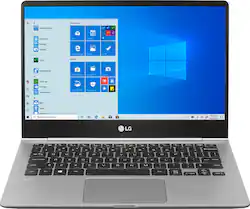
LG - gram 13.3" Touch-Screen Laptop - Intel Core i5 - 8GB Memory - 256GB Solid State Drive
Model: 13Z990-A.AAS5U1
SKU: 6346556
This item is no longer available in new condition. See similar items below
The vast majority of our reviews come from verified purchases. Reviews from customers may include My Best Buy members, employees, and Tech Insider Network members (as tagged). Select reviewers may receive discounted products, promotional considerations or entries into drawings for honest, helpful reviews.
Its a 2019 model and I had it for few days. Am impressed with its features and functionality and is good value for your money. My reviews are based on my experience with 2018 and 2017 laptop/surface book that I own which are in similar price range. This can definitely compete with Microsoft and Apple laptops in terms of spec and performance but comes at a lower price tag. I consider this as a mid-range laptop and good for day to day use, play some games and watch some 4k videos. Battery Life (72Wh): Its 4 cell lithium ion built in battery pack. The spec says 20.5 hrs. But I did some tests and played some PC games, watched videos, browsed internet and the battery lasted for about 13 hrs with brightness and contrast levels set to recommended power management settings Weight: Lightweight (2.1 pounds) and you can literally hold it with two fingers. Overall dimensions 12.0 x 8.3 x 0.6 inches Screen (13.3"): Played Netflix 4K videos and it delivered life like picture quality. It has a webcam (HD) on the top bezel that I didn’t test it yet. Pretty responsive touch screen and amazing resolution (1920x1080). No complaints at all on the display for gaming or videos needs. It supports four finger multi touch gestures Memory: DDR4 dual channel memory (8GB DDR4 2400MHz - 4 GB x 1 (On Board) - 4 GB x 1). One is soldered on to the board and one is upgradable. This is descent enough RAM for day to day use (multitasking) and might fall short for extreme gaming needs. Graphics: Intel UHD Graphics 620 (8th generation with higher clock speeds compared to its processor with noticeable performance improvement for gamers) are usually found in i5 and i7 core processors. This is a 2017 released graphics processor and is a mid-range graphics processor that satisfies most of the day to day applications. Processor: 8th Gen Intel Core i5 processor (Intel Core i5-8265U 1.60GHz/3.90GHz). It’s a mid-range laptop processor released in Q2, 2018. It offers a higher maximal clock speed (turbo boost) frequency of 3.9 GHz and a little better compared to its predecessor (3.4 GHz). It’s a latest generation processor and amazingly fast. Played couple PC games (Apex Legend and Rainbow Six Siege) and saw a little lag but is acceptable for mid-range laptops . I overclocked the CPU and memory by multitasking (video, browsing, ports powering accessories) and didn't' see it struggle, was impressed by its performance. I could hear the fan running at its max speed to keep the PC cool. Will stress test it the next couple days to see how it performs. Body: Metal body (magnesium alloy) has a good feel to it and feels tough. Shouldn't have problems with durability and spec says military grade durability (i.e. passed military grade tests levels on shock, low pressure, temperature, dust, vibration and salt fog). I specifically like the color its sliver with grey tint on it - dark silver ? Keyboard: Its back-lit and has 3 settings - off, level 1 and level 2. Fingerprint logon: This is the best feature by far on this laptop and logging on is a breeze and password free (supports windows hello feature - biometric login)- the power bottom has a finger print reader to unlock the PC, apps and websites. Added a picture to this review Ports: 2 USB ports 3.0 ports, 1 HDMI, 1 USB C(thunderbolt 3!) and mini SD card slot Few things I still feel could be improved - The fan is a little loud (but less louder than the ones I currently own), feel the technology is out there and it can addressed in the new generation laptops but it didn’t get hot though. Overall this is a great laptop for day to day use with good multitasking capability and am impressed with its battery life. It can last for the entire day on a single charge. The sound system was amazing , great DTS (multi-channel sound) experience with Bose Headset. This laptop comes with a 256 GB SSD hard drive which is pretty much industry standard now. Super-fast boot-up and no lag in accessing files and folders on the system. Supports bluetooth 5.0 which is pretty much the latest version on bluetooth technology. It has a ultra-small (compared to the previous laptops I owned) bezel and barely noticeable. Overall 5/5 rating for the value it delivers for a lower price tag when compared to similar laptops that can easily cost another $250-$300 more.
Posted by TechGeek
For laptops, portability and screen size often take precedent before the internal hardware is considered. The LG Gram 13 inch attempts to tackle both, offering both performance and portability in a sleek well designed package. Clocking in at roughly two pounds, and combined with a quad core i5-8265U, a 256 GB SSD and 8 GB DDR4-2400 MHz, the LG Gram presents a fabulous opportunity to get the performance you desire without sacrificing portability. In addition, the LG gram is powered by a spacious 70Wh battery that should provide ample amounts of power on a single charge! Once unboxed, the LG Gram is sure to impress. Physically, the LG Gram is quite sturdy for its size. It is extremely light; no doubt the LG Gram would be perfect for travel. In addition, the laptop has a nice brushed feel to it. It is smooth, yet somewhat rugged. I was also quite impressed with the silver color as it is darker in person as opposed to the stock photos online. As for the keyboard, everything should be quite familiar. There are various function keys at the top, such as adjusting screen brightness or disabling the touchpad. You can also access the LG control center (FN + F1) for even more settings. In addition, the LED keyboard backlight has two different modes: low and high. Between low and high, the increase in backlight is minimal but nonetheless gets the job done. On the left side of the unit, you will note the charge port, an HDMI port, 1 USB 3.1 Type-A, and one USB 3.1 Type-C port. On the right side, you will note the security lock, 1 USB 3.1 Type-A, a 3.5mm headphone jack, and a micro SD card slot. Also, LG included a USB Type-C to RJ-45 adapter so you can use a wired internet connection. Despite its small size, there are plenty of port options available. In addition to the physical aspects, I was quite impressed with the 13 inch IPS display. Even at 1080p, the colors are absolutely vibrant and presents strong contrast throughout. Ironically, our other laptops look washed out in comparison. By default, the computer is set to scale the display at 150%. I did not have any trouble reading text, looking at pictures, or watching video. As for size, I felt that 13 inches is the perfect size as it is big enough for daily use, yet small and compact enough that it does not feel bulky. Furthermore, the LED backlight is extremely bright, especially in a dark room or environment. Personally, this is the brightest screen I have used. Overall, everyone will be pleased with the display quality. As for performance, the LG Gram is extremely fast out of the box. As one would expect, one of the main reasons for this speed is the included 256 GB SSD, which is listed as a Samsung MZNLN256HAJQ that is a SATA drive connected via the M.2 form factor. The drive easily saturates the SATA 3 interface. I decided to run Crystal Mark 6.0.2 and the results are quite impressive: Sequential Read: 549.459 MB/s & Sequential Write: 516.022 MB/s Random Read 4K QD=32: 249.451 MB/s & Random Write 4K QD=32: 224.102 MB/s Random Read 4K QD=1: 12.737 MB/s & Random Write 4K QD=1: 49.693 MB/s Furthermore, I also ran two manual transfers from my SanDisk Extreme 500GB external SSD over USB 3.1 Type-C. For the first test, I copied one file that was 28.3 GB. My second test was one more indicative of the drive’s 4k performance. I copied one large 27.9 GB folder that is comprised of 6,147 files scattered through an additional 1,141 subfolders. At the start of the first transfer, I was able to spike up to 480 MB/s before it held consistently at 300-310 MB/s. The 28.3 GB file finished after 1 Minute and 33 Seconds! The second test was naturally slower and not as consistent, but nonetheless still extremely fast. After starting off slowly, the transfer shot up to almost 300 MB/s and then bounced around between 170 MB/s - 210 MB/s, with occasional spikes up to 245 MB/s or higher. The transfer ended at 2 Minutes and 32 seconds. Overall, the performance of the SSD should be more than enough for most users. Additionally, I would like to mention that the LG Gram can be upgraded to a larger capacity drive, however, this is only recommended if you are comfortable with upgrading the laptop or have done it before. Naturally, this not necessary and is completely optional. In addition to the SSD, I wanted to test the i5-8265U to see how the CPU performs when stressed to its full potential. For a multithreaded test, I used Handbrake 1.2.2 to encode a 28.3GB .M2TS movie file to MP4. I ran the test using the very fast 1080p preset, but changed the frame rate to 24 fps to match the source. The audio was set to match its source. For comparison, I ran the same test on my HP X360 Envy that is powered by the Ryzen 2500U since they are fairly close in specifications. Both chips are quad cores with eight threads and have a TDP rating of 15 watts. I5-8265U – 47 Minutes 4 seconds (46.8 FPS) Ryzen 2500U – 42 Minutes 45 seconds (51.6 FPS) Both CPUs perform similarly, though the Ryzen 2500U edges out slightly for several reasons. First, the Ryzen was able to sustain a turbo frequency of 2.9 GHz, while the i5-8265U was running at 2.0 GHz. Second, the HP is a bigger laptop (15 inches) and ran cooler due to a larger fan. Since the LG is a smaller laptop with a smaller fan, the i5 had to throttle more aggressively. However, keep in mind that encoding video is well beyond what this laptop is designed for. Overall, the CPU performs exceptionally well. In addition to the multithreaded test, I ran a single thread test by converting a 24 minute WAV file to MP3 using MusicBee 2.4. The LAME encoder was set to a constant bit rate of 320 Kbps. The quality algorithm was set to 0 for the highest quality setting by using the –q switch. I also set MusicBee to run the encode on one thread. I5-8265U – 1 Minute and 44 Seconds Ryzen 2500U- 2 Minutes and 6 Seconds Unlike the multithreaded test, the i5-8265U was able to stretch its legs a bit and hold a turbo frequency of 3.8 GHz since the temperature and load was low. Using HW Monitor, I noted the temperature around 50-55 degrees Celsius which is well within a respectable range. Overall, I believe the i5-8565U is more than enough to handle everything you throw at it. In addition to performance, the battery is another area of importance. For my test, I left the power options alone and disabled all of the unnecessary startup items as well as all of the non-Microsoft services. With a fully charged battery, I ran a 28.3 GB .M2TS movie using VLC player. For the whole 90 minutes, I ran the screen at full brightness as well as the keyboard’s LED on its highest setting. After the movie, there was 83% battery left. I then proceeded to browse a couple of websites for about an hour and noticed that the battery had dropped to roughly 77%. I also want to mention that by default Windows 10 has the fast startup enabled in the power options. This setting also affects shutdown, as it does not shut the computer completely down but rather forces it to an extremely low power state that appears to be off (you will notice that your uptime counter in task manager does not reset after you turn it back on). However, I was able to note that after not using the laptop for 9 days while in this low power state, the battery still had 34% left of its charge remaining when I did turn it back on. I must absolutely stress that your battery results will differ than what I have observed here, though hopefully this can give you an idea of what to expect. Depending on your usage, you may even exceed these results. Also, I want to stress that you should watch your CPU/RAM usage as some services and background processes sometimes hog resources, which will have a detrimental effect on battery life. While LG claims that the battery can last 20.5 hours, I can't fully say that this is true for every charge, but it does seem that as long as your usage is within reason, it is possible you could see a single charge last that long. Overall, the battery performs exceptionally and it is definitely the longest lasting battery I have personally used. In conclusion, the LG Gram is the perfect laptop for those who want strong performance without sacrificing portability. At two pounds, it is extremely lightweight and portable. In addition, the 13 inch IPS display is one of the brightest screens that I have used. The color was incredibly vibrant and text was sharp and easy to read. Internally, the i5-8265U, 8 GB DDR4, and the 256 GB Samsung SSD performs with blazing speed. As for drawbacks, some might be disappointed with the initial size of the SSD or that half of its RAM is soldered down to the motherboard. However, these issues are minor enough that should not bother most users. As for affordability, the LG Gram sits at an upper price point. While there might be cheaper options, the LG Gram easily provides what it was designed to do. With exceptional battery life and an attractive design, the LG Gram comes highly recommended provided that it is well within your budget.
Posted by Dragonhunter281
LG - gram 13.3" Touch-Screen Laptop - Intel Core i5 - 8GB Memory - 256GB Solid State Drive - Dark Silver Summary: Great laptop to have to do work on-the-go. Pros: - Light for its form factor. - Nice and bright screen with a perfect resolution for its size. - Touch screen is convenient. - The Finger print reader is fast and accurate (enables Windows Hello!) - Unit charges via USB-C port, as well; one less charger to worry about! Cons: - Proprietary charger provided. Why not USB-C? - The build quality is solid, but the feel can seem cheap compared to similarly equipped competing products. - Why isn't there an LG logo on the device (externally)? Use: I use this unit for work when I'm on-the-go, but don't expect to have to work. That means I leave my main workhorses (a desktop and a larger laptop) at home and I bring this guy around. I use it to VPN and remote desktop and get stuff done. I work as a database administrator so the size is just about right for my use. The finger print reader works quite well, surprisingly, and is similar to those used on mobile phones. I have not had a chance to put the device through other potential uses I might have for it (like quick gaming at low/mid/high settings - while traveling), but expect it to function at some level given how snappy it is. The LG Gram has replaced my aging and more expensive to replace (and heavier?) Surface Pro 3. It is a good buy. But for its price point I think some might look towards other options such as the competing similarly equipped Surface Laptop.
Posted by Rhostam
Customers have good things to say about the Gram 13.3" Touch-Screen Laptop. They appreciate its lightweight design, with comments like "This thing is a featherweight!" and "At two pounds, it is extremely lightweight and portable." The laptop's long battery life is also a plus, with users reporting "over 10 hours" of use. The backlit keyboard with two illumination settings is another feature that customers appreciate.