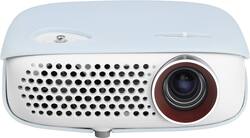
LG - WXGA LED Minibeam Projector - White
- Key Specs
- Product Weight: 1.3 pounds (The out of box weight of the item.)
- Light Source: LED
- Resolution: 800p (Refers to the number of pixels, both horizontally and vertically, used to capture video/images. The higher the resolution the finer the detail that can be seen.)
- Contrast Ratio: 100,000:1 (Measured difference between a displayed image's brightest whites and darkest blacks. The larger the first number, the more detail and color that can be displayed.)
- General
- Product Name: WXGA LED Minibeam Projector
- Brand: LG
- Model Number: PW800
- Dimensions
- Product Height: 2 inches (The out of box height of the item. Height is measured as the vertical distance from the bottom of the item to the top as it would be primarily used or placed.)
- Product Width: 5.5 inches (The out of box width of the item. Width is measured as the horizontal distance from one side of the item to the other as it would be primarily used or placed.)
- Product Depth: 5.5 inches (The out of box depth of the item. Depth is measured as the distance from the front of the item to the back as it would be primarily used or placed.)
- Product Weight: 1.3 pounds (The out of box weight of the item.)
- Display
- Light Source: LED
- Display Technology: DLP (Denotes the product’s visual process, sometimes manufacturer specific, used to display an image.)
- Resolution: 800p (Refers to the number of pixels, both horizontally and vertically, used to capture video/images. The higher the resolution the finer the detail that can be seen.)
- Resolution (Native): 1280 x 800 (Native resolution of a screen refers to its single, fixed resolution. Sometimes screens must scale an image up or down in order to fit the native resolution. This can cause a loss of resolution or detail.)
- Contrast Ratio: 100,000:1 (Measured difference between a displayed image's brightest whites and darkest blacks. The larger the first number, the more detail and color that can be displayed.)
- Aspect Ratio: 16:9 (The measurement of the width of a screen compared to the height of a screen, expressed as a ratio.)
- Throw Ratio Range: 40" at 4.3'; up to 100" (This measurement indicates what size of projected image can be produced from a certain distance. The smaller the ratio, the closer the projector can be to the screen while still producing a large image.)
- Digital Keystone Correction: true ("Keystone effect" refers to the distortion of an image when it is projected on an angled surface or when the projector is positioned too high or too low from the center of the display. Projectors with a digital keystone correction feature are able to scale the image as needed before it is projected, resulting in the correct image orientation no matter where it is displayed.)
- 3D Technology: false
- Viewing
- Minimum Viewable Screen Size: 25 inches
- Maximum Viewable Screen Size: 100 inches
- Features
- Remote Control Included: true
- TV Tuner: false (The ATSC TV Tuner is a component built into conventional TV sets or other devices for receiving over-the-air broadcast TV without a cable/satellite box. Digital tuners may be purchased separately and connected to a device if it does not have one built in.)
- Audio
- Speaker(s) Included: false
- Certifications Listings & Approvals
- ENERGY STAR Certified: false (Devices carrying the ENERGY STAR service mark, such as computer products and peripherals, kitchen appliances, and other products, generally use 20% to 30% less energy than required by federal standards.)
- Other
- UPC: 719192599239
This LG PW800 WXGA LED projector delivers 800 ANSI lumens of color and white brightness for a highly visible display with clear on-screen images. A maximum viewing screen size of 100" allows everyone in the room to get a good view.
- Not sure what size projector or screen you need? Learn more.

- Portable design: Weighs only 1.3 lbs. for lightweight transport for use at home or at the office.
- DLP (Digital Light Processing) technology: Produces sharp visuals.
- 800 ANSI lumens white brightness: Ensure crisp on-screen images.
- 1280 x 800 resolution in 16:9 format: Delivers lush graphics; 4:3 format also available.
- 25" - 100" viewable screen size: Offers flexible use with small or large groups.
- Supports 1080i signal: For ease of use.
- LED lamp: Provides 30,000 hours of light for long-lasting life.
- Inputs/outputs: Include 1 HDMI (MHL), composite video in, 1 RGB video in, 1 USB Type A and one 3.5mm audio out for versatile connectivity options.
- Remote: Lets you operate the projector from across the room.
- Built-in digital TV tuner: Allows you to enjoy your favorite over-the-air TV stations.
- Wireless connection: With select laptop and Android cell phones and tablets via Intel® Wireless Display and Miracast, so you can view your favorite content through the projector.
Whats Included
- WXGA LED Minibeam Projector
- Remote
- Owner's manual
Q: What Powerpoint formats are allowed on the PW800?
A: Hi Astroboy. You can see document files stored on a connected device on the LG - WXGA LED DLP Projector, Model # PW800. The supported file formats are; XLS, XLSX, DOC, DOCX, PPT, PPTX, TXT, PDF, HWP Microsoft Office 97/2000/2002/2003/2007 versions. Adobe PDF 1.0/1.1/1.2/1.3/1.4 versions Hangul: 97/2000/2002/2005/2007 Versions. File Viewer realigns a document, so it may look different from what is displayed on a PC. For documents that include images, the resolution may look lower during the realigning process and if the document is large or has many pages, it may take longer to load. Unsupported fonts may be replaced by other fonts and the file viewer may not open for Office documents that contain many high resolution images. In that case, you would have to reduce the image file size, save it on a USB storage device and run the file viewer again or connect your PC to the projector and open the file on your PC. You can also use the Screen Share feature on this unit if you have devices that support Screen Share, by connecting the projector from the search list of the device you want to connect to and a pin code will be shown on the initial connection and if the device you wish to connect to accepts the pin code, then Screen Share is started. Windows 7 / 8 / 8.1 are compatible with SCREEN SHARE. However, other versions of Windows, and some other operating systems, may not be compatible with SCREEN SHARE. Ice Cream Sandwich, Jellybean, and KitKat versions of LG’s Android devices are guaranteed to be compatible. Certain Windows 8.1 laptops may have difficulty in reconnecting when initializing the device information during a wireless connection. In this case, it is recommended that you remove the registered device and reconnect. You can view photos stored on a connected device, but only JPEG files are supported. Non-supported files are displayed in the form of an icon and may take some time to view high resolution images in full screen.You can control playback to select the previous or next photo. The Slide Show function will allow you to display all photos during slide show and you can set Slide Speed in the Option ? Set Photo View. menu...^IFV
Q: What movie file formats are supported for playback from a USB memory stick?
A: I'm not sure of all the formats that it will play. I have had no problems using .mp4 formatted video. Hope this helps..