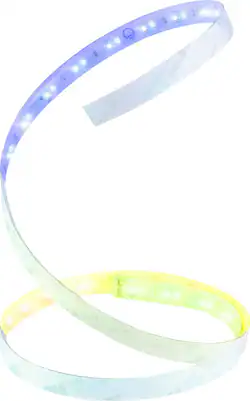
LIFX - Z TV Smart LED Backlighting - Multicolor
Model: LZTV1MUS
SKU: 6374013
This item is no longer available in new condition. See similar items below
The vast majority of our reviews come from verified purchases. Reviews from customers may include My Best Buy members, employees, and Tech Insider Network members (as tagged). Select reviewers may receive discounted products, promotional considerations or entries into drawings for honest, helpful reviews.
I’m a fan of LIFX. Products have worked well with my Apple HomeKit setup. I have 7 LIFX bulbs of various types and now the Z strip lighting for the back of my LG OLED 65” LED TV for home theater lighting—as the packaging says “create a cinematic glow for your TV.” It really does seem to relieve eye strain when watching TV in an otherwise dark room. It’s nice that you don’t need a bridge (though I have an Apple TV and two HomePods that can act as bridges). I’m also a fan of Best Buy where I buy most of my electronics. I frequent my local Best Buy store and also order other the Best Buy online store. That said, if I could do it over, there are a few things I’d do differently. I’d use string to measure for optimal placement on top and sides of TV and buy the closest “all in one run” size option. Despite internet research, I did not find much in the way of specific, helpful information for sizing and placement of the strip on the back of the TV and I hope this review helps others with regard to planning, purchasing and execution to achieve optimal results. I found three online videos that discussed specifically LIFX Z Lightstrip application to the back of a TV, but two did not show the back of the TV application and the one that did ran the lights very low on the TV (along the top of lower “bump out” which turned out to be bad advise to maximize the visual light (and be able to dim from there as you see fit). Originally I bought this reviewed item, model number LZTV1MUS LIFX Z TV Smart LED Backlighting, which is 39” long and comes with the wi-if controller and power supply AC Adapter (U.S. Plug Type A). The packaging (and copy on Best Buy’s online store) says: “Suits TVs 46” and above.” It is unclear if the “size reference of 46” or above” is TV Length or the typical diagonal measurement reference to TV size. Not on the Best Buy website, but on the back of the box is a line art depiction of the back of a TV with the strip running along the top of the TV showing the length of the strip as 39” (1M) and indicating “Position top or bottom for preferred lighting effect” but giving no measurements as to proximity to TV edge. My goal was to project back lighting on the top and sides of the TV. After receiving the LED strip branded for TVs (online order), I realized it would only run along the top (the LG 65” OLED TV to which I was applying is about 57” in length. The strip is 39”. My goal was to create an upside down “U” shape with the strip running across the top and down the sides of the TV. It was quickly obvious that what I ordered wasn’t long enough. If I could do again, I would have ordered the longer version (that doesn’t have reference to “TV” use but is the same thing, just longer). So I suggest if you have a 65” or larger TV (with a length of 57” or more inches), you buy Model# LZHC2M1USUC07 (Best Buy SKU: 5935610) LIFX Z Wi-Fi LED Starter Kit 6.6’ - Multicolor for $89. This will allow you to run the strip along one side, across the top and down the other side of your TV. There is also a 9.8’ size strip for $99.99 that could work for large TVs and maybe also get some run along the bottom. I was happy to find the LIFX Z LED Lightstrip Extension Kit 3.3’ ($29.99) which I added to the LIFX - Z TV SMart LED Backlighting to get the necessary length. I posted similar review on that product as well. But would have been easier (and $10 less expensive) to just have had the single longer 6.6’ strip in the first place (no worries with “connecting” the two strips. Application of the strip: The peal-off 3M tape adheres very well, once on, it’s not coming off! It will pull off, but will leave the glue residue, so be careful to apply where you want it. My TV is mounted to the wall and the mounting bracket allows me to pull out a bit and tilt in any direction. Tight quarters to apply the tape though, but put it on alone so pulling TV off the wall was not an option. I ran the electrical cord from Surge Protector strip into the wall (LeGrand - In-Wall Power Kit was already in place to accommodate this wire). The length of the thin power cord run was sufficient to go from the floor power strip, through the bottom wall opening to the top wall opening behind the middle/right of the TV and then to the lower right side of my TV where I began the light strip run. I started the strip on the bottom side of the TV next to the section that bumps out 5” from the side edge of the TV and ran above the horizontal “bump out” 5” above it which was about 13” from the top of the TV edge. If I could do it again, I’d placed the strip higher on the top of the TV (maybe 5” from the top and 5” from the inside, however this would have required another 16” of length to achieve and the extender strips come in lengths of 39”, so I think I arrived at the best solution for cost and performance for my situation. While the light strip is 5” from the sides of the TV, it is 13” from the top. The good news is the lights are pretty forgiving and while they are brighter on the sides, the top has a longer light run and the top/sides together look nice (like movie theater lighting) when lit. If making an upside down “U” as I did, you will have to carefully curve the light strip to a rough right angle to go the new direction. This “corner” portion will lift off the TV surface, but the rest of the fore & after run will keep it in place just fine. Happy with the purchase, just be sure to think through the length you need and buy the right length from the beginning and measure and practice the placement (I used masking tape and electrical tape to hold the power strip in place while I decided on exact application location. Before buying, using a piece of string in place of the light strip to get location and measurements figured out would be a good idea. I had no trouble getting the light set up on the LIFX app. Be sure to update the firmware first thing. I did have some difficulty getting Apple HomeKit to recognize and add the device. Took multiple attempts (maybe like 6) before it finally took, but is working great now. I had to type in the 8-digit code manually, as while it would scan the code, I kept getting a message saying it couldn’t add. I’d recommend the LIFX LED strip lighting for your Home Theater for application to the back of your TV as it provides great ambient lighting for movies and mood. Happy to see a quality item that works with Apple HomeKit.
Posted by Scott
Easy accessibility with app; Able to customize specific color pattern. Adds very calming ambience to the room. Have many preset light modes saved and ready at a press of a button! These lights are amazing!
Posted by mish
I installed this on the top part of my wall mounted 49 inch TV, it’s the perfect length for a TV this size. It was easy to install and set up on the LifX mobile app. Setting up HomeKit integration was a little tricky at first but once I got it going it was really to control using Siri so you can turn it on/off or change colors. I really like there are different zones so you can display multiple colors at the same time, making really cool different scenes. I also think it’s a great value at $60, it makes my setup look very high end.
Posted by Fred
Customers are pleased with the brightness and ease of use of the Z TV Smart LED Backlighting, frequently praising the vibrant colors and user-friendly app. However, some customers expressed concerns about the product's price and occasional connection issues. The setup process is generally considered straightforward, although the product's long-term reliability has been questioned by a few users.