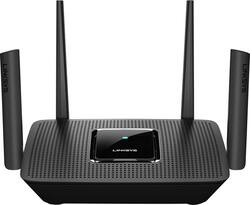
Linksys - Max-Stream AC3000 Tri-Band Mesh Wi-Fi 5 Router - Black
Model: MR9000
SKU: 6370647
This item is no longer available in new condition. See similar items below
Customers have good things to say about the Max-Stream AC3000 Tri-Band Mesh Wi-Fi 5 Router's ease of use, performance, and range. Many appreciate the straightforward setup and reliable signal strength, with positive feedback also given to the app for managing the router. However, some users experienced connection issues and occasional lag. A few comments mentioned the router's size, with some finding it unexpectedly large or small.
The router went on sale and the specs and performance appeared to meet and slightly exceed my home and home office needs. I paired this with a new Arirs SB33 modem with xfinity gbps service. Setup was very easy and the wifi coverage was greatly improved! I have a ranch style home with finished walkout lower level. From end to end is about 90 feet and width 26 feet. I now have 120-250mbps speeds from the house ends (garage to master bedrm and home office on both levels) where before I had dropped signals and lucky to get 20-40mbps speeds if able to connect. The modem and router are centered in the house and if within 20 feet with one or two walls separating between my laptop or note-9, 300-500mbps downloads on speed test and uploads of 40-42mbps are typical. From router, speed test averages 920-960mbs down and 42-44mbps up. The ease of use, setup, speeds, and costs have exceeded my expectations. Debated on wifi 6 router but could not justify the increase in price and glad I made this purchase. Devices in home 4 phones, 3 HD TV, 4 laptops, 1 gaming PC, and several cameras. This router/wifi is tri-band and is mesh expandable using velop hardware. The router admin app is easy but does lack advanced features but for most tech savy homes this appears to be a great router and is rocking it in my environment. After almost one month I have zero complaints and highly recommend!
Posted by spitcher
Great router, have had no issues with it ever. Easy to set up and the app makes it even easier to use!
Posted by Gadzukes
xfinity in their infinite-wisdom COMPLETELY BROKE Port Forwarding. They moved it from your router to their server so, for instance, lets say you have a tech help you with port forwarding (like me), you need to give me your xfinity account logon/password to access port forward settings - that should be in your router. And once there, you can't add ports/IP combos, their system only adds to "recognized devices" and it sees none of mine (several PC on RDP). Put an ARRIS - SURFboard 32 x 8 DOCSIS 3.0 Cable Modem SB6190 ($66) which upped me from 24x8 channels and got rid of the garbage arris router (their cable modems are good their routers suck). Then this Linksys - WOW!!! SO GLAD I DID THIS. Has a great port forwarding setup (single or multi-port entries), all worked perfectly 1st try on that. Had to scout around a little to find port forwarding, it was under Security and not Connections, but OK, that's fine. BUT THE SPEED ... our up/down speed is the same, as would be expected, but latency is WAY improved, sites flash, page to page flash, and the home/office network SCREAMS with speed. All TVs can access at the same time w/o bogging down our wireless, now we are only limited by internet speed which should be the bottleneck, not your own wifi. And Apple TV running a moving wireless from my iphone starts instantly instead of a 30 second or so delay, they just start playing. One note - if you turn your unit over to see/take a pic of the security sticker, don't forget to turn to back over, when upside down wireless coverage really lacks and the unit is not aesthetically pleasing, but when sitting properly it looks cool and works so much better - the Apple TV test went from ridiculous/what's wrong to WOW!!!!! Dan F, P.R.S. President eecons.com
Posted by EECONS
The vast majority of our reviews come from verified purchases. Reviews from customers may include My Best Buy members, employees, and Tech Insider Network members (as tagged). Select reviewers may receive discounted products, promotional considerations or entries into drawings for honest, helpful reviews.