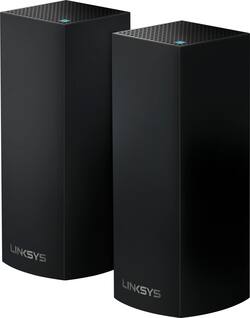
Linksys - VELOP AC2200 Tri-Band Mesh Wi-Fi System (2-pack) - Black
Model: WHW0302B
SKU: 5990500
This item is no longer available in new condition. See similar items below
Customers are impressed with the Velop AC2200 Tri-Band Mesh Wi-Fi 5 System's ease of use, coverage, and setup, frequently citing its simple installation and strong signal. Many also praise the system's range and performance, reporting consistently reliable connectivity. However, some users experienced connection issues and noted the relatively high price. A limited number of Ethernet ports was also a recurring point of feedback.
I recently moved into a bigger house and, on the recommendation of my Best-Buy in-home consultant, decided to purchase the Velop 3-pack whole home system for better wi-fi coverage. I also have 2 adult children and 1 teenager in the house who are ravenous consumers of anything that has to do with using the internet. For them, the coverage in the house has to be beyond average. I set the Velop system up myself, right out of the box. All the nodes were relatively easy to set up. Once I downloaded the Linksy’s app on my cellphone and hooked up the “mother node” to my Arris 9160 modem in the upstairs bonus room, I was able to see each node recognized quickly on my network, right from my phone. I even conducted a speed test for performance, right from the app. I placed each of the remaining nodes downstairs- one in the kitchen area and the other near the guest room to the front of the house. The coverage throughout the house was amazing and has remained ever-so. The kids have noticed a huge difference in coverage and everyone is pleased. We like to entertain, and no matter the number of people in the house logged in to my network, I did not notice any drop in coverage strength or capacity. I’m also able to see the number of people logged in at the same time, right from my app. In summary, I would like to say there’s been no regrets on this investment; it’s definitely been money well spent!
This review is from Linksys - Velop AC2200 Tri-Band Mesh Wi-Fi 5 System (3-pack) - White
Posted by MOSTN
For the past few years I've solely used Apple's AirPort Extreme Base Stations in all my homes and have numerous current generation models bridged and running well. As Apple has officially announced leaving the networking market, I began researching mesh networks. I decided on the Linksys Velop system as it's the only alternative Apple currently sells and endorses, thus it should be a perfect fit for my homes as my computers are Mac's (with a few Windows systems) and my mobile devices are iOS based (iPad Pro 10.5's and iPhone X's). I also have numerous HomeKit smart home devices from smart locks, lighting systems, garage and gate openers, thermostats, etc. and servers in my Berlin and New York homes. If Apple supports it, then it should be a perfect fit, especially as I use some of my servers for Time Machine. I haven't dealt with non-Apple routers in my home in years, so I was a bit trepidatious as my previous experiences with Linksys were far from great. The nodes are small and contrary to what some others have stated they aren't eyesores. In fact, I found the black nodes to be the perfect size, shape, and they blend in with their surroundings. I tested this unit in my 5,000 sq ft home which has two current generation Airport Extreme Base Stations (one in bridge mode). Either node can be the main node connected to your modem. The mobile app walks your through the setup process which was very easy and quick. After the first node is setup, simply follow the instructions to place the second node (and third if you have more). After the nodes were placed, the system ran tests to ensure each node was in the best location, then scanned your network for devices and analyzed your setup proper optimization. The two nodes cover 5,000 sq ft well, which saved me from having to purchase the three node system (and you can always add more nodes). My only issue with the nodes are the limited ethernet ports (two for each). As this is a mesh system, wireless connectivity is its main priority although you can connect the nodes with ethernet cables should you have them already placed. Simply setup the nodes wirelessly first, then connect each node to your wired setup. Unlike traditional routers which broadcast 2.4GHz and 5GHz as separate networks, these systems broadcast both under one wireless network name and use the 5GHz band by default, automatically switching to the lower ranger 2.4GHz depending on device and/or range. Each node's processors constantly evaluate the signal strength of each device in order to ensure the everything on the network has the best connection. Essentially, it's akin to an easy to setup bridged network system with intuitive and seamless device prioritization. The "Channel Finder" feature in the app evaluates connected devices and node placement should you wish to check that the system is properly functioning, however this is done automatically in the background. The speeds were slightly than my current AirPort Extreme Base Stations even though each utilize the same protocols. Trio-Band mesh networks are superior in this area as they are constantly adjusting to your needs. I tested this on my 300 Mbps down and 30 Mbps up system and found wireless speeds to be faster and more consistent, especially in area's that seemed to struggle maintaining a connection. The downside is the mobile application necessary for setting up and monitoring the system (although the desktop browser portal is a much better method as it allows for more fine tuning such as port forwarding, device prioritization, security options, etc). The iOS app UI seemed extremely basic and disappointing. In fact, it turned me off so much that I'm on the fence whether or not I should keep this system or sell it online. It's very limiting especially with naming and categorizing devices (the icons are not only hideous and generic at best, they are limiting as only a handful of devices are listed). Port forwarding allocation is archaic and my Synology servers did not recognize the systems UPnP or NAT and many manufacturers have been slow in developing proper mesh system support. Port Forwarding and DHCP Reservations are the only way to ensure LAN and external connectivity, which I normally do for all my systems. Unfortunately I experienced a handful connection issues over the 2-3 weeks in which I used the system. Sometimes a node would drop its connection, requiring the system to search for the node and ensure it was properly functioning. I had to restart it a few times as well, which I rarely had to do with my Apple wireless routers. At the end, a windstorm came in and the power flickered yet was never lost and my equipment is attached to server grade UPS's, etc. Yet the entire system lost all the settings. As there is no way to save your configuration to your computer as you can with other systems such as Apple's Airport Utility, this meant I had to setup the entire network from scratch. At this point, I packed up the system and reconnected my AirPort Extreme Base Stations and in a few minutes was back online. Pros: Speeds, coverage, seamless adaption Cons: Terrible mobile app necessary for setup and usage, lack of ethernet ports (although a simply switch remedies this issue), no dedicated desktop apps, no way to backup your system configuration should it fail
Posted by cjd2112
Hardware Set-up: Cujo, Arris Surfboard 8200, Linksys Velop (3 Pack), Linksys SE3005 (5 Port Switch), 4TB WD MyCloud, and a Philips Hue Bridge. I've seen a lot of bad reviews on this product. So, I wanted to write about my experience. Setup was fast, easy, and seemless! I have zero compatibility issues with any device, and I have about 50 connected, this includes smart lights, ring products, etc... This is a very solid mesh networking solution and I'd recommend it to anyone. My speed and range have stayed amazing without a single drop.
This review is from Linksys - Velop AC2200 Tri-Band Mesh Wi-Fi 5 System (3-pack) - White
Posted by Vailene
The vast majority of our reviews come from verified purchases. Reviews from customers may include My Best Buy members, employees, and Tech Insider Network members (as tagged). Select reviewers may receive discounted products, promotional considerations or entries into drawings for honest, helpful reviews.