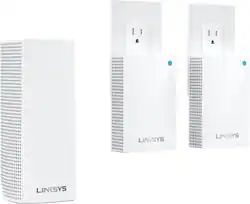
Linksys - Velop Tri-Band Mesh WiFi System (1 Node+2 Plug-in) 3-pack
Model: WHW0203P
SKU: 6292290
This item is no longer available in new condition. See similar items below
Customers have good things to say about the Velop Tri-Band Mesh WiFi System's coverage, ease of setup, and ease of use. Many appreciate the improved signal strength and performance, resulting in a reliable connection throughout their homes. While some find the price to be a drawback, the system's range and design are also frequently praised. A few users noted the lack of Ethernet ports on some nodes as a limitation.
The Linksys Velop Tri-Band Mesh Wi-Fi system is very easy to set up using the Linksys App. The units are small and fit in with just about any décor with a modern, but not too modern look. My wife even allowed me to place one in the kitchen so that was a plus for the design in my book. The three nodes easily provide coverage throughout my 2300 sq ft. house and the entire back yard area, front yard, and garage. They are rated to cover a 5000 sq. foot area. The AC4800 version comes with a regular size node and two plug-in nodes, which will fit in the bottom outlet and leave the top one open for something else. I was really hoping that the plug-in nodes had an Ethernet port or two on them like the regular nodes do, but they do not. They strictly provide Wi-Fi coverage only. They are well packaged, and the presentation of the devices is top notch. Something I have come to expect from Linksys. I easily connected the main node via the RJ-45 cable that was included in the packaging and just followed the set-up procedures in the App. I didn’t have to update the firmware immediately, but I did have to do one a few days after install. The update took about 5 minutes for each node and then the system rebooted. My cable modem speed is 100mb down and 13mb up. I am seeing speeds faster than that in the times that I have checked. I have not noticed any slowdowns or buffering while multiple devices are streaming in our house either. I tried to max it out by streaming Netflix on both TV’s, and YouTube videos on 3 tablets and 2 phones. No issues to report there. Linksys provides a 3 year warranty with these so I am sure I will have no problems. These also give you the ability to set up a guest Wi-Fi and you can toggle it on or off using Alexa. My guests have been impressed with that feature. Over-all, I am very impressed with the speed and ease of use so far with these and you can easily add additional nodes as your needs require them. I have tested both tri-band and dual-band nodes at the same time and had no issues. I suspect speed would be degraded to the slowest device on the network, but even the dual-bands were plenty fast for my needs.
Posted by jago
I've used the Linksys Velop Tri Band System for the last 15 days. I recently tried out the Linksys Velop Dual band system (Model WHW0103 – also available at Best Buy) and decided to see what the Tri-Band version had to offer. Much like the dual band system I haven't had any issues using the Mesh system. So far, I have been happy with the performance of the Tri Band system. My house is 1700 sqft split between 2 stories, and an attached garage. I have gone through and performed a couple of network benchmarks and random tests to see how the Tri-band performs, and how it differs from the Dual-band. The Tri Band Velop Mesh System (3 pack) The system comes with 3 separate nodes – a primary tower and 2 plug-in nodes that resemble wall-warts. The primary node is an AC2200 router (2 bands of 867Mbps @ 5Ghz, 400 Mbps @ 2.4Ghz) with simultaneous tri-band radios and MU-MIMO. The other 2 nodes are AC1300 routers (867 Mbps @ 5GHz, 400 Mbps @ 2.4GHz) with simultaneous dual band radios and MU-MIMO. MU-MIMO allows multiple WiFi users to communicate with the router simultaneously without taking the performance hit - this is the latest and greatest router technology until 802.11ax gets fully released in 2019. Each plug-in node packs 3 antennas and amplifiers. The primary tower has 6 antennas and amplifiers, as well as 2 ethernet ports (for WAN or LAN use). Along with the nodes the pack comes with a single ethernet cable (its not marked, so I assume cat5e) and a power adapter. The operating temperature range for the Velop routers is 32° to 104°F – for anyone looking to deploy these in a garage setting. Setup, just like I experienced with the dual band, is pretty easy. You need an Android or IOS device to download the Linksys app to do the setup. I started with the setup of the main tower (based on the quick start sheet in the box), and from there the app gave me instructions going forward. The main tower was setup without an issue. I did run into 1 issue with each of the plug-in nodes. For whatever reason each node had to be reset (with the button on the side) before the app would pair with it and setup. The same situation happened when I setup my dual band system, so maybe this is an issue with the router/app/or my phone. Who knows? In any case the app will eventually suggest that you reset the node after failing to pair a couple of times. Once the first plug-in node is setup and connected the app will prompt you to add another. Follow the same steps again and the system is up and running. Once they are all setup the mesh network forms one contiguous wireless field that has a single Wifi name and password. You seamlessly switch between nodes as you move about your house with your device. There's no drop in coverage before the next beacon picks you up. Unlike the Dual Band system I have, the secondary nodes of the Tri-band cannot be setup as wireless backhauls (i.e. wired via ethernet to the primary node to pump out a full speed signal) since they lack the necessary LAN ports. They can only act as repeaters that boost the primary nodes signal to create the mesh. The loss of this functionality is compensated by the strength of the primary node’s signal, and the ability to more easily locate the nodes. I was able to locate a plug-in node in my foyer (the midpoint of my house between the primary and furthest out node), which was a place that I couldn’t locate my dual band tower. This allowed for better placement of the nodes to more adequately create the mesh. Tri-Band vs. Dual Band The biggest difference between the 2 versions of the Velop, that I have used, is the single Tri-Band tower that comes with this kit. The other 2 nodes function as dual band AC1300 plug-in routers. The Dual Band system has 3 AC1300 tower routers, each with the same effective speed and range as the plug-in routers. The Tri-Band tower has a larger range due to the additional sets of antenna/amplifiers. Speed wise, there shouldn’t be much difference between the 2 sets since the fastest radios each set carries is 867 Mbps @ 5 Ghz. What the Tri-band allows is more traffic to be handled due to its additional 5Ghz radio. In effect if the amount of devices, and traffic on your network, is great enough you can fully saturate a dual band signal and cause a drop in speed. The Tri-band, in this scenario, would keep chugging along at a higher speed since the 5Ghz traffic can be divided amongst the 2 radios. Think of it like a highway – 2 lane vs 3 lane. For both systems, I hit 106 Mbps at 5 ft from the main node (speed test shows 116 for wired connections). I know my house falls well below the square footage for this setup (5000 sq ft). Like I did with the dual band, I disabled 2 of the nodes and tested speeds. I located the nodes from the 2 different systems in the same spots, to remove the variable of one system getting more favorable placement over the other. The lowest inside my house was 45 Mbps (Tri) and 40 (Dual), and the lowest overall being in my garage – 24 (Tri) and 18 (Dual). With 1 node disabled (the one closest to the garage) my house coverage was perfect and the lowest speeds inside the house was 65 (Tri) and 63 (Dual). The garage rating stayed pretty similar - 26 and 21. With all 3 nodes running the lowest in the house was 76 (Tri) and 72 (Dual) with the garage coming up to 58 and 53. The added range of the Tri-band router provides a small, but noticeable bump in performance for the further out connections. Performance I wanted to test the performance of the nodes so I booted up LAN Speed test from Totusoft and performed some dummy file transfers between my computers. My transfers went between 2 computers with NVME ssd drives. With the nodes and PC's fully wireless I ran the test with both PC’s connecting to the main node from 15 ft. I achieved 135 Mbps Up and 240 down. I would have though the Up/Down numbers would be the same with 2 NVME drives, but I guess not. Then I tried again with the PC's connected to 2 separate nodes – both at 15 ft their respective nodes, and another 20 ft between each node. I hit 83 / 155 with this setup. That’s a decent drop in performance, but I was skipping across a couple of nodes to make that connection, so I expected some losses. I also decided to load up my network with wireless traffic on the 2 different Velop systems to see how much more traffic the Tri-band could handle. I had music streaming on my Sonos, Netflix on my Xbox and Roku (1080p), Netflix on a laptop (4K), Youtube on a Chromebook (1080p), Hulu on my PC (1080p), and a Steam Download. For both systems I had QoS rules in place to prioritize traffic to the laptop, Xbox, and PC. On the Dual band system none of my video streams experienced any buffering or stuttering, but the Steam download speed was pretty low – 22 Mbps (105Mbps with no traffic). I loaded up all the same traffic on the Tri-Band, and again I did not experience any stuttering or buffering. However, the Steam download was hovering around 39Mbps – so a 77% boost in the Steam download speed. I know that may not seem like a big difference, but this was all the traffic that I could drum up as an individual. Households with several users could easily match this much traffic, and more on a daily basis. This would eventually lead to stuttering/buffering on the Dual band, while the Tri-band would chug along. Reliability A central part of the Velop Mesh system is its ability to self heal if a node goes down. If one node drops, all traffic going through that node automatically shifts to the next closest node without you noticing. That is unless the node you are connected to is the last one in a daisy chain of nodes. If that is the case you may be out of range for the rest of the mesh, but you would need to be pretty far away to fully lose the mesh. As long as the node connected to the router doesn't drop you really shouldn't lose internet and your WiFi network. I have kept a system uptime logger (like I did for the dual band) going on my PC and it has been 100% for the last 2 weeks. I played around with power cycling the nodes (unplug and plug back in) to see how quickly they would reacquire the mesh - it was right around 30-35 seconds (the same as the dual band). If a node drops, you get a push notification from the Linksys app on your phone telling you that a node has lot connection. Interface I said this in my review of the Dual Band system - the app interface is pretty slick and simple to navigate. This is no longer the router configuration of the old days. Some networking pros may cringe at the simplicity, but most folks just want their router to work without much effort needed. I have no issue looking at what devices are connected, what nodes they are connected to, and setting QoS rules. Overall, I am very pleased with the performance of this Mesh system. This is the second Velop system I have tried out, and both have left me consistently happy with their performance. The plug-in nodes are easy to locate and setup while providing a stable connection. The range for the system is pretty good – greater than what I would truly need for my dwelling. However, during the warmer weather months I plan to relocate a node to my garage to expand my mesh outside (I have extra nodes with my dual band, so I might as well). I am very happy with the ease of setup and the app interface. I think It's really well thought out and easy to use. The design of the main node is a little modern and larger than its dual band counterpart, but it looks cool and monolithic. The plug-in nodes blend right into the wall and are barely noticeable, which I thin
Posted by DaveW
Setup: The setup process is very easy, but you will need to use your cell phone easy as long as you have your smart phone with you, I had to download the Linksys app, create an account and the app took me through the steps. It was very clear and easy to setup. This came with one main router unit 2 plug in nodes. Once the router was set up, it asked me if I wanted to add a node and after that it asked me if I wanted to add another. Very simple. It asked me to name each node as I went along. For example, after setup it suggested using the room name each device is in. Even though the setup requires a cell phone to set up, the router itself can be managed via website by putting in the router IP address. It is a standard address for Linksys routers, so I won’t list it here. During the first log in it asked me for a recovery key which can be found on the bottom of any of the nodes. Once entered I was able to set my router password. The admin portal allows you to view the devices connected to the router, set guest access, parental controls device prioritization and a speed check of the internet (more on speed test later). Performance: Overall the performance of the mesh network was good, however compared to another mesh network system I have in my house currently it was not nearly as fast. I switched back and forth between the two routers and performed a speed test using well known, popular speed test application and my existing system consistently outperformed the Velop bt nearly double on download speeds and just a few Mbps upload speed. I am not a network professional, but from what I understand, the difference in performance between my system and the Velop would only be an issue if there were several people on the network all streaming video at the same time. The bottom line is the performance of the Velop should be more than adequate for an average family. Of course all of this depends on your internet provider as well. Just as important to good internet performance is signal strength and that is where the Velop shines. With the 3 nodes covering my modest 200sf home, there were no dead spots anywhere and that is the whole idea of mesh network. Being able to go from room to room without losing signal strength or having to switch to a different network name like the old network extenders means you are covered wherever you go. Taking a walk outside, I was able to get a solid signal up to 40ft from my house which is on par with my exiting system. Design: Compared to my existing router, the Velop is much more modern and compact. The nodes plug directly into a standard outlet keeping them out of the way. One thin I did not like is that the Velop has only two Ethernet ports. If you have more than 2 devices connected via ethernet cable (I have 3) you will need to get a ethernet switch for additional ports. They are cheap enough, but it’s just one more device to plug in. These days with most devices being wifi enabled it shouldn’t be an issue going forward, but if you have some legacy printers like I do, you’ll need the ports. Overall this is a good solid choice for houses up to 5000 square feet. Performance will hold up under average use and the system won’t take up valuable desk or side table space.
Posted by GH06903
The vast majority of our reviews come from verified purchases. Reviews from customers may include My Best Buy members, employees, and Tech Insider Network members (as tagged). Select reviewers may receive discounted products, promotional considerations or entries into drawings for honest, helpful reviews.