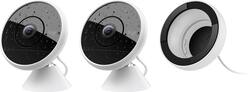
Logitech - Circle 2 Indoor/Outdoor 1080p Wi-Fi Home Security Camera (2-Pack)
Model: 961-000469
SKU: 6162247
This item is no longer available in new condition. See similar items below
I chose this surveillance camera because of the good history Logitech has established. Plus, once you go into the “Apple HomeKit” world as far as I have. This is the 1st outdoor option for “Apple HomeKit.” I still have a Logitech Harmony that glows in the dark from over 10 years ago. It works fine. I find all the different accessories fascinating. It has different colored status indicator ring lights. I like that a lot. The people detector option is pretty nifty. There is a frame holding it in place. Some of the early reviews made it seem like it was just hanging there which is not true. It is secure. I would suggest mounting at least 8ft up. Apple HomeKit integration is why I bought it though. It adds both Motion & camera. The ability to get a plug mount, battery, window mount(very cool), & a weather extension cable is very unique. Logitech “spared no expense.” ;) Thank you Logitech & Best Buy for a wonderful surveillance camera. Thinking about the Logitech Pop Smart button now for sure.
This review is from Logitech - Circle 2 Indoor/Outdoor 1080p Wi-Fi Home Security Camera
Posted by DiscoveryStar
Full disclosure: I received a Logitech Circle 2 Wired Camera for free in exchange for a timely and honest review. I own many security cameras from different companies. (Nest, Arlo, Axis, NetAtmo, RingPro Doorbell, D-Link, and traditional coaxial cameras). I use them to monitor my homes and my Father-in-Law's home. I was very interested to see how the Logitech Circle 2 measured up to the other camera systems. My bottom line is that this is a very nice camera, but there is some remaining work to be done on the software side in terms of features and function. Setup was very simple as advertised. Snap the camera onto the power ring/mount, snap the US power plug onto the power adapter and plug it in. Download the Logi Circle app from the App Store. Create an account. And finally, connect the camera to my WiFi network. The camera updated the firmware automatically as soon as it was connected to my WiFi network. It was very easy and quick. The image, even in 720 mode, is very crisp and clear. Low light performance is very good! The night image is crisp and clear. I've only tried this indoors. IR LEDs have limited range so don't expect to light up your back yard. The camera displays a circle of light on the camera face which conveys the camera status...ready to pair, connected & ready, someone is watching, privacy mode and "Off". You can turn this off, if desired. I experienced a little funkiness with the on/off setting, so it may not be prefect yet, but it finally worked. Video is stored "in the cloud" (on servers run by Logitech). Circle comes with free 24 hour storage and other options are available for a fee. We get a free trial of Circle Safe for a week. "Circle Safe™ is a subscription plan that gives you more video storage options. With Circle Safe™ Premium you get Person Detection, Motion Zones, custom timelapse Day Briefs and more." Many consumer systems store video "in the cloud". It has advantages and disadvantages. It is good that the data is off site and can't be stolen with the camera. It is also good that share viewing by others uses video on the cloud servers (except for live view) rather than pulling video directly over your internet connection. That down-side of cloud storage is that your video has to be transmitted to the cloud when it is acquired. If your internet is down, you don't record anything. Also if you want several cameras, they can bog down your internet connection, especially since most ISPs offer slower upload speeds than they do download speeds. Two cameras can typically bog down a DSL circuit. If you want more than that you need cable or fiber based internet. I suspect satelite internet performance would be worse than DSL. It appears to me that even though the video is supposedly continuous, I can only view video that was part of a recognized motion event. With Nest & Axis, I can see the timeline for my entire day and scroll through the entire day and stop at stop at times when sound or motion did not trigger an event notification. This allows me to see video from a period of time the camera may not have recognized an event, but something subtle happened that is of interest. The event approach is more like motion-only recording on other platforms. There is a Window Mode for use with the window attachment accessory. This sounds like it solves a common problem with other cameras that don't allow night mode without lighting up the IR LEDs which then reflect off the window. I don't have the window accessory, so I haven't tried it, but I see the problem with Arlo-Q and NestCam. This should be a nice feature for owners of the Circle 2 who want to shoot video through a window. I'm eager to try this. There appears to be no ability to rotate the image 180°, so you can't mount this camera upside down, which limits flexibility. There appears to be no "schedule" mode which allows the camera to automatically turn off and on based on a schedule for each day of the week. Ideally schedule mode also links to geofencing. Arlo does this well. No other camera that I've used so far does this right, IMHO. GeoFencing: "Smart Alerts" changes notifications, but not camera operation....like turning it off when I'm home. This really should alter camera behavior, not just notifications. So the camera is still on, but just not notifying me. I realized I was in my office placing a phone call to a credit card company and my entire conversation was recorded because geofencing didn't turn it off. I could do it manually, but that is not state of the art for camera systems today. The speaker is very low output...audible in a small quiet room ...likely not useful outside or with any room noise. I'm not sure I could get the attention of a person in the room to hold a conversation. Certainly no a burglar frantically riffling though my stuff. Like most other camera systems there are differences in functionality between the web interface and mobile apps. No Zone Editor on mobile app. No firmware update on web interface No SmartAlerts on web...likely due to GPS needs. No "Remove Camera" on Web interface. No "Manage Account" on Web interface. Nice accessories. Can the wired camera also be wireless with the purchase of a battery? That would be very cool. Again...overall a nice camera, easy to set up, high quality recordings and nice accessories. Currently missing some essential settings/functionality that I consider deal breakers now that I have used surveillance cameras for a few years. Once Logitech fleshes out the software features, this will be a nice system.
This review is from Logitech - Circle 2 Indoor/Outdoor 1080p Wi-Fi Home Security Camera
Posted by AncientGeek
This Logitech Circle 2 internet security camera does not disappoint! It is really, really nice! There are several things I love about it - design, modularity, video quality, audio quality, ease of setup, and the easy-to-use phone app. First about the design. I really like its dual-tone black and white color scheme. I think the design is simple and clean, modern, and sleek. In other words, it is pleasing to my eyes. It being weather-proof is icing on the cake. Second, I like the Circle 2's modularity. The box comes with the small circular camera part/housing along with a base stand you connect the camera to. One can use the camera like this out of the box or one can purchase additional components to expand the functionality of the Circle 2. Parts such as the Window Mount module, Waterproof Extension cord, and Wall Outlet Mount. Giving customers these options really expands the camera's usability and gives it much flexibility. Video quality. The wide-angle, 1080P video quality of the Circle 2 is excellent. The image is sharp, motion is smooth (except when a person or animal runs really fast), the color fidelity is excellent and does not look washed out, and the contrast is great. See the comparison picture below showing the difference between my 1080P Samsung SmartCam HD Pro versus the 1080P Logitech Circle 2. A picture can tell a thousand words...Both screenshots were taken from a Samsung Galaxy S8 Plus. Audio quality. The audio comes through clear and sharp. The Circle 2 does a very good job filtering out ambient noise and only transmitting the important stuff. With that said, there is a delay of about 1-2 seconds before the sound will reach your phone but this is to be expected for an Internet camera. I recommend setting the Mic setting to Mid as the Loud setting will pick up too much ambient noise that can be distracting. Easy of setup. Setting up the Circle 2 is a really simple affair. You push in the circular camera module into the base stand and rotate it to securely fit it inside. Then you connect the power to it and connect it to your home Wifi through the Logi Circle app. The app detected the Circle 2 right away and after I entered in the home Wifi password, it was ready to stream. Logi Circle smartphone app. Thankfully, the app is very easy to use. After creating a Logitech account and verifying your email address, you can begin streaming from the Circle 2 right away simply by launching the app. There is no repetitious and tedious login screen - the streaming begins right away. Love it. From within the app, you can take a screenshot of the video stream, talk to anyone near the Circle 2 by using its two-way talk function, go back in time to watch past video events, and access the Settings. The ability to rewind the video to earlier times of the day is really nifty and cool. The Settings menu contains many useful features such as Privacy Mode (live streaming but no recording), Smart Alerts (motion detection), and adjustments of field of view and screen resolution. You can also easily update the Circle 2's firmware from the app. I especially appreciate how you can "lock down" the Circle 2 with a password so that other people who may share access to the live video stream will not be able to make changes to the camera's settings. Brilliant. Now, those were all of my positives. Despite its numerous strengths, I ran into two shortcomings with the Circle 2. First, the base stand. Not only is the circular base stand small, it doesn't offer much grip and slip resistance. I know the kit comes with some anchors and screws but if I decide to place the Circle 2 on a bookshelf, I wouldn't want to drill holes into the bookshelf. I wish the bottom circular base stand was wider in diameter and a little bit more grippy and textured. My second gripe is the low volume level of the built-in speaker. Despite speaking loudly into the phone, the volume that comes out of the Circle 2 is very low and sometimes a bit crackly in sound. In the Settings menu, I expected to find some sort of granular volume control for the speaker loudness level but there wasn't such an option. The only option is either On or Off. I'm hoping a future firmware update will improve upon the speaker's loudness level and offer volume adjustments. With that said, I still very highly recommend the Circle 2. Despite its two minor shortcomings, its very strong positives - video & audio quality, ability to wind back in time and easily view past events, flexible mounting options and its modular nature, and the easy-to-use Logi Circle app - the Circle 2 is an excellent internet security camera.
This review is from Logitech - Circle 2 Indoor/Outdoor 1080p Wi-Fi Home Security Camera
Posted by optimummind
The vast majority of our reviews come from verified purchases. Reviews from customers may include My Best Buy members, employees, and Tech Insider Network members (as tagged). Select reviewers may receive discounted products, promotional considerations or entries into drawings for honest, helpful reviews.
Customers highly value the Circle 2 Indoor/Outdoor camera's excellent picture quality, ease of use, and effective night vision capabilities. Many appreciate the wide field of view and straightforward setup process. However, some users express concerns regarding limited storage capacity and occasional connectivity issues. Improvements to battery life are also suggested by some customers.