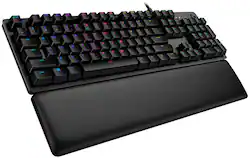
Logitech - G513 Full-size Wired Mechanical GX Red Linear Switch Gaming Keyboard with RGB Backlighting - Carbon
Model: 920-009332
SKU: 6397082
This item is no longer available in new condition. See similar items below
Customers appreciate the high-quality build and comfortable wrist rest of the G513 Carbon keyboard. The responsive keys and vibrant RGB backlighting are also frequently praised, along with the convenient USB passthrough port. Positive feedback also highlights the ease of use and customizability offered by the Logitech G Hub software.
I liked the linear switches. silent and smooth. Great for typing. I a am picky when it comes to keyboard because of typing experience needed. I am happy and this is one of the best keyboards . I would buy one more for office.
Posted by Karthik
Logitech is the first name that comes to mind when you think keyboards and mice and computer accessories. I’ve been a long time fan of the Logitech keyboards, mice, webcams, and gaming accessories, having pretty much owned several versions of their popular keyboard and mice models over the years. This is my first mechanical keyboard from Logitech’s premium gaming line that I now get to the pleasure of reviewing. I am a typist, not much of a gamer these days, though an occasional FPS always hits the spot. What makes a good typist and a good gamer squeal with joy is the feel of the keys. We want keys that are responsive, smooth and a solid feel. A touch typist wants to know that the keys are accurately reflected on screen, much like a gamer who wants to strife on a shooter without going too far. I’ve been a long-time user of an IBM Model F Keyboard, having owned one from 20 years ago, that uses a USB adaptor (since none of the new computers do PS/2). The mileage I’ve put on the IBM keyboard is a testament to its heavy-duty build quality, and this keyboard reminds me of it by weight, feel and build quality. The keyboard is manufactured of a lovely aluminum alloy that is both stylish and durable. That said, The new king of the mechanical keyboard in my menagerie of keyboards is the New Logitech G513. This “Carbon” edition keyboard in the middle of the pack for the Range of gaming keyboards that Logitech offers; Logitech keyboards come in a range of different keystroke feels. This G513 Carbon Edition has the “linear” feel GX Red keys, the Logitech G513 line of gaming keyboards also include “Tactile” (GX Brown) and “Clicky” (GX Blue). Other Logitech keyboards offer the GL series keys (for the low profile keyboards) and the G-Romer Linear & Tactile versions. For the G513, of the three, the Linear Red GX keys would be the smoothest in terms of feel, and the quietest, and while it does miss the tactile ‘bump’ click that other mechanical keyboard versions that Logitech G513 line has. The benefit of not having the tactile bump is that you don’t have to completely reset past the bump to reinitiate the keys, which means by nature rapid double and triple tap for gamers who need the edge in rapid-fire speed. Given that this model that I am using is the GX-Red linear keys is linear in actuation, it feels very much like the Cherry MX Red keys but maybe a bit better. The keyboard takes a bit of getting used to when coming from the regular membrane interface keyboards, partly because of the increased travel required by mechanical keyboards over their membrane brethren. Mechanical keyboards, which eventually can make you a bit tired of typing but you benefit from the fact that your typing gets better, and in line, lesser spelling errors in the long run. That is why the beloved IBM F series keyboards are still so loved. The other part that gets getting used to is the noise. A mechanical keyboard is NOT quiet; compared to a membrane keyboard, but that’s by design. The feel of the keys and the noise it makes is part of the experience and the joy of using a well designed mechanical keyboard. For the gamers, Logitech provides replacement keys for “A,” “S,” “W,” “D,” “Q,” “E,” and # 1-5. These are keys that have an indent that allows gamers to lock their fingers on the standard movement keys for the optimal gaming experience. The keyboard comes with a key puller removal tool that makes replacing the keys very easy, hook it to the key you want to remove, and pull upwards. Replacing the key is just a matter of pushing down the new key into the replacement slot. The keyboard does have some quirks, as for one there are two USB inputs, but on closer observation, one has a “keyboard” symbol etched on the USB, the other has the standard USB Hub symbol. One of the connectors serves to provide power for the keyboard while the other connector is for the built-in USB 2.0 pass through that exists on the keyboard. It is best to install the keyboard directly to the computer, and not through a USB Hub, as the keyboard is a power hog when the LED lights are on and working. Thus if this connected through a hub, rather than on to the computer, any other device plugged in would mean the keyboard stops working. To make sure no such thing happens, it MUST be plugged into the computer directly. The other “feature” I found perplexing is what looks like a tripod connector (3/8” 16 screws) in the middle of the keyboard (picture), looks like Logitech may have plans to create additional accessories that can be mounted to the keyboard in the future like the old G510 series displays. The keyboard features 16.7 million colors backlit LED that is fully customizable with the Logitech GHUB software. The Logitech RGB LightSync allows you to allow one to customize the colors per your use case scenario, for example, you may want to light up or change the key colors for those that are associated with your game controls. The software also allows programmable “Macro’s” that allow for key combinations that could be triggered in a single keystroke. The keyboard “Play” “Pause” “Skip” “Change lighting effects” can be controlled with the Fn+F5-F12 keys. Keys F5-F7 control lighting built-in styles, downloaded styles and brightness. F8 is unique in that it turns off the “windows key” in “Game Mode”. Keys F9-F12 are control keys to the media controls and FN + Print Screen (PRTSC), Scroll Lock (SCRLC) and Pause control the audio controls. Speed of the keyboard effects can be adjusted with the FN with the + or -.. The GHub software allows for some interesting effects. I particularly like the “Echo Press” with a 1000 ms delay, which makes shows which keys have been pressed. There are a million effects one can trigger through the GHub software. There are downloadable color effects should you need them. So how is this keyboard? The feel of this keyboard is better than my worn down other keyboards, and the overall adjustment took only a few minutes. The initial typing errors took a few minutes to sort out, but after four days of typing, this feels just like any other keyboard that I use. I kinda prefer this keyboard over the older ones, may have to get another one of these Logitech mechanical keyboards for work too. The keyboard accurate and super fast in typing and in the limited gaming that I did with it. The foam wrist support is effective and helps keep the typing strain off the wrists. I did end up with some carpel tunnel but could be from the extra typing, and I wish Logitech would make one of these mechanical keyboards for the curved ergonomic line of keyboards that they make. Overall I am very happy with this keyboard and looking forward to getting another version of this for the office. Cons: • Logitech, please make an “ergonomic” version of this keyboard for the touch typists with carpal tunnel… • No “NUM LOCK” light, does have a “G” light, which • The secondary option keys are not lit, therefore harder to read in the dark. It seems, Logitech did make a version with fully lit keys, but this is keyboard does not have it. Pros: • Great typing accuracy and speed. Relatively quiet, for Red Linear GX keys. • Heavy-duty, will last a long time for my gaming and typing needs. • Love the USB hub built into the keyboard, makes plugging in USB sticks and security authentication keys easier.
Posted by TheStigenator
Great keyboard for gaming or office work. Would highly recommend
Posted by Branden1990
The vast majority of our reviews come from verified purchases. Reviews from customers may include My Best Buy members, employees, and Tech Insider Network members (as tagged). Select reviewers may receive discounted products, promotional considerations or entries into drawings for honest, helpful reviews.