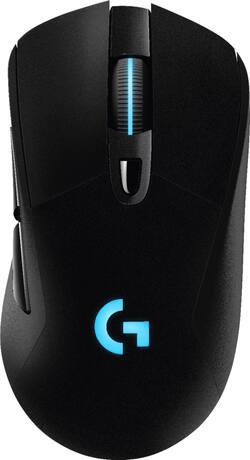
Logitech - G703 Wireless Optical Gaming Mouse with RGB Lighting - Black
Model: 910-005091
SKU: 5877913
This item is no longer available in new condition. See similar items below
Customers regard the G703 Wireless Optical Gaming Mouse with RGB Lighting highly for its excellent battery life, wireless functionality, and comfortable weight. Many appreciate the responsive performance, accurate tracking, and ease of use, although some found the shape and price less appealing. A few users experienced issues with the scroll wheel and buttons. Overall, the positive feedback on performance and features outweighs the negative comments.
I bought this mouse on sale for $50. I could not be more impressed with the options in Logitech’s software and the comfort of this mouse. I was so impressed that I went out and got a G810 Orion Keyboard to match. I’m in love. <3
This review is from Logitech - G703 Wireless Optical Gaming Mouse with RGB Lighting - White
Posted by Matt
This mouse is so good that it has finally replaced my >10-yrs-old trusty Logitech MX1000 wireless laser mouse. I LOVE its white-and-black design that matches my computer case & keyboard, its lightness (adjustable with an included weight), in-hand feel, and the super-responsive and clickity buttons. I also really like the glowing LED lights on the wheel scroll and body sections of the mouse. With the Logitech Gaming Software (LGS) installed, one can assign different colors and set different lighting rhythms. If all of that is too gimmicky for you, you can always just turn off the LED lighting entirely. I have mine setup to a "breathing" white LED pulse pattern. Installation is super simple and easy and I like its charging cable setup. One can either charge it with a phone charger using a microUSB cable or use the cable that comes inside the box. The benefit of charging the mouse with the included cable is that you can still use the mouse while it is being charged. And since the charging cable plugs into the front end of the mouse, the cable won't get in your way as you're using it. Brilliant! As for performance, there are no complaints. Used across different gaming genres (FPS, hack-and-slash), the mouse performs excellently and without any lags, delays, or stutters thanks to its ultra-high DPI options and fast connection to the connection dongle. To maximize the full potential of the G703, one needs to install the LGS software. With it, you can change around button assignments, create shortcuts and macros, and expand the number of key combinations and functions by using the G Shift function. Looking at and using the G703 is such a pleasure. I highly recommend it.
This review is from Logitech - G703 Wireless Optical Gaming Mouse with RGB Lighting - White
Posted by optimummind
Logitech G703 Quick Features on the Product Integrated LIGHTSPEED wireless (2.4GHz) Advanced button tensioning Pro-graded PMW3366 sensor (200-12000 DPI) Customizable lighting and buttons Charging/data cable Works with new Logitech G POWERPLAY Wireless Charging System USB report rate: 1000 Hz (1ms) Main buttons: 50-million clicks (durability) Battery Life w/ Default Lighting = 24 hours, w/ No Lighting = 32 hours What's in the box? G703 wireless gaming mouse Plug and forget nano receiver USB Charging/data cable Optional receiver extension adapter Optional 10-gram weight Setup guide Important Safety, Compliance, Warranty Information sheet Setup/Testing/Conclusion I’m going to first start off with the packaging. This is a personal opinion as I am one of those consumers that thoroughly enjoy walking through an aisle and seeing really nice “thought out” packaging on a product I am looking to purchase. With the Logitech G703, I didn’t really get the WOW factor on the packaging. Being that I am a FPS gamer, I buy mouses pretty regularly. I’ve purchased Razer, Logitech, Microsoft, Thermaltake, SteelSeries, etc. in the past many times. The thing that hooks me when purchasing a mouse is of course the mouse itself. But it definitely helps when I pick up a mouse box and get the WOW factor when I haven’t even taken the mouse out of the box yet. But hey, as I said it's a personal opinion and what crossed my mind is that Logitech probably put more money into the mouse than the box itself. So here goes the setup, testing and final thoughts. Setting up the mouse was self explanatory. It was extremely simple to setup. One I set up the mouse, I went ahead and downloaded the Logitech Gaming Software. During the installation process, it gives you an option to download/install a program called OverWolf. OverWolf is basically a software that gives the gamer the capability of not having to “alt tab” to do things like browsing, instant message, etc… I personally didn’t download/install it but it's definitely a neat feature to look into if you’re deciding on purchasing the Logitech G703. Once I was all ready to go I went into the Logitech Gaming Software and tuned the mouse to my liking and changed the color(s) of the mouse. Logitech Gaming Software is definitely something I would recommend downloading because you can fine tune your mouse like buttons, colors, surface optimization, etc. So download it! I play one main FPS and that is Counter-Strike. I understand it’s an old game but it’s a really good FPS game and people still play it competitively. All I can say is… WOW. The Logitech G703 performs exceptionally well. Can you say… HEADSHOT! During my gaming session, my hand did not feel fatigued at all and the side grip texture definitely helps. I am a hybrid grip when it comes to gaming on a PC. There are people that are “claw grip” and some that are “palm grip”, hybrid just means you do a bit of both. By the way speaking about grip, if you’re a left handed user I want to sincerely apologize but the G703 will not work for you because it's for right handed users ONLY. This mouse resembles a lot of my most favorite mouse ever and that is the Microsoft Intellipoint mouse. I like the shape of the G703 and the way it performs. I tested DPI from 200 ~ 12000 and I did not experience any stutter or acceleration at all. Why you would need 12000 DPI still baffles me because even 3200 DPI is a lot for me. But some people may need 12000. When it comes to FPS games, I feel like the Logitech G703 delivers what Logitech promises.. If you’re looking to do a lot of key mapping/binding of keys, the G703 may not be the best mouse for you. This is only because it has a total of 6 programmable buttons. If you’re looking for a mouse with more buttons to program, you may want to look into the G903 from Logitech. It supports the same wireless charging technology G POWERPLAY. I did insert the optional weight and it does make a little difference but nothing drastic. I’ve owned the Logitech G502 and the Logitech G500 previously and enjoyed the feature of having more weights to fine tune the weight of the mouse to my liking. With the G703 you only have a single 10g weight to either put in or leave out. The cable that the G703 comes with is fantastic. I must say, Logitech has improved a lot on their cable game. When I used the G500 a while ago even though it had a braided cable, it wasn’t as flexible as the ones now. The braided cable that Logitech uses now is flexible yet durable and I really enjoy that. So with all these pros that I’ve been giving the Logitech G703, you’re probably wondering if there are any “issues” with the mouse. I hate to do it because I really like the G703 but the only con I ran into is the build quality of the mouse. For an MSRP of $99.99, I expect to get a mouse that is built around that price range. For the build quality of the mouse on the G703, I feel like it's the same quality as a mouse I would get for around $40.00. I’m sure the Logitech G703 “guts” are where the funds were put into as opposed to the “shell” of the mouse. But I just personally feel like it has a “cheap” build quality “feel”, a lot of plastic. I would’ve liked seeing maybe a more grippy texture on the top of the mouse as opposed to the smooth plastic. That is probably the only con I have with the G703. Besides that, it performed exceptionally well wired and wireless. At this time, I wouldn’t even mind dishing out another $99.99 for the G POWERPLAY. Its definitely a nice addition to add to the G703. Since the mouse performs as well via wireless as it does wired, that is why I personally feel like paying an additional $99.99 for the G POWERPLAY is worth it. This way, you never have to worry about plugging/unplugging the wire to charge the G703 because it’ll charge as you play. So there you have it ladies and gentlemen. Those are my thoughts with the G703. I’d definitely recommend it to a friend or family member. I work around a lot of people that are gamers and would not hesitate to recommend the G703. As I mentioned above, if you’re looking for a mouse that has more buttons to map for games like MMORPGs; I would look into the G903. All I can say is, great work Logitech and keep it up!
This review is from Logitech - G703 Wireless Optical Gaming Mouse with RGB Lighting - White
Posted by MarkusKong
The vast majority of our reviews come from verified purchases. Reviews from customers may include My Best Buy members, employees, and Tech Insider Network members (as tagged). Select reviewers may receive discounted products, promotional considerations or entries into drawings for honest, helpful reviews.