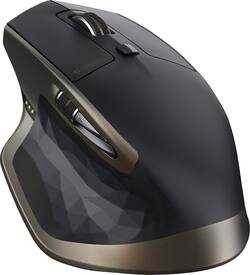
Logitech - MX Master Wireless Laser Mouse - Black
Model: 910-004337
SKU: 4106015
This item is no longer available in new condition. See similar items below
Customers value the MX Master Wireless Laser Mouse for its long battery life, comfortable design, and smooth scrolling wheel. Many appreciate its responsiveness, accuracy, and ability to work on various surfaces. While some find the price high and the weight substantial, the positive feedback on features like Bluetooth connectivity and precise tracking outweighs these concerns for most users.
The vast majority of our reviews come from verified purchases. Reviews from customers may include My Best Buy members, employees, and Tech Insider Network members (as tagged). Select reviewers may receive discounted products, promotional considerations or entries into drawings for honest, helpful reviews.
You really don't know how much you use a mouse until you own your first quality mouse. This particular mouse is super ergonomic, and is practical for small and large hands. The shape of this mouse is good weather you use the claw method or palm method of using a mouse. The quality of this mouse can set a standard for all productivity mice. It's gripe and tactile. Logitech software, allows for easy customization. You have no idea how valuable side scrolling is until you have a dedicated scroll wheel to allow you to do such a thing. Personally I found that will the customization software I use the side scroll wheel for zooming in and out of my display. This mouse features a dark laser, capable of using it on glass. What also makes this more convent is that you can toggle this to three setup, allowing you to choose between these setups with just an easy click of a button. What also drives this further, is that this mouse also allows you the option to use bluetooth or a dongle connection. I'm currently using the dongle. One more added plus, I find myself only charging this mouse once a month. I could go on for days about this device. But here's what I do. I'm currently a college student and in addition to school work I perform alot of CAD (Computer Aided Designing). Every now and then I do some light gaming. This mouse has increased my productivity greatly. I recommend it to all my friends. After using this mouse for awhile I felt that Logitech could've charged me double and I would've still got this for a deal. *Note, If you are a heavy gammer, this mouse will work for you, however you may want to look into dedicated gaming mice as the target for this mouse is productivity* I you find this review helpful.
Posted by Norm
I bought it looking for more comfort at work. I used to work about 8 hours with my computer and I am completely satisfied with it not only because it is really comfortable but also it has a great performance. The battery life last for ever!
Posted by Pipe
I'm a long time Logitech fan when it comes to mice and keyboards. I had been using an MX Performance mouse for the past couple of years. When I recently built a new computer I wanted to update the mouse. I chose the Logitech MX Master. At first I was not sure if I liked it as much as the older MX but after a week or so I am sold. The best feature of the new MX is the scroll wheel. It has a clutch on it that makes the wheel click or ratchet when the wheel is turned slowly (for precise scrolling) but when the wheel is spun quickly (for fast scrolling) the clutch releases and the wheel spins freely. When the wheel slows down, the clutch re-engages and the wheel clicks again. The older MX mouse had a button that would allow the user to select the wheel mode, but that is no longer necessary. Other than that, the mouse is comfortable to hold and the rechargeable battery is nice. One negative is that Logitech did not include a plug-in USB charger with this mouse as they did with the older MX. A USB cable is included and the mouse is intended to be charged by plugging into a computer's USB port. Overall, it is a great mouse and I would recommend it. Don't forget to use the Best Buy price match to get the best deal.
Posted by Phatman