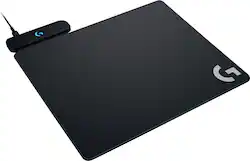
Logitech - POWERPLAY Wireless Charging System for Select Gaming Mice - Black
Model: 943-000109
SKU: 6121406
This item is no longer available in new condition. See similar items below
The vast majority of our reviews come from verified purchases. Reviews from customers may include My Best Buy members, employees, and Tech Insider Network members (as tagged). Select reviewers may receive discounted products, promotional considerations or entries into drawings for honest, helpful reviews.
I’ve been using the Powerplay mat for a year now and it has been great. I use a Logitech G Pro Wireless mouse that is compatible with the Powerplay. I’ve had it up and running with no issues this entire time. I wanted the Powerplay as soon as it was announced. I hate wired mice and changing batteries. So what am I supposed to do? Well I got my hands on a G Pro Wireless and knew that I needed the Powerplay to finish the setup. Setting up the Powerplay is as easy as plugging it into an available USB port, downloading the software from Logitech’s website, and that’s it. You can change the LED on the mat to match the LED on your mouse. The mat comes with 2 different pads to use depending on your preference - hard and cloth. The pads are 11 x 13.5”, so they are plenty large enough. The wireless sensor is the same lightspeed sensor that’s in the mouse and is capable of 1ms response times. Basically, it’s faster than some wired gaming mice. The pad always keeps my mouse topped off. I have yet to see the battery life dip to any noticeable degree. However, this thing is not cheap. This is my only complaint. Once you buy the mouse, even the $80 G703, you are $200 deep on a mouse and pad. That’s a lot of scratch to drop to avoid wires and battery swaps. Do I regret it? No. But I went all out on my PC build and got the mouse for free, so I didn’t feel bad springing for the pad.
Posted by DaveW
The Logitech POWERPLAY Wireless Charging System is an absolute game-changer for anyone using a compatible Logitech gaming mouse. I’ve been using it for a while now, and I can confidently say it eliminates the hassle of constantly recharging or swapping batteries. The seamless integration with my Logitech G502 Lightspeed is flawless—my mouse stays charged at all times, even during long gaming sessions. The mouse pad itself feels premium, offering both a soft and hard surface to fit your preference. Setup was effortless, and the Lightspeed technology ensures there’s zero lag while playing. If you’re serious about gaming and want uninterrupted, cable-free performance, this is hands down the best investment you can make. Highly recommend!
Posted by DavidC
Love this product. Solid mousepad with both a cloth and hard top surface to choose from and keeps my G502 Lightspeed Wireless at full charge all the time. It fits perfectly on top of the deskpad that I already had so my overall deskpad space stayed the same. I definitely recommend this product if you have a compatible logitech mouse!
Posted by John
Customers have good things to say about the wireless charging feature, long battery life, and the included mouse pad's feel and size. Many appreciate the ease of setup and compatibility with select Logitech mice. However, some find the price to be a significant drawback. A few users also mentioned concerns about added weight from the charging puck and some software-related issues.