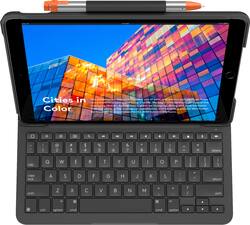
Logitech - Slim Folio Wireless Keyboard for Apple® iPad® Air 10.5" (3rd Generation 2019) - Graphite
Model: 920-009482
SKU: 6385753
This item is no longer available in new condition. See similar items below
Customers enjoy the Slim Folio Wireless Keyboard's high-quality keyboard, ease of use, and protective case. Many appreciate its lightweight design and long battery life, finding it a good value for the price. While some find the case adds thickness, the overall positive feedback highlights its functionality and convenience for iPad users.
I love Logitech products, especially their G-series gaming line of products, but I'm afraid they've missed the mark with the "Slim Folio" keyboard for iPad Air. Unfortunately this product really misses the mark in turning something thin, light, and portable and making it rather clunky and unwieldy. This really has nothing to do with the build quality, which is excellent, but more about the size and execution of the cover. For positives, it is well built, the keyboard and cover are both high quality and will undoubtedly protect your iPad from damage. The built in keyboard mode and magnets work well and everything latches nicely and the stand holds the iPad well when typing. Once it latches the keyboard comes to life instantly. Batteries are easily replaced and hidden well, I had to look for them. For negatives, the keyboard is just way too big when you try to fold it back into tablet mode, and it doesn't LOCK into place. You kind of just have to hold it like a sandwich which quickly becomes cumbersome and fatiguing. Contrary to some other reviews, you can fold it behind the iPad without exposing the keys backward, you just fold the keys toward the body of the iPad and it works just fine, but it is still clunky. Overall, I think Apple's official 11" cover for iPad Pro is a better combination of laptop and tablet mode because it is thinner and magnet snaps into place. It costs a lot more but it retains the premium and sleek feel of the iPad, while this makes it more into a laptop.
Posted by TechBuyer
Upon taking it out of the box, I immediately noticed the quality of the keyboard and case. This is a rather sturdy and resistant-looking case. It is made of hard plastic with a rubber-like layer on top, which adds good grip and traction. The iPad snaps securely in place and fits snuggly. The rubber layer wraps around the bottom for added stability and protection. This makes the iPad a bit more than twice its original girth. Still, it remains fairly compact. Logitech claims water repellency, but I will have to take their word for it. Regardless, I do believe my iPad will be well protected and provide some good piece of mind. The Slim Folio pairs with the iPad via Bluetooth easily. The cover closes magnetically and activates the wake/sleep function with no hiccups. There is a holder on top that will keep a digital pen in place, which comes greatly appreciated. I did notice that the Apple Pencil fits a bit loosely, and the Logitech Crayon is a bit on the tighter side. All inputs, cameras, speakers, and microphones are not obstructed. The keyboard is compact and does not extend too far out, which reduces the iPad’s footprint. However, this makes placing the iPad on the lap a bit awkward and unstable at times in my experience. While it certainly changes the “look” of the tablet, I think it is definitely a good-looking case. Although the keyboard does have full-size keys, they can be a bit too close to each other for some and may take some time getting used to. One must remember that this keyboard is designed for a 10.5 in. tablet. Typing on this keyboard is a joy as the keys have excellent travel, are quiet, and very satisfying to press with no discernible lag. The iOS shortcut keys on top are very useful. The keyboard’s battery can last up to 4 years, according to Logitech. One big drawback is that there’s no backlight, so it must be used mostly under good lighting conditions. Unfortunately, the Slim Folio has a very limited range when it comes to positioning and viewing angles. For typing, the case attaches magnetically, providing only a 45˚ angle. Again, this can be an issue when using it on your lap and repositioning the screen is needed. The case lays down completely for sketching and note-taking. I found no issue with this and using the digital pen in this position is comfortable for me. In this mode, the device can be used as a traditional tablet. This is another problem for me as the whole setup weighs over 2 lbs., is twice the width, which can make holding the tablet rather uncomfortable to hold in one hand without resting. I tended to use both hands. I do wish the keyboard was detachable, but that would have added to the price point. This is kind of a letdown in my opinion because it makes being mobile a bit difficult as I like to walk around while reading. In the end, I would still recommend the Slim Folio. Yes, there are some issues when it comes to versatility, ergonomics, and backlighting. However, the case will definitely keep your device and pencil (if you have one) well protected and right where is needed, the keyboard feels amazing, and all of this brings the iPad closer to an actual laptop experience. And at this price, it is certainly a great value.
Posted by insomniak1
I’ve tested various ancillary keyboard products, but this one so far tops them all. Despite Apple’s claims that the iPad is capable of replacing a fully functional laptop, I’ve not experienced the feeling, ... until now. Logitech is a brand that continues to climb itself the quality and now, premium quality. This Slim Folio Keyboard is super easy to setup. This is due largely to the lack of any Bluetooth pairing process thanks to the Smart Connector; - just snap the iPad 10.5 into the perfectly fit cradle, flip the bottom to the magnetic smart connector, enter the code the first time, and viola, instant success. It just works. Has an almost Apple like quality by it’s simplicity. PROS + Solid construction feels very much like a real laptop + works with 10.5” iPad Air and 2017 iPad Pro + button cutouts are perfectly placed (vol, camera, lock, lightning port and smart connector) + Strong Magnetic grip feels super sturdy + <Control-Space> pulls up Emoji keyboard + short cut keys for quick access to brightness, play controls, volume, etc + magnetic disconnect triggers on-screen keyboard and deactivates accidentally clicked keys + no-pairing process thanks to Smart Connect + fold over protection of the iPad + Apple Pencil slipper pocket CONS -space bar does not wake up iPad if locked (requires Finger ID) -fixed screen angle, prefer adjustable -no backlit keys like Brydge offers -smaller keys take getting used to (suited for smaller hands) -no trackpad, would make this product awesome -vertical apps require folding the keyboard back to use iPad (pictured) Conclusion : This is by far the most impressed that I've ever been with any product from Logitech..., and that's saying something.
Posted by TechReviews
The vast majority of our reviews come from verified purchases. Reviews from customers may include My Best Buy members, employees, and Tech Insider Network members (as tagged). Select reviewers may receive discounted products, promotional considerations or entries into drawings for honest, helpful reviews.