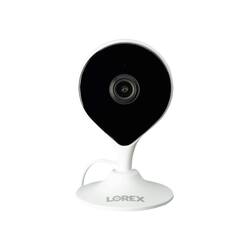
Lorex - 1080p Full HD Smart Indoor Wi-Fi Security Camera - White
Model: W261ASC-E
SKU: 6409281
This item is no longer available in new condition. See similar items below
Customers have good things to say about the video quality, motion detection, ease of use, and setup of this 1080p Full HD Smart Indoor Wi-Fi Security Camera. Many appreciate the night vision capabilities and the convenient local storage options via SD card, allowing for recording without cloud subscriptions. The wide field of view is also frequently praised. However, some users have reported challenges with Wi-Fi connectivity.
This review will be done in 4 parts – features, set up options, usage impressions, and Pros/Cons. Features: The HD Wi-Fi camera is a well-featured Wi-Fi camera with a security orientation. Features include 1080p HD video, 2 way-talk, private local storage via up to a 256 MB MicroSD card (a 16 GB card is included), IR night vision up to 33 feet, 2.4 GHz Wi-Fi connectivity, 112° wide-angle field of view, person detection, and on the go connectivity via the Lorex Home App. Finally, the device can be used with Alexa and Google Assistant (not reviewed here as I don’t use those services). The following items are included in the package with the Wi-Fi Camera – a magnetic wall mount, a pre-inserted 16GB MicroSD card, a power adapter, a camera mounting kit (screws, plastic anchors, mounting template), and the literature pack featuring 3 quick start guides (English, French, and Spanish), regulatory and warranty information, and 2 window stickers for Lorex 24 HR Protection/Video Surveillance. Set-up/ Installation The quick start guides have sections for package contents, camera overview, instructions for connecting to Lorex home (see below for more), camera placement guidance (how to avoid interference), wall and ceiling mounting instructions, an overview of the Lorex Home app device page (since you can have multiple devices linked to one’s account), safety precautions, where to get help, troubleshooting, and LED behavior for the LED on the camera. Set up begins by plugging in the camera to power near the location you select for this camera to monitor. Next, one installs the Lorex Home app on your iPhone® or Android™ phone. Once you have created your Lorex Home account you connect to the camera by scanning the QR code located in the rear of the camera. The account and the camera both have passwords to help secure them. Usage Impressions: Once installed the camera monitors the area it can see. It can be configured to alert you to people in your home. You can then use the features to record the area, talk to the person in your home, or even capture still images. Each device can be configured to send you notifications as the camera senses people in the home – this can be continuous or on a schedule of your choosing. You can also designate the zone in which you want the camera to detect within its field of view via the Motion Zones feature. You can also set the camera to record when it detects sound about a designate decibel level (90 dB being the default setting. One nice feature of the camera is that it records in HD, but can stream in both HD and SD, with SD being the default to reduce bandwidth requirements of live video. When monitoring live you can watch and/or listen via the camera’s microphone. Overall, I like this well-featured camera. It has very good features and capabilities for a device with an MSRP of $59.99 and available for as low as $39.99 - $49.99 based on a quick web search it is priced well and makes a great first impression with the included features and capabilities. One item that I did have some issue with is that the initial card got corrupted within a few hours of activating the camera. I was able to replace it with another card and to date have not had any further issues but it was a concern for me that there might be a possibility that the replacement card would go bad as well. This camera has several use cases above and beyond the basic security and alerting features. First, it can be used as a monitoring system for those that have pets or family in the home that one would like to keep an eye on. It can also provide peace of mind if you were going on a trip and could not remember if you closed the front door or not (it happens) and were far enough away that returning to check was not a viable option. Pros: Features, Ease of installation, Lore Home App, Price. Cons: The included card went bad.
Posted by dnottingham4
These were my first cameras in the Lorex eco system, and i was very impressed. The selling point for these are that they do not use cloud services, everything is stored on the on-board sd card. All Lorex wifi cameras use a on-board sd card. These work with the Lorex Home app where you can customize, and view recorded footage. These do not have a time when they cut out or off during recording. These can record however long the event takes place, and will start right up with another record even if the previous one just ended. You will never miss an event. I know some cameras are on a time limit, but these are not and do not have a time limit of when they can start recording again. Very fast and efficient. I have had no problems. These do not record 24/7, but can record right away when something happens, no matter how long the event is taking place. To see all footage you will need to look at the app and you can click events and see what events it has recorded, or go to timeline, where you can see every little movement, or person that was in the frame where it started recording. You will not miss a thing! You can customize where you want the motion settings to be and how strong you want the sensitivity to be. These can be used in a window but only if your window does not get much sunlight. Otherwise you will just see glare. Night vision does not work through glass or a window due to the infrared bouncing off the glass and back into the camera. Using night vision in the house is awesome. You can see pretty far and it will pick up just as well as it does during the day. You can share these cameras with other users. They will need to make a free Lorex account, and you can share this camera with that user. Just put in their email address and choose what access they can use with the camera. Then both of you can view this camera each with your own different devices. The status Green LED can be switched on or off, some people couldn't figure that out, but it is in the settings of the camera on the app. These cameras are also great for watching animals when you are not home. I would go under timeline on the app, because it will not pick up that movement under person detection. I think these are great for anyone who wants a little home security system that doesn't have monthly fees where you have all footage on the sd card. Don't worry about the sd card being full, you will have about a month to two months depending on the recordings it captures, on the 16gb sd card pre installed, but you can expand the sd card to 256gb. The camera will rewrite over the existing footage when it's time. You don't have to do a thing. If you're tired of your existing security system that uses monthly fees, then you can put these cameras up around your house very easily. No contractor required. Do it yourself easy. Would definitely recommend to anyone who wants freedom from other companies selling their cloud service and have ownership of their own footage. These have lots of cool features, just read about it and give it a go!
Posted by techman
The first thing you're going to notice on this camera is how it resembles the nest cam but is not. That being said, this camera was very easy to set up. Like most of the smart equipment nowadays requires the creation of an account with the respective brand. Once that is done scan the barcode in the back and you're set. The app was very simple to use with minimal navigations and everything within the home screen . The camera is well made and is very light. it records in 1080P and the images look decent but, in my opinion for this camera being at 1080 it should look much better. The images don’t look as sharp as other 1080p cameras I have and look kind of washed, and when you zoom in they get ever worse. Something I also notice while using the live feed on the app it has a noticeable delay. This camera records clips and is also capable of taking pictures and night vision was actually pretty good. I do like the fact that you can store events right on the camera using an SDCard and a 16GB is included. One thing that really failed was the camera speaker, it is not very loud and people will have trouble hearing you, now the mic was much better. I was able to hear the sound on my phone with no issues. One of my favorite features was the ability to link the camera with the Google Home, I was able to see the live videos on my google home hubs and it worked flawlessly. That setup was simple and to bring up the camera on your google display just say “Google show me (the room the camera is in)”. You can also use this same feature with Alexa. In the Lorex home app you can manage all the cameras and adjust the alerts, storage but you cannot change the video settings. Overall this camera for the price and all the features it comes with it is a very good budget security camera. In the box you get the camera, mounting kit, USB cable, power brick and manuals.
Posted by Wishkid
The vast majority of our reviews come from verified purchases. Reviews from customers may include My Best Buy members, employees, and Tech Insider Network members (as tagged). Select reviewers may receive discounted products, promotional considerations or entries into drawings for honest, helpful reviews.