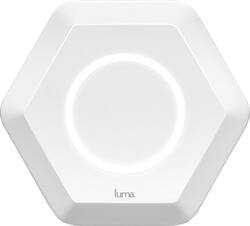
Luma Home - Luma Wireless-AC Dual-Band Wi-Fi Router - White
Model: LUMA1
SKU: 5310400
This item is no longer available in new condition. See similar items below
Customers highly value the Luma Wireless-AC Dual-Band Wi-Fi Router's ease of use, extensive Wi-Fi coverage, and straightforward setup process. Many appreciate the strong signal, extended range, and included parental controls and security features. However, some users experienced performance issues with the system. A few customers also commented on the router's relatively high price point.
I have my gaming consoles hardlined on the modem, but have several laptops, tablets, and various devices connected via Wi-Fi. I have the 150 MBPS DL speed from Cox so it does me justice. Previous set up was a modem router that would slow down to a snail's pace during peak times. Replaced it with the Luma system and voila! everything works just swell now. Again, would not recommend for gaming, but good for everyday usage. P.S. my Internet is called Spam, just in case you were wondering why it states that "Spam is enabled".
This review is from Luma Home - Luma Wireless-AC Dual-Band Wi-Fi Router (3-pack) - White
Posted by Archer
This is kind of a long review, so in summary: Wifi download went from 70mbps to 170mbps+ throughout the whole house, setup was painless (their customer support is fantastic), and controlling content for individual users/devices is really easy to setup and works as expected. Pro tip: If you have a router/modem combo (like mine from Xfinity), enable "bridge" mode. This will turn off your router's wifi so you only have Luma running out of your modem. I called Luma support and they walked me through this. On to the review - I was blown away by the increase in speed that I experienced with this product. I pay for 150MBPS internet from Xfinity. Through their modem, I would consistently get 70-75mbps over wifi on the main floor of our home - which was acceptable. However, I didn't buy Luma expecting a big increase in speed everywhere. I bought Luma for two reasons. First, I wanted to get the same 70mbps in the basement as I was getting throughout the rest of the home. Second, we just bought our kids a tablet and I wanted more control over the content they were consuming. Honestly, it's an android tablet and I wasn't sure how to setup parental controls. I'm sure there is a way to do it - but Luma seemed like a really simple way to kill two birds with one stone. I looked to Luma for improving my wifi speed in the basement because streaming netflix / hulu / on-demand didn't work well down there. Signal was poor in the basement and the speeds would sit around 20MBPS (via speedtest.net on my phone). Fast forward to setting up the Luma in each room. The app is very well done and guides you through the setup process seamlessly. I thought the packaging was nice and simple - although I did have a tough time sliding off the outer shell so I could open the box. Anyways, my router/modem is on the main level. I set that one up first, then upstairs in the master, then the basement. The first speedtest I did was on the main level near the router and I noticed that my phone was switching back and forth between my Xfinity Wifi and Luma. I uploaded a screenshots of the results. The bottom two tests were my xfinity wifi which sits around 70mbps like I said. The middle two were Luma, but it was switching between signals. And the top 3 were all Luma - HUGE JUMP IN SPEED. If you can't open the screenshot, I went from 70mbps to 159, then 167, then 175. This is by far the fastest speed I've ever seen over our wifi. During these tests I decided to give Luma support a call (see the 10 min gap between 159 and 175 on the screenshot) and explained the issue I was having with wifi switching back and forth. They suggested enabling "bridge" mode on my router, and this something I could call Xfinity to do for me, or they would walk me through the process themselves. Not interested in dealing with Xfinity customer support, I opted for the latter and they took me through each step (which is basically 1. Log into router 2. Click big "Enable" button under "Bridge Mode"). Support gets a 10/10 from me. The guy I spoke with was extremely friendly and knowledgable. Finally, on to the two reasons I originally purchased Luma - basement signal and parental controls. Since installing Luma my basement speeds are anywhere from 80mbps to 100mbps. - and the signal is steady. Not quite what I get on the main level next to the router - but still FAR better than what I was getting before. So check that box. Parental controls were very easy to setup. I creased a user for my daughter, assigned the new tablet to her, then set a G rating for content. That's basically it. She's been busy the past few days so I haven't had a chance to see how the monitoring works, or exactly what type of content is being filtered, but I'll update if there's anything notable that happens. In summary, I think this is a great product and I'm excited to see how it continues to evolve. There is more I can do with it (like setting times of day to disable devices) so I'll dive into that at some point - but I've gotten a ton of value from this product from the speed boost alone. It's a pricier product, but works leaps and bounds better than the wifi extender I tried and the parental controls are a big value-add for me.
This review is from Luma Home - Luma Wireless-AC Dual-Band Wi-Fi Router (3-pack) - White
Posted by JeffSS
I have been using the "free" newest generation dual band ( 2.4 gHz and 5gHz ) wifi router provided by my cable company. The single wifi box did fine when I only had a few connections in my home but with everything using wifi from my smart tv's to tablets and all my neighbors adding more, more and more wifi (interfering) devices' my WIFI was becoming a BIG problem. I purchased this Luma 3pack and my WIFI is now PERFECT! I have ZERO dead or slow spots around my home, I now have FAST speed even on my porch! I was unclear exactly how a mesh system would compare to adding a popular extender but an extender looks to my device as 2nd WIFI that I must connect to. Even with my provider WIFI I had to choose to connect to 2.4 or 5 gHz. The Luma no matter how many you have around the house it just looks like one network. The Luma will auto connect to the best channel and the strongest box around the house with out you having to give it a single thought! Think of the Luma mesh similar to how a cell tower works. Cell towers just work! If you walk from room to room the smart system will auto switch you to the closest / fastest Luma like when in your car using cell towers. No delay or issues, just PERFECT fast internet! This system also has great content protection for the kids if you need that and monitors the network for malware and the like. This system is smart so you don't have to be. No more rebooting my WIFI router or the kids complaining the PC is slow and I now have ZERO buffering when watching Netflix! LUMA is simple, perfect, fast wifi that I no longer have to think about. IT JUST WORKS! The Luma does require an app on your cell or tablet to do the set up and makes for EZ monitoring of the health of my network! I love it! Mesh is wifi future. You need this in your home!
This review is from Luma Home - Luma Wireless-AC Dual-Band Wi-Fi Router (3-pack) - White
Posted by soundman
The vast majority of our reviews come from verified purchases. Reviews from customers may include My Best Buy members, employees, and Tech Insider Network members (as tagged). Select reviewers may receive discounted products, promotional considerations or entries into drawings for honest, helpful reviews.