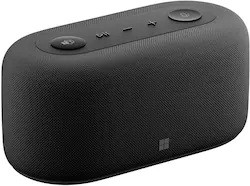
Microsoft - Audio Dock - Teams Certified, HDMI 2.0, USB-A/C, audio speaker phone, works with Teams, Zoom, and Google Meet - Matte Black
Model: IVF-00001
SKU: 6523306
This item is no longer available in new condition. See similar items below
Customers enjoy the Audio Dock's sound quality, noting its decent volume and rich bass. The HDMI 2.0 port and ease of setup are also frequently praised. While some users found the power delivery insufficient for high-power devices, the overall design and compact size are generally well-received. The dock's compatibility with popular video conferencing platforms is a significant plus.
The vast majority of our reviews come from verified purchases. Reviews from customers may include My Best Buy members, employees, and Tech Insider Network members (as tagged). Select reviewers may receive discounted products, promotional considerations or entries into drawings for honest, helpful reviews.
Great purchase on discount at BestBuy. Form factor and audio quality are amazing - given the integration for Teams does not need extremely dynamic range or volume. It's capable to have low volume HD audio streaming when not being used for productivity. From an audio usage, I actually spend more time streaming than using it for productivity. Buttons and features are well integrated and set-up and compatibility (Lenovo Carbon X1, Microsoft Modern Web Cam and 4k LG monitor) was awesome. The USBC cable that wraps under the device makes cable management elegant and intuitive. The fabric quality is amazing but the other plastic elements could stand a bit better quality at this price point (even discounted)
Posted by earlymac
I returned after spending hours trying to figure out how a docking station could possibly be designed that cant do the primary function - charge a laptop. Kidding right? Nope. I knew it didn’t have bluetooth from the start, but having to keep my laptop separatley plugged in when a audio dock brick is sitting next to it cluttering everything…. No thanks. Even if this design was intentional, the oroginal price is too much.
Posted by OCNate
This dock is really good at what it sets out to do. And the more I used it, the more it grew on me. Its biggest drawback is its limited use case and the fact that it might not fit into your workflow depending on your current setup (without additional investments beyond the dock itself). I originally thought of using it more as a travel accessory to make video calls on the go, but it’s too bulky for travel - I could make do with the dock, but it has a large power brick. Especially when the only tangible benefit is better audio. This is intended for those who work primarily in Teams (it works with Google Meet and Zoom as a microphone/speaker) in a home office with an external monitor and webcam. And if you don’t plan on plugging a monitor into the dock, it’s definitely not worth it. The other caveat is that while it delivers power to your laptop (eliminating the need of a separate power cable to your computer) it may not power fully featured gaming laptops (like mine) - at least during GPU intensive tasks. IN THE BOX You get the speaker dock as well as a large charging brick. The USB-C cable is permanently attached to the dock. At first, I thought there was something weird going on with the base (there’s a piece of rubber) but it’s intended to wrap the excess cord inside. I thought this was a nice addition to help keep your desk as clutter free as possible. SETUP Setup is about as easy as it gets. You plug the power cord into the dock, then plug the USB-C cable into your laptop’s USB-C port. Here, I do have to confess some ignorance, as my laptop has two USB-C ports, one that has power delivery and the other that doesn’t. The dock operated as a speaker/microphone when plugged into either port but it only delivered power to my laptop when plugged into the one designated for power. I mention this because 1) your laptop needs a USB-C port, and 2) it seemingly must be able to accept power. I’m guessing most laptops made within the past few years qualify, but something to keep in mind if you have an older laptop. When I plugged it in (I’m using Windows 11) I got a notification that it was setting up the device, and then a window popped up walking me through the dock’s features. That was it. I noticed off the bat that my ASUS Rog gaming laptop was charging (I was concerned the dock wouldn’t give it enough power). But I was unable to tell the difference between power delivery from the dock and power from the ASUS charger. AUDIO QUALITY Once I was set up, I started listening to music. I was pretty impressed with the sound. It’s plenty loud for an office or home office. It provides rich bass and clarity. Is the loudest or best speaker? Probably not, but for 99% of what people need - including me, for work - this is more than enough in that department. For video calls, I didn’t really get any “wow, you sound really great” feedback from other participants, but that’s expected. People typically only tell me when they can’t hear me or I sound terrible. When asked how I sound, I got, “yeah, you sound good.” I didn’t walk around the room to test how far away I could be while talking, I only talk when in front of my meeting, but you should have some wiggle room there. MY IMPRESSIONS AND USE CASE I do have a dedicated work desktop. But I use my ASUS laptop for more GPU heavy tasks like editing videos/audio. I basically have several workstations between my office and home. I have a 27 inch monitor that I sometimes plug into my laptop, but sometimes I don’t because I don’t want to hassle with plugging everything in. This dock alleviates some of those problems. I can now plug my monitor into it, my webcam, and USB receiver for my mouse (my keyboard is Bluetooth). Here I see the benefit but also the drawbacks. It has as many display out ports as USB ports. One of those is USB-C and I confess not to have a USB-C monitor or know its capabilities. So I use the HDMI out. I’m left with a USB-C port and a normal USB port. One of those is reserved for my webcam. Leaving me with one. For most people this should be enough, but I would like to see more. (your laptop should have a few USB ports to use as well, but that's more cables to plug in, eliminating one of the benefits of a dock). I now find myself using my monitor more because I only have to plug in the USB-C cable on my desk into my laptop. I don’t have to fiddle with my laptop’s power brick. The drawback is that the dock only gives you half of your virtual meeting setup. Obviously there’s no webcam, so you need that. And webcam’s have built in microphones, so what’s the point of the dock? You can then point to the buttons on the top of the dock. There are 5. There’s a dedicated Teams button, play/pause button, volume up and down and a microphone mute button. The Teams button brings up Teams in a moment’s notice. So if you don’t use Teams, this button is rendered useless. Our office uses Teams, but not for video chat. It’s not much use for me in that department. I do however, like having large play/pause buttons and volume buttons as I am listening to music most of the time. I also like having the microphone mute button so readily available, and how it lights up red when muted. This is the easiest way to quickly mute and unmute yourself during a call. CONCLUSION All this leads me back to the question of who is this device for and is it worth it? As with everything, it’s a loaded question as everyone’s needs are different. This dock doesn’t give you anything your laptop doesn’t provide. Sure, it has a microphone and a louder speaker but is it worth it? If you have a desktop computer, probably not, you could get a good microphone and speakers for less than the cost of this. This is meant for those who take their laptops with them and like to work at a monitor in their workspace. I love the dock aspect and frankly, wish I would have gotten a dock before, but that doesn’t mean this audio dock is the best for you. The Teams integration button is a little much for me - again, I’m not a heavy user of Teams audio/video calls. But I like the convenient buttons that I use frequently on top of the speaker that sits right above my keyboard for easy access. I find myself adjusting volume and muting/unmuting frequently. Even if it had more USB ports, I’d say it’s a tough recommendation but to all the heavy Teams users. Don’t get me wrong, it works really well, but I’m not sure it’s the best value proposition. If you are looking for a dock, want to minimize cables and speaker quality matters to you, and you can look past the cost, I’d say it’s definitely worth it.
Posted by callmeageeth