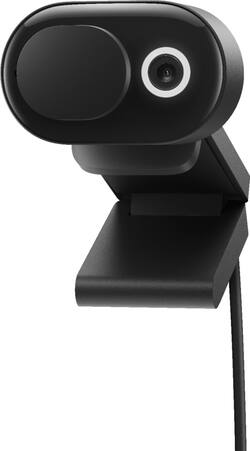
Microsoft - Modern 1080 Webcam with Built-In Noise Cancelling Microphone, Certified for Teams/Zoom - Black
- Key Specs
- Video Resolution: Full HD (1080p) (Refers to the number of pixels, both horizontally and vertically, used to capture the video. The higher the resolution the finer the video detail that can be seen.)
- General
- Product Name: Modern 1080 Webcam with Built-In Noise Cancelling Microphone, Certified for Teams/Zoom
- Brand: Microsoft
- Model Number: 8L3-00001
- Color: Black
- Camera
- Video Resolution: Full HD (1080p) (Refers to the number of pixels, both horizontally and vertically, used to capture the video. The higher the resolution the finer the video detail that can be seen.)
- Maximum Video Frame Rate: 1080p (Full HD) @ 30 FPS (The maximum frequency at which consecutive images can be captured by a video recording device.)
- Megapixels: 2 megapixels (Measures the amount of graphic resolution that the product can capture.)
- Image Resolution (Display): 1920 x 1080 (Refers to the number of pixels, both horizontally and vertically, used to either capture an image or display it. The higher the resolution the finer the image details.)
- Autofocus: true (Allows the camera to automatically focus through the lens, rather than by adjusting the lens manually.)
- Features
- Integrated Microphone: true
- Mount Type: Clip-on
- Plug And Play Operation: true (The product can work when first used or connected, without reconfiguration or adjustment by the user.)
- 360 Degrees Rotation: false (The product is capable of turning freely about an axis, incorporating horizontal points of view covering 360 degrees.)
- Connectivity
- System Requirements: Microsoft Windows 10 / 8.1 (The software that a product must have for it to be able to integrate with another product.)
- Connectivity: USB Type A
- Cable Length: 4.9 feet
- Dimensions
- Product Height: 2.94 inches (The out of box height of the item. Height is measured as the vertical distance from the bottom of the item to the top as it would be primarily used or placed.)
- Product Width: 1.42 inches (The out of box width of the item. Width is measured as the horizontal distance from one side of the item to the other as it would be primarily used or placed.)
- Product Depth: 1.99 inches (The out of box depth of the item. Depth is measured as the distance from the front of the item to the back as it would be primarily used or placed.)
- Product Weight: 0.21 pounds (The out of box weight of the item.)
- Other
- UPC: 889842758504
Look your best on face-to-face calls and Microsoft Teams meetings. HD Certified for Microsoft Teams camera with versatile, easy-to-mount system adds reliable, high-quality video to your laptop workspace. Featuring high-quality video with HDR and True Look that deliver facial retouch and auto light adjustment.
- Look your best: High-quality video with HDR and True Look that deliver facial retouch, auto light adjustment, and auto focus to help you look your best.
- Integrated privacy shutter: Featuring a Microsoft Teams LED usage indicator, plus controls that let you open and close the privacy shutter to turn Teams video on and off.
- Versatile mounting system: Easily secure to your monitor, laptop, desk, or tripod.
- Certified for Microsoft Teams: With up to 1080p video and expansive 78° field of view.
- USB-A connection: Convenient plug-and-play design.
Whats Included
- Modern Webcam
- Quick start guide
- Safety and warranty documents
Q: Does this Webcam have a built in Mic?
A: Yes, it does have a built in microphone. However, the microphone is disabled by default and must be turned on within the Microsoft Accessory Center app that Windows 10 installs when you plug the webcam into your computer. When you toggle it on, it also displays a prompt to warn you that the microphone isn't Microsoft Teams certified and to confirm that you want to enable it. This is very strange given that this is the MICROSOFT Modern Webcam with MICROSOFT Teams logos on the front and back of the box.
A: Nope, it's really plug and play for Windows 10 and 8/8.1. It does say mac OS X 10.15 mac OS 11.0 but I'm not sure if it would require an extra download to run or not on those. It has a long USB cord already attached to it. Nothing else is needed. Just plug it in an off you go. I didn't even need to try and adjust any settings. It was fine right out of the box. The Web Cam can be used either attached to the top of the monitor like I have mine or you can even use it's base as a stand if you didn't want to attach it to the monitor. I was 100% surprised by how easy it was to set up and place on top of the monitor.
Q: Does this webcam have close feature that will not show your face?
A: The black oval that you see can be slid to the right to cover up the camera lens.
Q: Will this work on windows 7 ?
A: undefined
Q: Will this camera work with Windows 11 ?
A: This works with Windows 11
Q: Is this compatible with Microsoft Surface 6?
A: undefined






















