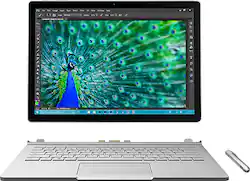
Microsoft - Surface Book 2-in-1 13.5" Touch-Screen Laptop - Intel Core i7 - 16GB Memory - 512GB Solid State Drive - Silver
Model: CR7-00001
SKU: 4531401
This item is no longer available in new condition. See similar items below
Customers highly value the Surface Book 2-in-1's performance, ease of use, lightweight design, and touchscreen capabilities. Many appreciate its solid state drive and find it a convenient device for various tasks. However, some customers express concerns about the product's price and occasional overheating issues. A few also mention challenges with the pen and hinge design.
The vast majority of our reviews come from verified purchases. Reviews from customers may include My Best Buy members, employees, and Tech Insider Network members (as tagged). Select reviewers may receive discounted products, promotional considerations or entries into drawings for honest, helpful reviews.
Got this the second day it becomes available at Best Buy. I bought this for my girlfriend, who is currently pursuing an architecture degree. Main use: Office, autoCAD, SketchUp, Photoshop, ArcGIS, etc. The set up was a breeze. Ported everything from her Microsoft account. After installation of a few essential softwares this bad boy is good to go. Looking at the form factor and the build quality of the Surface Book, it is by far the closest laptop on the market compared with a Mac. I am using a Macbook Pro myself so I am able to compare them side-by-syde. Surface book is just as beautiful, and feels just as premium, if not better. The hinge makes it look a little bit thicker than expected, but still very portable. The screen is crystal-clear, but keep in mind it has quite some glare. I haven't tested much on the performance side, but so far everything runs blazing fast including booting and opening - closing apps. Sepcs-wise, it shouldn't disappoint. 6th gen i7 CPU, discrete Nvidia Graphics card, 16G of RAM, and especially the format of solid state drive is NVMe, the latest and fastest on the market. I have installed all the aforementioned softwares so hopefully after my girlfriend gives it some road test I will be able to update on the performance. Regarding the features, I love its 2-in-1 capability, and its laptop-first mentality. By that I mean, if you use it under laptop mode (screen and keyboard together), you will never notice that it can be a tablet. A solid, all-round laptop. The detachable screen gives the Surface Book its unique versatility: it functions by itself as a tablet. Has 1024 pressure sensitive stylus. You can write notes, draw, doodle, do other creative works, read, etc, on the tablet. The writing experience is very very close to true pen-and-paper. If you own a Surface Pro, you probably understand what I'm talking about. What's more, you can even turn the screen around, facing outwards, and still plug it back into the keyboard base, to make it a kiosk. Fold it all the way down, you got a clipboard. Versatility at its finest. There are some Cons that I have noticed, however, that need some attention. But maybe some of them are just personal preference. I will leave you to be the judge. 1, The CPU is ULV, not the normal wattage processor that you see in most high-configuration devices. The 6-gen ULV i7 in the Surface Book only has two cores, whereas a previous generation non ULV i7 has four cores and higher TDP. This means, although Surface Book is fast, it probably won't be up to highly demanding tasks, compared with those workstations. 2, It gets moderately warm, even under light work. I think that's because the i7 cpu is fit in the ultra-thin screen. So if you run CPU intensive tasks, the screen can get hot; if you run GPU intensive tasks, the keyboard gets hot. Normally if a PC runs very hot, it will slow itself down, causing a lot of unresponsiveness and lags. I hope this device won't be too bad on thermal handling. I will update on that. 3, The Graphics card is not the gaming chip that a gamer would expect. From early reviews and tests of this laptop, it shows that the Nvidia custom GPU is close to a GTX 940M in performance. So Don't expect to play a lot of games with high settings with the Surface Book. However, mainstream games with med-to-low settings are most likely to cut it. 4, The hinge does make the Surface Book look a little bit weird. One end is thicker than the other end, and the laptop cannot completely be closed. But aesthetics mainly depend on personal preference. Personally I don't see it as a big deal. 5, The battery life of the tablet alone is short. So you cannot unplug the screen, take only the screen with you and expect it to last all day. The screen has no port except a headphone jack (so no charging). I would say, this laptop is designed to spend only about 25% of the time as a tablet. All in all, it's still a well-designed and great-looking laptop, with mostly all of the latest bells and whistles. I hope this Surface Book can give my girlfriend a good 3 years (or more) of usage.
Posted by ShufromChina
I am a traveling robotics installer. I take this surface book with me on installs. I use it to surf the web. I use it to do solidworks on. The screen is really to small to do intensive 3d cad work but it works ok for reviewing models with the customers. If i have time i can hook up a bigger monitor but i do not do this often. My biggest complaint is that when it looses connection to wifi I have to disconnect and tell it to reconnect. This happens when I close the lid. There is likely a setting I should change but I have not discovered it yet. The laptop now has a couple nicks and scratches on the outside. I have not dropped it but i just through it in my bag and throw my bag around. I detach the tablet sometimes and use it without the keyboard. It is much better to read with than my galaxy s7 edge but it is hard to hold with one hand because it is so big. I love the magnetic charger. I have triped on the cord and it just popps out with out hurting anything.
Posted by EricM
I've waited for the surface pro 4 since January but my mind changed after they revealed the book. It's really great to have an actual laptop that can be a tablet when you need it, and it runs very well. The facial recognition works flawlessly and instantly signs me in. I also ordered a sleeve from waterfield hope that turns out nice
Posted by nmmn1