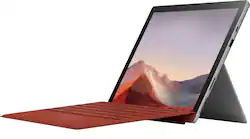
Microsoft - Surface Pro 7 - 12.3" Touch Screen - Intel Core i5 - 8GB Memory - 128GB SSD - Device Only - Platinum
Model: VDV-00001
SKU: 6375055
This item is no longer available in new condition. See similar items below
Customers are satisfied with the Surface Pro 7's ease of use, responsive touch screen, and lightweight design, praising its portability and performance. However, some customers expressed concerns regarding battery life and the device's tendency to overheat. A few also mentioned that the storage capacity could be limited and the price point might be high for some.
I am a consultant who spends the majority of his time reading documents, analyzing data, and writing reports. After growing tired of carrying around my 17-inch laptop, I decided to look for something more portable. I am so glad I brought this Surface Pro 7 (i5, 8 ram, and 128 ssd) instead of a 13-inch 2 and 1 laptop. This device has far exceeded my expectations. In fact, I'm not sure I'll ever go back to using a traditional laptop again. I find myself reaching for this device over my 17-inch laptop and Samsung tab s6. Here are a few thoughts after using my Surface Pro 7 for about a month. PROS: -Light portable device. Not heavy to carry around and fits nicely in my computer bag with plenty of room to spare. -High build quality. Nothing about this device feels cheap or poorly made. -Great cpu. Geekbench 5 scores: 1226 single-core test and 4480 multi-core test (2020 iPad Pro 12.9 Geekbench 5 scores are 1126 single-core and 4720 multi-core). -Good battery life (don't believe the fact news). -Apps run smoothly. -No fan noise. -The surface connect charger is wonderful. Magnet is very strong, but the charger detaches easily if pulled off. -Rapid charging (0 to 60 in about an hour). -The kickstand is sturdy and flexible. -Expandable ssd. Consider getting the 128 ssd model, and then pay $20-$30 for a 128 ssd card. This will save you a lot of money that you can spend on accessories. -Screen is bright enough at 395 nits (my laptop's brightness is 355 nits). -USB-C port. When I need more screen space I use this port to connect the Surface Pro 7 to my 24-inch monitor. I also use it to transfer files to and from my laptop. CONS: -This device can get warm if you are using the internet while the device is recharging. -A little too big for notetaking. I prefer my smaller 10-inch Samsung Tab s6 for notetaking. -Twice I restart the device because the virtual keyboard was acting buggy. The problem went away both times. -Does not come with a pen or keyboard. -Pen and keyboard are pricey. You may want to consider buying an open-box excellent condition pen (mine was $64) and I used the savings to get Best Buy's $15 warranty. And/or buy a $30 portable wireless/bluetooth keyboard. The money you save can go toward purchasing a professional-looking case cover, ssd card, and/or screen protector. -Surface Pro 7's (8 ram, 128 ssd) full price of $899 (with no pen or keyboard) is not cheap. It might be a good idea to wait for a $699 sale or go open-box. I paid $615 for an open-box excellent condition Surface Pro 7 and bought Microsoft’s 2-year warranty with my savings. BIGGEST CONCERNS? Battery. I put my Surface Pro 7 on battery saver mode and lowered the screen brightness to 50%. Then put Youtube on continuous play (no other apps were open and all background apps were closed). It took 7 hours for the battery to die. If you are just using Word, Excel, and/or analyzing data the battery should last most, if not all, of the working day. There is plenty of information on the internet outlining strategies for enhancing the Surface Pro 7’s battery life. From my brief experience, an open internet browser is the biggest drain on the battery (Google's Chrome, Firefox, and Opera browsers all drain the battery faster than the Microsoft Edge browser). Overheating. With no apps open and all apps closed in the background, my Surface Pro 7’s average cpu temperature is approximately 32 degrees Celsius. My ASUS laptop's average cpu temperature (i7 8th generation cpu, 16 ram, dual fans) is approximately 30 degrees Celsius. After noting these baseline cpu temperatures, I opened 10 Youtube videos, Word, Excel, Powerpoint, and one of my statistical software programs to see how much both cpu temperatures would increase. Very basic rules of thumb are that a temperature near or above 70 degrees Celsius is seen as running hot, and a temperature close to or above 100 degrees Celsius is considered overheating. With all the above apps running simultaneously (and no apps running in the background) my Surface Pro 7’s average cpu temperature was roughly 53 degrees Celsius. The average cpu temperature of my laptop was about 50 degrees Celsius. Does the Surface Pro 7 get warm when it is pushed? Mine did. Does it overheat or get too hot to touch? Mine didn’t. In short, if you want a great portable computer the Surface Pro 7 is an ideal device.
Posted by 1a2b3c
The Microsoft Surface Pro 7 is a powerful and versatile device with a 10th Gen Intel Core i5 processor, 8GB of memory, and a 128GB SSD. The 12.3-inch Full HD touchscreen is bright and responsive, and the device is lightweight and portable. The device comes with a variety of ports, including USB-C and USB-A, making it easy to connect to external displays and other accessories. My daughters love this device. Great purchase.
Posted by AjBaseface
I’ve been needing a smaller laptop hybrid for some time now. I had a 14” laptop 2-in-1 where the screen folded back, but that was too heavy to hold. Seeing the Surface Pro line, I was immediately drawn to the design where it can serve both as a laptop and as a tablet with the ease of attaching/detaching the keyboard. Everyday use has been a joy. It does not feel heavy at all, can easily hold it in tablet mode and typing on my lap, although the kickstand does feel awkward on my lap when typing. I suggest using it primarily on a hard surface if possible. Speaking of the kickstand, it feels nice and sturdy. The magnetic surface keyboard was included in this bundle, but it was not the alcantar leather one. So the keys are hard plastic. The over maintains that nice smooth velvet feel. I got the i5 128 GB 4GB RAM edition, which I now feel was a mistake. It does slow down at times and lags, not ideal for heavy gaming. My daughter uses it for her Minecraft games which works perfectly well. The storage goes away real fast, which is why I wished I had gotten the i7 with at least 256 GB of storage. Thankfully you can install a microSD card behind the kickstand which was what I did. Connectivity ports is really lacking on the Surface Pro 7 as you only have the USB-A and C ports just above the charging port, and the Sd card slot. I ended up buying the docking port by J5 Create which doubled my USB-A’s, and included a USB-C, SD and microSD slot, and a hdmi port. One big issue that I noticed was it got really warm in the upper back portion, above the kickstand. Online sites says this is normal, as it does not have an internal fan, but sometimes it is too hot to touch/hold. Purchasing a skin to cover the back has helped. I feel this needs to be addressed if they make the Pro 8’s. Overall, this is exactly what I was looking for. The 12.4” screen is nice to look at, does not feel small at all, and I am able to multitask easily with this surface. The included keyboard is nice but I do suggest in getting the surface pen and a docking station. I did get the surface arc mouse too but since it is a touch screen, the mouse is not important. I also placed a pop socket at the back for easy holding when using it as a tablet. Great computer/tablet! Very happy with this.
Posted by APFLORES413
The vast majority of our reviews come from verified purchases. Reviews from customers may include My Best Buy members, employees, and Tech Insider Network members (as tagged). Select reviewers may receive discounted products, promotional considerations or entries into drawings for honest, helpful reviews.