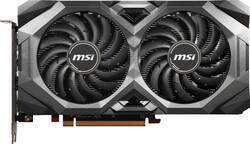
MSI - MECH OC AMD Radeon RX 5700 8GB GDDR6 PCI Express 4.0 Graphics Card - Black
Model: RADEON RX 5700 MECH OC BV
SKU: 6374967
This item is no longer available in new condition. See similar items below
Customers value the MECH OC AMD Radeon RX 5700 8GB GDDR6 graphics card for its strong performance and competitive price, frequently citing high frame rates in games. However, some users experienced challenges with drivers and reported higher-than-expected temperatures, particularly concerning memory cooling.
The vast majority of our reviews come from verified purchases. Reviews from customers may include My Best Buy members, employees, and Tech Insider Network members (as tagged). Select reviewers may receive discounted products, promotional considerations or entries into drawings for honest, helpful reviews.
I offer a detailed review of Radeon 5700 MECH OC BV, along with 2 open questions below: I recently purchased a Radeon 5700 Mech OC at Best Buy. When I opened the package, I noticed that the sticker on the backplate read "Radeon MECH 5700 OC BV" <-- note the "BV". Question #1: What does "BV" in my product stand for? I ran Display Driver Uninstaller 18.0.2.2 by Wagnardsoft ot uninstall previous video card drivers prior to installation of Radeon drivers on this card's product page at MSI.com. I have beem advised that doing so will help prevent crashes and problems reported with other users of new video cards. I have however experienced some problems, stuttering, and crashes with various games, all as a result of trying out various Radeon features such as Radeon Virtual Super Resolution, Radeon Anti-Lag, and Radeon Enhanced Sync. I suppose it takes some experimentation to figure out which special Radeon features are compatible with which games. I attribute these issues to drivers, not hardware. The performance of my product seems on par with expected, with a 3dMark Time Spy score of 8054 and Uniengine Superposition score of 4420. I have a Ryzen 3600 CPU and 16gb of 3200Mhz DDR4 memory, which also contribute to these scores. However, it seems the memory on this video card runs quite hot. I was able to play DOOM 2016 at 4k virtual super resolution (a feature of Radeon cards) at a pretty solid 75 FPS. But in doing so, I noticed that my memory temperature hit 98 degrees Celsius. Question #2: What is the maximum safe temperature for the GDDR6 memory modules on this card? I don't want to degrade or break my memory. I decided to see if I could do something to get my temperature down. With MSI Afterburner and the Uniengine Heaven 4.0 Basic benchmark, I conducted a few experiments... I have a Corsair Carbide 200r case, which has a single 120mm fan in the front and a single 120mm fan in the rear. I locked both these case fans to run at 100%. I then used MSI Afterburner to lock my GPU fans at various speeds and compared the respective temperatures with my case's removable side panel on or off. Here are my results after running Uniengine Heaven 4.0 in 10-minute increments: Side panel ON: 40% fan (1860 RPM): GPU at 72, memory at 94 50% fan (2200 RPM): GPU at 71, memory at 94 60% fan (2500 RPM): GPU at 70, memory at 90 70% fan (2767 RPM): GPU at 67, memory at 88 80% fan (2975 RPM): GPU at 65, memory at 85 (above 80% is subjectively too loud for my ears, even with headphones) Side panel OFF: 40% fan (1860 RPM): GPU at 66, memory at 89 50% fan (2200 RPM): GPU at 61, memory at 82 60% fan (2500 RPM): GPU at 58, memory at 79 70% fan (2767 RPM): GPU at 57, memory at 78 80% fan (2975 RPM): GPU at 55, memory at 75 These results clearly indicate that my case is a heat trap. Simply removing the side panel usually reduced temeratures by about 10 degrees. But since I would prefer to not have to open up my case whenever I run a modern computer game, I tried installing a couple of 120mm fans into the side panel. Running these accessory fans at 100%, I got the following results: Side panel ON, side fans ON: 40% fan (1860 RPM): GPU at 61, memory at 83 50% fan (2200 RPM): GPU at 57, memory at 77 60% fan (2500 RPM): GPU at 55, memory at 74 70% fan (2767 RPM): GPU at 54, memory at 72 80% fan (2975 RPM): GPU at 54, memory at 73 So my experiments clearly indicate that this GPU will likely want plenty of airflow to manage it's high memory temperature. I reiterate that I don't know what constitues an unsafe temperature for GDDR6 memory; if it's safe up to like 110 degrees, then I suppose anyone could just buy this card and not worry about it. However, I recommend downloading MSI Afterburner and set it to automatically start with Windows, which should automatically set up a fan profile that's more effective than the default Radeon profile. However, I think the general rule of thumb is that all components should be well under 95 degrees. I have attached images of the default Radeon fan curve (which probably doesn't run the fans fast enough for this card) versus the default MSI Afterburner fan curve (which probably runs the fans faster than necessary) versus my own custom fan curve. Once again, I recommend downloading MSI Afterburner, setting it to start automatically with Windows, and either use the default Afterburner fan curve or set up your own as I have. Overall, I would recommend this card with reservations, for reasons that should be apparent from this review. If you have a case with powerful cooling, it's fine. Otherwise, you should search for a card with a bigger heatsink and better memory cooling.
Posted by BenzoSt
THE BEST value for the money if your willing to flash the bios. Very simple to do. This card runs smoothly on the MSI Mech XT bios for me without touching a thing. Not a fan of the new Radeon software much. Some of the features are a bit buggy with some games. The only thing I leave enabled is freesync for my monitor in the Radeon software. Everything else I leave off and I have zero issues. Runs a lot cooler than my old MSI R9390. Love it!
Posted by Napp
This cards performance caught me by surprise! I've been a long time Nvidia user and just came to realize how much I am overpaying. AMD for the win this year! Great for 1080p and 2k (1440p) gaming!
Posted by Bajo247