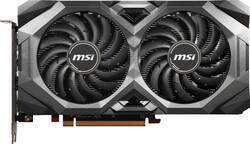
MSI - MECH OC AMD Radeon RX 5700 8GB GDDR6 PCI Express 4.0 Graphics Card - Black
- Key Specs
- Maximum Number of Displays Supported: 4
- Slot Size: Single slot (A graphics card only requires one PCIe/PCI slot for connection to the motherboard but, depending on size, may block other slots. The slot size listed by the manufacturer is therefore not an exact measurement of the card's size but an indication of how much clearance will be available after it is installed.)
- Product Height: 5 inches (The out of box height of the item. Height is measured as the vertical distance from the bottom of the item to the top as it would be primarily used or placed.)
- Product Width: 1.8 inches (The out of box width of the item. Width is measured as the horizontal distance from one side of the item to the other as it would be primarily used or placed.)
- Product Length: 9.1 inches (The out of box length of the item. Length is measured as the longest dimension of the item.)
- Graphics Processing Unit (GPU): AMD Radeon RX 5700 (Often referred to as a graphics card, a graphics processing unit (GPU) is the electronic circuitry responsible for manipulating and processing computer graphics/images and accelerating video decoding. Ultimately, a powerful GPU will provide a boost for anything involving visuals, including games, graphic design, and video editing.)
- General
- Product Name: MECH OC AMD Radeon RX 5700 8GB GDDR6 PCI Express 4.0 Graphics Card
- Brand: MSI
- GPU Chipset Manufacturer: AMD
- Graphics Processing Unit (GPU): AMD Radeon RX 5700 (Often referred to as a graphics card, a graphics processing unit (GPU) is the electronic circuitry responsible for manipulating and processing computer graphics/images and accelerating video decoding. Ultimately, a powerful GPU will provide a boost for anything involving visuals, including games, graphic design, and video editing.)
- Model Number: RADEON RX 5700 MECH OC BV
- Performance
- Cooling System: Fan (A computer's CPU generates heat while operating and requires a cooling system to keep internal components functioning properly. Air cooling uses fans to draw in cool air and exhaust hot air, while liquid cooling uses coolant-filled tubes and water blocks to regulate internal temperature more efficiently.)
- Display
- Maximum Number of Displays Supported: 4
- Compatibility
- Slot Size: Single slot (A graphics card only requires one PCIe/PCI slot for connection to the motherboard but, depending on size, may block other slots. The slot size listed by the manufacturer is therefore not an exact measurement of the card's size but an indication of how much clearance will be available after it is installed.)
- System Requirements: Microsoft Windows (The software that a product must have for it to be able to integrate with another product.)
- Operating System Compatibility: Windows
- Power
- Recommended Power Supply: 750 watts
- Dimensions
- Product Height: 5 inches (The out of box height of the item. Height is measured as the vertical distance from the bottom of the item to the top as it would be primarily used or placed.)
- Product Width: 1.8 inches (The out of box width of the item. Width is measured as the horizontal distance from one side of the item to the other as it would be primarily used or placed.)
- Product Length: 9.1 inches (The out of box length of the item. Length is measured as the longest dimension of the item.)
- Product Weight: 1.7 pounds (The out of box weight of the item.)
- Other
- UPC: 824142194522
Experience unmatched high-definition visuals during gameplay with this MSI Radeon RX 5700 XT MECH OC BV graphics card. The AMD Radeon FreeSync1 technology lets you enjoy an incredibly responsive, stutter-free gaming session. This MSI Radeon RX 5700 XT MECH OC BV graphics card features the iconic MSI TORX fan and a massive heatsink for cooling, ensuring a quieter computing experience with reduced overheating risks.
- Powered by the AMD Radeon RX 5700 graphics processing unit (GPU): With a 1515MHz clock speed and 1750MHz boost clock speed to help meet the needs of demanding games.
- 8GB GDDR6 (256-bit) on-board memory: Provides the memory needed to recreate game visuals with striking realism.
- PCI Express 4.0 x16 interface: Offers compatibility with a range of systems.
- AMD CrossFire technology: Lets you combine 2 or more discrete graphics cards, up to 4 GPUs (graphics processing units), to improve graphics performance for resource-intensive games.
- Virtual Reality Ready: Provides a powerful next-generation platform for the ultimate immersive virtual reality experience.
- DirectX 12 and OpenGL 4.5 support: Enhances gameplay by delivering ultrarealistic images, detail and texture and improved lighting effects that create lifelike interactivity.
- HDMI and 3 DisplayPort outputs: Enable flexible connectivity.
Whats Included
- MSI MECH OC AMD Radeon RX 5700 8GB GDDR6 PCI Express 4.0 Graphics Card
Product Manuals
A: The graphics card can use about 225 W of power, but a 750W power supply is recommended for your system when using this card. CrossFire technology no longer uses bridges.
A: I use it with my Rift with no problems.
Q: Does anyone know if this video card can play half life aylx
A: Yes it can.
Q: at what temp does the gpu stay at under load? games like rainbow 6 siege and apex
A: Mine will max out around 89 90c degrees max. On apex it sits around 77 80.
A: I have a 550 watt power supply with 80 dedicated and it runs it just fine.
A: As long as the power connector is an 8 pin (or 6+2) going to your existing card it will work no problem.
Q: My power draw in game says 160 at max is this correct or is something wrong
A: It sounds fine. The maximum would be up to 225 W.