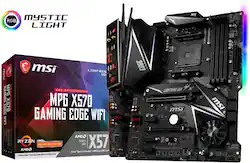
MSI - MPG X570 GAMING EDGE WIFI (Socket AM4) USB-C Gen2 AMD Motherboard
Model: MPG X570 GAMING EDGE WIFI
SKU: 6357223
This item is no longer available in new condition. See similar items below
Customers consistently note the excellent MSI BIOS, easy setup, and strong performance of the MPG X570 GAMING EDGE WIFI motherboard, along with its good value for the price and extensive features. However, some users express concerns regarding the limited RGB customization options, VRM overheating, and the placement of fan headers. The board's quality and accompanying software also received mixed feedback.
I did a lot of research before I decided on purchasing the MSI MPG X570 Gaming Edge motherboard. I was on a budget but I didn't want to be too cheap and then I came across this fairly priced motherboard. If you want a short answer this is a really good motherboard with some great features and benefits and can not be beat for the price. One of the things that I really appreciated about this motherboard is the preinstalled IO Shield it made installation a breeze and is a great for first time pc builders. The motherboard features wifi and bluetooth which is great for the price. I wish it was Wifi 6 but regardless its nice to even have wifi.It does have some RGB feature on which is minimal but honestly I didn't mind at all. RAM was interesting situation the initial speed was around 2200 MHz but when I messed around with it and enabled XMP my corsair 3200 MHz was working perfectly fine. One thing I did not enjoy was the location of the fan headers, they are near the bottom and may be awkward for some or difficult to reach. Lets break down some of the pros and cons PRO -Pre installed IO Shield -WIFI Bluetooth -USB C -BIOS updating -Quiet motherboard -PCIe 4.0 almost all slots with Ryzen 3rd Gen 3600 and above CON -IO Shield is lackluster -Fan headers placement -Slight RAM issues (just takes a little of messing around to fix it) - No WIFI 6 -Chipset Fan (sigh) Conclusion- The MSI X570 Gaming Edge is a great Mid Range motherboard with some great features and a competitive price. Most of the issues that I have encountered have resolutions that just take some time. The motherboard just like most MSI products is a great combination of quality and value. I recommend this motherboard especially with the 3rd Gen Ryzen in particular anything above the 3600.
Posted by Viper
This review is for the MSI MPG X570 Gaming Edge WiFi AMD AM4 motherboard. My review of this board is with the following attached components installed in a Mid Tower 17 X 17.5 X 7.5 inch case with the PS on the bottom. I mention this because with the large VRM heat sinks I had to move the AIO radiator installed in the top of the case, all the way to the edge to get it as far away from the board as possible just so the fans will clear the VRM heat sink and the top of the RAM heat spreaders. The top of the heat spreaders on my RAM sit 1 and 3/8 inches above the top of the RAM slot. So if your case is similar to my sized case and you use liquid cooling, it will be nip and tuck if you want to keep the fans inside the case. See pictures of the install. You will see that the upper VRM heatsink is under the AIO fans and the fan just clears the RAM . Power Supply-750 Watt CPU----------AMD Ryzen 3700x Cooling------240 mm AIO liquid GPU----------RTX 2080 Super RAM----------32 GB DDR4 3200 16-18-18-36 Windows 10 --1 TB PCIe 4.0 NVMe M.2 SSD Storage------512 GB PCIe 3.0 NVMe M.2, 2 X 1 TB 2.5 in SSD, 3 X 2 TB 3.5 in HDD, one 4 TB HDD and 3 USB 3.0 HDDs I had no luck with any kind of beneficial overclocking of the Ryzen 3700X or the RAM, which seems to be the normal experience with most who try. I choose not to loosen RAM timings to be able to overclock the RAM, I'm sure the RAM could have been pushed, but it did not make sense for me. By setting the strongest of the three prefigured overclock profiles in the BIOS I was able to increase consistent all core Boost performance to a constant 4.2 Ghz vs the + or - 4.0 it ran at default BIOS settings. I did get it to run at 4.3 under sustained boost for awhile, but it crashed immediately when I tried to go higher. I think that AMD has cranked about all you can get out of it so far as amateur overclockers like myself are concerned. I didn't really put a lot of effort into it as a couple of tenths was not going to make any difference that justified the occasional crash. I have tested it under stress for long periods using Furmark’s CPU stress test, which taxes the system more than Prime 95 does. It does reach the advertised 4.4 ghz boost under varying load, but at full 100 percent on all cores it will settle in at about 4.24 ghz. Let’s go to the chipset and M.2 cooling fan. No worries. I have mine set to run at 1300 RPM all the time. That way the chipset will not get hot and it is quiet at that speed. Under the most stringent use transferring files, HWMonitor shows the System temp at 36degrees C , the chipset at 48 degrees, MOS at 40 degrees, PCIe at 33 degrees and the 4.0 M.2 at 32 degrees. I have three fans pushing air into the case and three exhausting air. So I think with the good airflow I have, it is staying at a safe temperature. The board was easy to setup. After enabling A XMP in the BIOS it set my DDR4 3200 RAM at the proper speed and timings. I loved the fan control in the BIOS. You can set fan speed curves, full speed, do anything you want to either fan individually or all the fans together. You can choose the component board sensor for each fan that it is tied to. I found it much better than the iCue fan software that came with my AIO liquid cooler. It has a CPU, Pump and four system fan PWM connectors. What it does lack is enough USB 2.0 on board headers. I need two for my case and one for the AIO liquid heat sink, so I had to get a USB 2.0 splitter, which I have shown in one of the pictures. The board has both a USB 3.0 and 3.2 connector for external case connections. I am using 2 16 GB sticks of RAM. so I can't comment on if it plays well with all the slots filled. It has the RGB headers for those of you who have lit cases and components. I didn't mess with them as my PC sits in a ventilated enclosure in my desk so no body sees it. The board is a good looking board. The built in I/O cover fit properly. So far for my use, which is media editing heavy I am really happy. It may not be the best overclocking board, or maybe my 65 watt 3700X just doesn't have a lot of overhead to overclock. I bought it mainly because I need the fast file transfer speed that PCIe 4.0 provides. Need to note that only the one M.2 slot is 4.0 the other is 3.0. I bought a 1 TB 4.0 M.2 for the system and partitioned 250 GB for the system and use the rest as a working drive to load from and save to with Photoshop. I am getting 5500 MB/sec read speeds vs 3300 MB/sec read speeds with my Samsung PCIe 3.0 970 M.2. The system is unbelievably faster than I expected. PCIe 4.0 is going to be a major player in the next jump in PC performance. I suggest that you take advantage of this fast PCIe Bus and put a PCIe 4.0 SSD on it. Also when GPus start oversaturating the 3.0 PCIe bus capability, you will be able to benefit from those fast GPUs. There have been some complaints about the WiFi, but I updated the BIOS before I installed Windows and it has worked just fine. Even from my garage where my workbench is. Also it isn't the quickest to post, but that could be because of it having to enumerate all the drives that I have attached. So I think this is a good 200 dollar board for those who need WiFi and Bluetooth and buy the CPU and DDR4 speed RAM that they need and just let the board make it all work together with no fuss or worry about overclocking.
Posted by photofrankFM
I built my first pc, waiting for the new AMD Ryzen Zen 2 processors. I picked up the Ryzen 5 3600 for my first build along with the MSI X570 Gaming Edge. The motherboard has great features for this low of a price-point especially among the other X570 boards. If you want to save some few-extra bucks for a better gpu/cpu or other parts, I highly recommend the MSI X570 Gaming Edge! Many benefits for the MSI X570 Gaming Edge include the preinstalled IO Shield making installation a breeze and saving a little time and is a great for first time pc builders. The motherboard has Wifi and Bluetooth which is great for the price. It has minimal RGB features which is fine since I have other RGB. You have to go to BIOS to set your RAM to the frequency which you bought it at since the motherboard sets it lower. One thing that may be difficult for other users are the location of the fan headers which are on the bottom of the motherboard and may be hard for others to reach. Other pros/cons listed below. PRO - Pre installed IO Shield (Don't have to struggle like previous generations of boards) - Wifi & Bluetooth (Saves you time, money and worriment rather than getting a third party USB for either Wifi or Bluetooth that you may not know a lot about) - Has BIOS flashback for future updates - RGB is minimal, but is what you get for at this pricepoint - Overclocking is easy, especially for a first time pc- builder like me. - 2 M.2 slots. - Many SATA ports CON - Heat sink is a tight fit for my case (NZXT H500) since its right next to the fans. - Fan headers placement could be a little better since they are all on bottom, but for me it wasn't too bad since my fans (Corsair LL120) had long cables. - Need to go into BIOS to set RAM to desired speed which you bought since the BIOS sets it to a lower frequency. I recommend pairing this board with a AMD Ryzen Zen 2 (third gen) processor due to the ease of installing the board with easy overclocking for first-time builders since this is probably the best motherboard you can get around this price point for the features and ease of use.
Posted by KevinK
The vast majority of our reviews come from verified purchases. Reviews from customers may include My Best Buy members, employees, and Tech Insider Network members (as tagged). Select reviewers may receive discounted products, promotional considerations or entries into drawings for honest, helpful reviews.