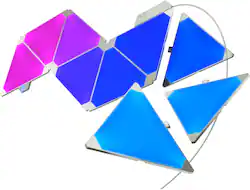
Nanoleaf - Rhythm Edition - 9 Panels - Multicolor
Model: NL28-2003TW-9PK
SKU: 6039500
This item is no longer available in new condition. See similar items below
The vast majority of our reviews come from verified purchases. Reviews from customers may include My Best Buy members, employees, and Tech Insider Network members (as tagged). Select reviewers may receive discounted products, promotional considerations or entries into drawings for honest, helpful reviews.
These things are really bright, good thing you can adjust it. Setup was simple, instructions are straight forward. But you can also look up videos on how to do it. Love that they can be customized and there are an abundance of lights features that can be downloaded. Only con is the price, too expensive.
This review is from Nanoleaf - Rhythm Edition - 15 Panels - Multicolor
Posted by Strikerm4
I will say that these are the coolest lights I have ever owned. Very customizable and beautiful, but definitely overpriced... especially with the app that you use to change the color. Since the last update, the app has been so much better, but before, my nanoleafs would disconnect from my wifi constantly, and it was a pain to reconnect. But, the app is updated every so often by Nanoleaf, and with each update it gets better. I also would recommend using velcro command strips instead of the stickers they give you, especially if you aren't 100% confident in where you want to place them. Using velcro stickers allowed me to easily take them off my wall and pack them with for college. Overall, these might be overpriced but I honestly still want to expand my collection soon! :)
This review is from Nanoleaf - Rhythm Edition - 15 Panels - Multicolor
Posted by jackie
Purchased 3 months ago: Ordering more. love them more and more everyday. I want my entire wall filled with them now. Great addition to any room. Creates a beautiful colorful atmosphere by setting the panels to any color mode you feel like. Panels can be SUPER BRIGHT at 100%. I keep them at about 30-40% brightness. When they are turned up all the way it feels like I'm tanning under mid summer sunshine. They can be easily moved around safely by using FLOSS behind the panel to cut the adhesive and remove from wall. I'd suggest wearing leather or mechanical gloves because the floss can hurt bare skin. Best method is to use a long piece of floss and use wide long sawing motions to cut through adhesive. **I'd recommend ordering the expansion pack of 3 to open up an almost infinite panel arrangement possibilities. I had trouble creating the design i wanted so i went to a website that has an emulator program where you put in the number of panels you have and it will generate different designs for you never repeating a single one! pretty cool. Pictures and video do no give these panels any justice because for some reason cameras can't pick up the colors correctly. I posted a few photos where i managed to get an idea of what they look like by turning down the brightness to about 10%.
Posted by Bunnney
Customers are satisfied with the brightness, ease of use, and customization options of the Rhythm Edition - 15 Panels. Many appreciate the product's setup and the wide array of colors and appearances it offers. However, some customers point to connectivity problems, app usability issues, and the price as potential drawbacks. Concerns were also raised regarding the adhesive strength and compatibility with certain systems.