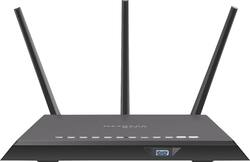
NETGEAR - Nighthawk AC2300 Cybersecurity Wi-Fi Router
Model: RS400-100NAS
SKU: 6345935
This item is no longer available in new condition. See similar items below
Customers regard the Nighthawk AC2300 Cybersecurity Wi-Fi Router favorably due to its strong security features. They appreciate the included Bitdefender subscription and the ease of setup for its cybersecurity protection. Positive feedback highlights the effectiveness of the built-in security in blocking unwanted access attempts and providing peace of mind for IoT device protection. There were no negative customer comments reported.
The vast majority of our reviews come from verified purchases. Reviews from customers may include My Best Buy members, employees, and Tech Insider Network members (as tagged). Select reviewers may receive discounted products, promotional considerations or entries into drawings for honest, helpful reviews.
This AC2300 router contains numerous features, many of which can be found and managed within the Netgear Nighthawk app. I found the app to be extremely helpful when setting up the router for the first time. Before I get to the setup portion of this router, I would like to first comment on the router’s range because it was remarkable. The router is marketed to cover up to a 2,000 square foot home but I wanted to really push its limits. I tested the router in a ~5,000 square foot home and placed on one end of the home. The router’s signal reached the far end of the opposite side of the home. I was absolutely amazed at how far the range was on this router. If you are wondering if this thing can handle a home slightly bigger than 2,000 square foot, believe me – it can! Now, let’s get to the setup portion of the review - which was an absolute breeze. I plugged the router into the power outlet, connected it to my modem, installed/opened the Netgear Nighthawk app and followed the instructions. The modem comes with a QR code sticker on the front and the app lets you scan it with your phone’s camera. The app immediately recognizes your router and initiates the router setup process, logging you into the router and letting you begin personalizing your network settings. Very slick! After renaming the Wi-Fi network and choosing my network’s password, I was ready to go. The app automatically installed the firmware update which made the installation process even more seamless. It takes a few minutes to get through this step, but it requires no effort on your part. Just sit back, relax and let the router do all the work. The app will keep you informed of the progress and let you know when the software update has successfully finished. If you are a tech savvy user and want to set up the router “the old fashion way”, you can certainly do so by connecting to the network and going to routerlogin.net in your browser. This will pull up the router’s admin screen and let you configure it the old school way before the convenience of the awesome app. The first thing the app does after getting your router setup is installs “Armor” which adds cyber security protection (powered by Bitdefender) and is built right into the router. From the app, you can see any threats that have been blocked as well as any vulnerability assessments after security scans. The app is setup to send you notifications on your mobile device when threats are detected. This lets you know the moment any security vulnerabilities exist or begin to be exploited. With the amount of cyber-attacks present in today’s society, this is a very nice feature to have and provides you with an extra peace of mind. Within the app, you can also see all of the devices on your network and their connection method (wired vs. 2.4GHz vs. 5GHz). Internet speed tests are built into the app as well, powered by Speedtest, providing you download, upload and ping rates. After the tests, the app will give you a readout, informing you whether your internet speeds are good, moderate, weak, etc. In your Wi-Fi settings portion of the app, you can share your Wi-Fi connection information in various ways including text message, email and a QR code. As with most routers, this router possesses the ability to setup guest Wi-Fi allowing guest to access the internet through your network but without giving out your secure network credentials. We don’t typically setup a guest Wi-Fi network, but it is a nice to have feature for those who do. The app allows you to enable a traffic meter, which provides you the ability to monitor the data transferred on your network. It also possesses the ability to configure traffic value limits, restricting how much you use the internet in your home. This is a nice feature to have if you are wanting to limit the amount usage of the internet due to fees increasing after certain thresholds. The router comes with parental controls, which can be configured directly within the app. The parental controls use Circle, which is a service powered by Disney. Enabling Circle requires you to download and install another app on your phone. This is less than ideal but after seeing the feature set within the Circle app, it is easy to see why it isn’t self-contained within the Nighthawk app. The basic version of Circle is free and lets you filter content by the user’s age and content category, pause the internet at any time and keep a history of which sites get visited by user/device on your network. The premium version gives you the basic features as well as allows you to see how much time they spend online, set time limits, create a bed time disabling the internet at night, create “no internet” times throughout the day for things like homework or family dinner time, and create rewards for appropriate internet utilization patterns. The circle app is neat because you can set different plans up for different users (children) and attach that plan to different devices. This will come in handy when the kids reach that curious age. If you are like me and enjoy tinkering with the advanced router setting, you will need to log into the router. Just fire up a web browser and head to routerlogin.net. Enter your admin user credentials and you are off to the races. The admin screen opens up the remaining features including managing static/dynamic IP addresses, DNS and MAC address management, wireless setup options (like wireless channel configuration, network passwords and security encryption options), WAN setup options (like port scanning and DoS protection, setting up in the DMZ and NAT filtering), LAN setup options (like LAN TCIP/IP setup, using your router as the DHCP server and IP address assignments), QoS setup options (like setting up dynamic QoS and configuring Wi-Fi multimedia settings) and setting up/refining your guest network. It also lets you use ReadyShare for the device you connect up to the router via USB. This lets you choose from Storage - setting up a wireless (cloud) device like a hard drive for online storage, Printer – setting up a wireless online printer you can access anywhere on the network or Vault – setting up a backup device to backup settings and content. The security settings available runs deep. In addition to Bitdefender’s armor, you also can allow/block certain devices from accessing your network, block specific websites or domains, block services, schedule internet availability time and manage notifications. The router’s administration section lets you see a deeper view of the router’s current status, see and manage the content of the router’s log file, see the attached devices, set the backup settings, reset the password and look for software updates. It also lets you access more advanced setup options such as setting the router up as an access point, configure port forwarding (opening ports), enabling VPN services, establishing static routes, enabling UPnP and manage the LED settings on the actual router. From Speedtest, to Bitdefender to Disney, Netgear has gone out of its way to partner with the best in breed providers to bring you a solid router with a comprehensive set of features. From the simple setup via the app, to the incredible set of features, it’s obvious that a lot of thought went into this router. I received this router from Netgear as part of a review and test program, but it didn’t impact the integrity of my review. I think this is a great router and I would certainly recommend it to my friends and family. Given the significant feature set, I think this router is a great value at its current price point.
Posted by Donkey1521
Took some time to set up, but worth it in the long run. Has blocked several spam attempts.
Posted by Waylon
This router works great after getting through set up, took several hours on the phone with customer support to get it working with my system and IP. I was following everything said to do and it was repeated several times with CS and then suddenly it all came together and worked. Has been great ever since then. If you have time to spend with CS then this is a great router and would be a great purchase.
Posted by Shadows