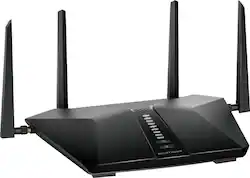
NETGEAR - Nighthawk AX5200 WiFi 6 Router - Black
Model: RAX48-100NAS
SKU: 6428135
This item is no longer available in new condition. See similar items below
Customers are delighted by the Nighthawk AX5200 WiFi 6 Router's ease of use, range, and performance, frequently praising its simple setup and strong signal. Many appreciate the improved WiFi 6 capabilities and the helpful app. While some experienced connection issues, the majority reported significant improvements in buffering and lag.
We have a 3000 sq ft house and this Nighthawk router does an excellent job of reaching every room with enough bandwidth to handle streaming without any lagging. This router gets average speed up 470-527 mbps. Setup couldn’t have been any easier. I personally set it up the manual way by logging into the router from my computer and was able to configure everything there. I also downloaded the Netgear Nighthawk app and followed the on screen instructions. We were given the option to name the new router the same as the old and use the same password so that nothing would have to be reprogrammed with new passwords. The app made set up easy and we were up and running that night. I can also run speed tests and wifi analytics, monitor UL/DL traffic, and engage parental controls from within the app. We can connect 5 cellphones, 3 laptops, Xbox-One S, Playstation 5 and even wifi connected security camera with no drops on the wifi network. It has an average set of features like USB port, 5- 1-gig Ethernet ports and basic networking/security feature. I highly recommend the Netgear Nighthawk AX5200 to anyone who needs more signal, a neat app that allows you to control the multiple capabilities of the router at ease.
Posted by Nicole
I have had the Netgear RAX48 WiFi 6 router for about a month. I replaced a Netgear Nighthawk R7000 that was more than six years old. The R7000 was still working but the RAX48 offered additional features as well as WiFi6. Coverage is great in my 1900 sq ft single family house. I have quite a number of smart home devices, wireless speakers, smartphones, tablets, printer, laptop and XBox One. Most are wireless but the smart home hubs and XBox are wired. Configuration was fairly easy. I used the smartphone app for the basic configuration and then connected via my laptop and browser to fine tune a few settings. Follow the instructions to check for a firmware update. Home routers are being targeted by hackers and firmware updates are a common means to address security vulnerabilities. Most default configuration settings are fine. I do recommend that you use a strong password and disable remote administration if you never plan to use it. Don’t mess with settings that you don’t understand. At minimum, google it or check the Netgear user forums. If you are replacing a router, make note of your old SSID (network names) and use those same names (must be exact) and passphrase in the new router. This will simplify the setup especially for the smart home devices. I have not used the USB port to connect a storage device but it worked well when I used it in my old Netgear Nighthawk. I am pleased with this router for my use case. If you have a large or multi-level home and need additional coverage, then a mesh WiFi system may provide better coverage (Netgear calls theirs “Orbi”).
Posted by StevoTNR
Finally gave in and bought this router because it was half off on sale. I do not regret the decision at al. Set up was super quick (just keep existing work name the same) and speeds have been great. I pay for 200 mbps and getting a little more consistently. All dead or weak spots in the house now have full coverage. Def recommend getting if you can get at a fair price.
Posted by Jkusiak
The vast majority of our reviews come from verified purchases. Reviews from customers may include My Best Buy members, employees, and Tech Insider Network members (as tagged). Select reviewers may receive discounted products, promotional considerations or entries into drawings for honest, helpful reviews.