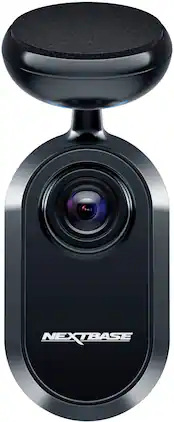
Nextbase - iQ Rear Window Camera - Black

Specifications
- Field of View140 degreesAutomatic Incident DetectionYesG-SensorYesRecording Resolution2560 x 1440CompatibilityNextbase iQ smart dash camera required (iQ 1K, iQ 2K, or iQ 4K)Wi-Fi Built-inYes
- Key Specs
- Field of View: 140 degrees
- Automatic Incident Detection: true
- G-Sensor: true
- Recording Resolution: 2560 x 1440 (Refers to the number of pixels, both horizontally and vertically, used to capture video. The higher the resolution the finer the video detail that can be seen.)
- Compatibility: Nextbase iQ smart dash camera required (iQ 1K, iQ 2K, or iQ 4K)
- Wi-Fi Built-in: true (Able to connect directly to a wireless network without the use of an adapter.)
- Camera Mounting Location: Windshield
- Vehicle Camera Type: Back-up
- General
- Brand: Nextbase
- Model Number: NBIQRWC
- Product Name: iQ Rear Window Camera
- Color: Black
- Vehicle Camera Type: Back-up
- Recording & Playback
- Field of View: 140 degrees
- Automatic Incident Detection: true
- G-Sensor: true
- Recording Resolution: 2560 x 1440 (Refers to the number of pixels, both horizontally and vertically, used to capture video. The higher the resolution the finer the video detail that can be seen.)
- Frame Rate: 30 frames per second (The frequency at which consecutive images can be captured. The higher the frame rate, the more detail that can be captured.)
- Loop-Cycle Recording: Yes
- GPS Enabled: true
- Camera Power Source: Vehicle battery, Other
- Expandable Memory Compatibility: microSD, microSDHC
- Recording Feature: true
- Compatibility
- Compatibility: Nextbase iQ smart dash camera required (iQ 1K, iQ 2K, or iQ 4K)
- App Compatible: true (The product can be connected to a program or software application on a mobile device, which then receives collected data from the product.)
- Wi-Fi Built-in: true (Able to connect directly to a wireless network without the use of an adapter.)
- Operating System Compatibility: Apple iOS, Android
- Features
- Integrated Microphone: true
- Night Vision: true
- Display
- Screen Included: false
- Mounting
- Camera Mounting Location: Windshield
- Mount Included: true
- Mount Type: Adhesive
- Input
- Number Of Auxiliary Inputs: 0
- Number of USB Port(s): 0
- Dimensions
- Product Height: 1.18 inches (The out of box height of the item. Height is measured as the vertical distance from the bottom of the item to the top as it would be primarily used or placed.)
- Product Width: 1.57 inches (The out of box width of the item. Width is measured as the horizontal distance from one side of the item to the other as it would be primarily used or placed.)
- Product Depth: 4.02 inches (The out of box depth of the item. Depth is measured as the distance from the front of the item to the back as it would be primarily used or placed.)
- Product Weight: 0.22 pounds (The out of box weight of the item.)
- Warranty
- Warranty - Parts: 1 year
- Warranty - Labor: 1 year
- Other
- UPC: 5060910803271
Raise your car’s iQ with the latest Nextbase iQ Rear Camera, the perfect companion for your Nextbase iQ Smart Dash Cam. Add an extra layer of protection with the 2K Rear Camera to guard against tailgaters and rear end impacts. It simply installs to your rear windscreen via the adhesive mount and supplied front to rear cable for all-round protection, offering you a triple view Smart Dash Cam
- 2K recording: Record the road behind in 2K footage, also known as 1440p Quad HD, for superior image quality. Simply install the Rear Camera to your rear windscreen and connect to your front facing using the supplied cable for all-round protection and superior image quality.
- Live view: See what your car sees with the always-on camera. Set custom alerts and check your car’s feed to show the inside and outside of your vehicle, when at work, sitting at home, or halfway around the world, the iQ has you covered. Intervene with voice or an alarm, so you’re always in control.
- SmartSense parking: Your iQ detects threats using Spatial Awareness and custom-trained AI to monitor movement around your vehicle, including potential break ins, a car backing up too close, or people loitering around your car. Intervene from anywhere with voice or an alarm.
- Witness mode: Simply say, "Hey dashcam, start Witness Mode” anytime you feel on edge, in a road rage incident, or if you’re pulled over. Your iQ will lock onto the incident and share live footage with a trusted contact so they can step in and help.
- Emergency SOS response: Get instant life-saving help. If you, or whoever is driving are unresponsive after an accident, your iQ will share location and key medical details with emergency 911 personnel.
- Roadwatch AI: Go back and see the evidence with Roadwatch AI adding crucial context to any recording. It will show the approximate speed and distance of vehicles around you in recordings, while also classifying pedestrians, cyclists, vehicles and more to track their movements as you watch.
- Setup: Install your Nextbase iQ in just minutes. Our user-friendly guide walks you through the setup process with easy-to-follow instructions and tips to get you on the road in no time at all.
- Sleek design: Your iQ is built around your convenience and safety, blending in with your car so you don’t even notice it. Smart Voice Control means you can do everything hands free.
- Always-on 4G connection: Access your data anytime, anywhere. Our secure encryption keeps all your data safe. Your iQ uses an always-on 4G connection to make your files accessible, no matter where you are.
Whats Included
- Nextbase iQ Rear Camera
- Front to Rear Cable ( 24.6ft)
- Spare Window Adhesive
- Fitting Tool
- Cable Clip and Ties
- Window Cleaning Pack
Q: Can this camera be used with other dashcams?
A: This camera is specifically designed to work with the Nextbase iQ smart dash camera models (iQ 1K, iQ 2K, or iQ 4K).
Q: How is this camera powered?
A: This camera is powered by the vehicle's battery.
Q: What is the recording resolution of this camera?
A: This camera records in 2K resolution, also known as 1440p Quad HD.
Q: Does this rear window camera come with a mount?
A: Yes, the camera includes an adhesive mount for easy installation on your rear windscreen.
Q: What is the field of view for this rear window camera?
A: The field of view for this camera is 140 degrees.
Q: Does this camera have night vision?
A: Yes, this camera is equipped with night vision for clear footage in low light conditions.
A: Any of the iq series… so iq 1k, 2k or 4k.
Q: Can I use this as a front dash cam?
A: No, this is a satellite camera and needs to plug into main unit to work.
Compare similar products
Raise your car’s iQ with the latest Nextbase iQ Rear Camera, the perfect companion for your Nextbase iQ Smart Dash Cam. Add an extra layer of protection with the 2K Rear Camera to guard against tailgaters and rear end impacts. It simply installs to your rear windscreen via the adhesive mount and supplied front to rear cable for all-round protection, offering you a triple view Smart Dash Cam
This advanced model offers 4-channels each w/ 1080p resolution, which is a unique advantage not many dash cam owners can boast. You can eliminate all blind spots by setting up your camera to record your front, rear, left and right view as you drive. Or, you can choose to point the left and right cameras w/ built-in IR lights to capture your cabin view, making for a fully customizable experience. To take your camera to an even higher level, we recommend using our CPL filter to reduce the glare caused by street lights and headlights. ***If a hardwire kit was not included wih your purchase, please contact [email protected].

Stay in the clear with the voice-controlled Garmin Dash Cam Mini 3 dash camera. This ultracompact key-sized dash cam automatically records high-definition 1080p video with a wide 140-degree field of view — and even saves video of detected incidents. The built-in-Garmin Clarity polarizer reduces windshield glare for a clear view. Plus, Garmin Clarity HDR optics enable the camera to capture crisp details, day and night. With a paid Vault subscription and an active Wi-Fi network connection, the secure online Vault automatically stores important saved video clips so you can easily view and share with the Garmin Drive smartphone app. Voice control lets you use spoken commands in English, German, French, Spanish, Italian and Swedish to save video and start or stop audio recording. Some jurisdictions regulate or prohibit use of this device.

Small but mighty, the Nextbase Piqo 2K delivers premium performance in an ultra-compact design. This dash cam captures every critical detail in stunning 1440p HD, whether you're driving in bright sunlight or on dark roads. With built-in Wi-Fi, Bluetooth, and GPS, the Piqo 2K offers seamless connectivity and real-time tracking, letting you easily access, edit, and share footage through the Nextbase App. The Piqo 2K goes beyond capturing footage—it's designed to be your complete driving companion. Smart Parking ensures your vehicle is monitored while you're away, automatically recording any knocks or bumps and notifying you via Wi-Fi and Bluetooth. Guardian Mode Lite allows you to set limits for anyone borrowing your car, so you're always in control. In emergencies, the Piqo 2K’s Emergency SOS system contacts services and sends your GPS location, while Witness Mode Lite alerts a loved one if something goes wrong. Piqo 2K doesn’t just provide protection—it offers peace of mind every time you’re on the road. With its powerful features, the Piqo 2K is more than just a dash cam—it’s a smarter, simpler way to safeguard what matters most.
| Pros for Nextbase - iQ Rear Window Camera - Black | |||
|---|---|---|---|
| Video Quality, Installation, Overall Performance, Field of View, Cable Length | Video Quality, Ease of use, Overall Performance, GPS, Resolution | Overall Performance, Size, Video Quality, Field of View, Installation | Video Quality, Ease of use, Size, Overall Performance, Design |
| Cons for Nextbase - iQ Rear Window Camera - Black | |||
| Connectivity | Wi-Fi, App, Parking Mode | Connectivity | Connectivity, Battery Life, Screen |
Specs
Reviews
Customers are saying
Customers value the iQ Rear Window Camera for its video quality, straightforward installation, and ample cable length. Users appreciate the wide field of view and clear footage provided by the camera's resolution. However, some customers have expressed concerns about the connectivity of the camera.
Customer Images
The vast majority of our reviews come from verified purchases. Reviews from customers may include My Best Buy members, employees, and Tech Insider Network members (as tagged). Select reviewers may receive discounted products, promotional considerations or entries into drawings for honest, helpful reviews.
- Rated 2 out of 5 stars
Not worth the money
After watching their advertisement for this IQ cam I guess I was hoping for it to work as advertised. Not at all, it doesn't even read license plates of cars that are literally in front of me, I decided to buy another IQ but this time I went with the 4K, I thought this would resolve my issues of clarity and quality. WRONGGGGG, I have both IQ cams, 1k on my wife's car and the 4K on my truck, LET ME TELL YOU GUY'S, THEIR IS NO DIFFERENCE WHATSOEVER IN VIDEO QUALITY. I WISH I CAN ADD THE VIDEOS HERE AS PROOF. To make things worse, I've been trying to contact customer service that doesn't exist, thru phone the line is always busy and it hangs up after 5seconds, thru chat it's a bot that doesn't answer any questions and thru email, well I'm still waiting for a response....... I'll we wait one more week before I return this 2 junk cams. I have it to 2 ⭐ because you do get notifications if you subscribe to a $10 or $20 per month.
FernandoS Posted
- Rated 5 out of 5 stars
Compact High-Resolution Security
Adds a rear-facing, rear-mounted camera to the iQ’s two built-in cameras. Now your iQ will record all three views so you always know what’s in front, inside and behind your vehicle. Plus, it adds a rear-facing motion sensor for all-around parking awareness. Easy to install and fully integrated to enhance your dash cam’s capabilities and your peace-of-mind whether driving or parked. Highlights: * Records in 1440p (same as the iQ 2K’s front camera) * Wide 140 degree field of view. * Has a built-in motion sensor. * Has subtle status lights that match those on the main dash cam. * Easy single-cable installation. * Flexible mounting with a ball-joint. * Long enough cable (7.5m/24.5’) for even the largest vehicle. * Includes extra mounting adhesive disc if needed. * Includes trim tool and wire mounting clips for a clean installation. Room for Improvement: * The right-angle USB-C plug on the end could make it more challenging to thread through tight spaces. * Cable cannot be detached from the rear camera. Setup: Installation of the Rear Window Camera (RWC) is relatively easy to wire up. As is typical of additional cameras like this, the most time-consuming part of the installation is in cleanly hiding the wire that connects the camera at the rear of the vehicle to the main dash cam at the front of the vehicle. In my case, it took me less than 5 minutes to wire up the camera and another hour to neatly thread and hide the single USB-C cable that connects the dash cam to the RWC. The single USB-C cable provides data and power between the dash cam and the RWC. Threading that single cable made it easier than if there were several cables. I positioned the RWC loosely on my rear window in the general area but didn’t stick it to the glass yet. I then started working the wire from the back to the front and tucking it behind headliners and other panels. Once the cable made its way up to the front, I plugged it in to the dash cam and started the setup in the iQ app to add the RWC and use the app’s live video feed to assist in framing the video before doing the final attachment of the RWC to the glass. Setup with the app was fast and easy. After plugging in the cable and telling the app to add the RWC, the iQ quickly recognized the RWC and showed me a live video feed so I could frame up the video and position the RWC while looking at my phone’s app. There is a lot of flexibility in the ball joint on the RWC’s mount so it wasn’t necessary to perfectly position it - just get it close and then move the camera around on its mount until the framing is perfect. That ball joint is firm enough to hold the camera in position through the roughest of driving. In my Polestar 2, there was quite a bit of excess cable so I just tucked it in behind a panel in the trunk. Most likely there is more than enough length for even the largest vehicle. Now that the RWC is plugged in and the cable is hidden and looking clean, I can start checking out the app’s new third camera feed and settings. Usage: The iQ dash cam has 2 built-in cameras; a front-facing and an interior-facing. There are also motion sensors in the main dash cam to detect things near your vehicle or inside it. The RWC not only adds a third camera but also adds another rear-facing motion sensor toward the back of the vehicle. Once you connect the RWC, you can adjust the dash cam’s settings and motion sensitivity to accommodate this additional camera. The two main settings to update once you get the RWC connected are the Exposure and Proximity settings. I generally don’t have the Proximity set to very far away from the car so I don’t get a lot of false alarm push notifications when parked. You can now set the rear-facing proximity with the RWC installed, and adjust the exposure of the video for that camera if needed. On the main screen, all three video thumbnails now show images whereas only two had content before the RWC was installed. When viewing “live” video from the iQ, you can also now toggle between all three video angles, and when viewing Events, Library or Downloaded video, all three cameras are now available. The only thing to consider when you have the third camera (the RWC) installed is that your storage card will now be saving video from three rather than two cameras, so it might be worth considering a card storage upgrade to keep more recordings from all three cameras. Overall: Easy to install and adds a third camera view and additional motion sensor to the iQ dash cam. No complaints and everything has been working great since installation. The parking security feature now has views out the rear as well as motion sensing back there.
gadgeTT Posted
- Rated 1 out of 5 stars
It's not ready... works when it wants to.
Stay away for the moment Nextbase needs to workout ALL the bugs. Sometimes it records and sometimes it doesn't. When it records the video quality is good. Combined this with the price of the front windshield camera all the current bugs aren't worth the hassle. Hopefully Nextbase will get this together in the future. But for the moment let this bake a bit longer.
TECHNERD Posted