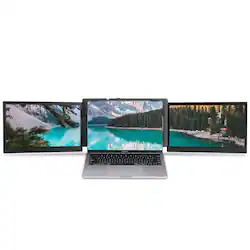
NHT - Portable 13.3" IPS LED FHD Dual Screen Monitor for Laptops - Black
Model: P2 PRO
SKU: 6493051
This item is no longer available in new condition. See similar items below
The vast majority of our reviews come from verified purchases. Reviews from customers may include My Best Buy members, employees, and Tech Insider Network members (as tagged). Select reviewers may receive discounted products, promotional considerations or entries into drawings for honest, helpful reviews.
The screens are nicely constructed, Overall, it's a little too heavy, but it is very solid not flimsy. Wish they came in 14" the cable broke, the USB c portion is very flimsy. I may have to return the entire thing, I can't find the manufacturer. That may be another issue too, is if you don't have a warranty, who do you reach out to get repair.
Posted by Bugzy
To give a bit of background: I've been doing WFH for about a couple months now and had just got the go ahead to be able to get a multi monitor setup (FINALLY!). Anyone that's had the luxury of two monitors to work with and then not having that experience at home knows that it's like having your bedroom condensed into the size of your bathroom. Now let's move onto the monitors: Packaging and unboxing was simple, there's the screen unit and then a compartment underneath for the cables, manual, and carrying case. Nothing wrong, but also nothing spectacular. The setup is pretty straight forward: there's an included microSD that auto loads the driver software, enabling the device as 'plug n play'. In my case, the installation didn't start automatically and I had to do it manually. Even still, it was simple enough as clicking the necessary .exe file. The screens themselves seemed a little dim at first but they were at least from what I could tell, quite identical in quality and color. I was able to mess with the brightness and contrast controls to help with the dimness, and so far it's in a pretty good spot for me. Construction seemed really heavy-duty with brushed aluminum and a solid frame all over. The kickstand is easily the weakest part of the product, the mechanism feels so clunky and ancient. There's simply just no ease-of-use taken into consideration here. You have to manually rotate a wheel to release the kickstand and then rotate it counter-clockwise in order to tighten it. Reminds me of the window crank of my dad's 30 year old Toyota Cressida. Thankfully, the kickstand isn't a make or break deal on a product that focuses on the screens. Overall, I'm pretty happy with this product. The kickstand is a bit of a sour point but it's a rather minor one given the upsides. I think it was advertised as being able to improve your work efficiency by like 50% and it really does feel like that at times. I'm flowing through .pdfs, emails, and spotify while being able to keep everything organized and on-screen. The experience is seamless and so well incorporated that it ends up feeling completely natural for me. Definitely would recommend for anyone still working with one screen.
Posted by AsteRisk
Color and brightness leave something to be desired, it worked fine for 6 months then dumped the drivers so it no longer connects to anything. If there was a way to reload the drivers it might be better? The hinge on one of the screens split so I had to glue it. The pad on one of the laptop grips came off and had to be glued.
Posted by RhyleeD