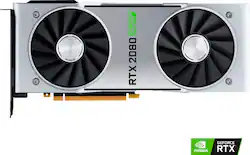
NVIDIA - GeForce RTX 2080 Super 8GB GDDR6 PCI Express 3.0 Graphics Card
Model: 9001G1802540000
SKU: 6361326
This item is no longer available in new condition. See similar items below
The vast majority of our reviews come from verified purchases. Reviews from customers may include My Best Buy members, employees, and Tech Insider Network members (as tagged). Select reviewers may receive discounted products, promotional considerations or entries into drawings for honest, helpful reviews.
Customers recognize the NVIDIA GeForce RTX 2080 Super 8GB GDDR6 graphics card's high performance and excellent graphics capabilities, frequently citing its ability to run games smoothly at high resolutions. However, some users noted elevated temperatures and occasional fan noise under heavy load. The card's price-performance ratio also received positive feedback.
You can really feel the quality and attention to detail just by holding the card, it definitely does not feel cheap. Personally I love the reflection on the super card, it goes with my build and looks super clean. Its representation kina feels like an apple product , premium. With it's all aluminum build it packs some serious power, easily dominating 1440p and 4k games, especially games for ray tracing. I would stay away from the 2080 ti , it's way to expensive, I feel as the 10 -15 fps difference is not worth it for that much performance. I think the 2080 super is the sweet spot.but if you've the money go for it or sli with the 2080 supers.i love that it is quiet, like extremely quiet ,probably because I upgraded from a gtx 1060 to the rtx 2080 I can just tell the difference and appreciate its noise level. The heat since does a really good job at keeping things low at heavy load, I tried a couple rtx games and it didnt make my room hot like my gtx 1060 on regular games. Overall I was glad I made this purchase especially how hard it was to obtain this cause they always went out of stock but i see why, the founder's edition cards is just better than the third party cards in my opinion. Its almost perfect but I do have 1 complaint and it's the dawm green led, you can't change it or turn it off and can throw off any good looking build, I heard that it was rgb but nvidia took the feature off, i understand it's their branding but I would have definitely love color change or at least an option to turn off. Some people don't want any lights in their system, luckily I found a way to turn it off in the evga precision drivers x1 but I shouldnt have to use a third party as to turn it off. Anyways that concludes my review it's a definite comp if your thinking of buying this high end card
Posted by Blair
I bought this card for a new build that I was putting together. I paired this card with an i9-9900k and 32gb of 3200mhz ram, I put it all on an Asus Rog Strix z390 E motherboard. I installed everything and booted up the computer, installed everything, opened MSI afterburner and started playing. Mainly I play Apex Legengs right now so that is what I am going to base this review on, I've had the card for two days and have not had a chance to try any other games. Anyways, booting up Apex and leaving everything on mad settings, 1440p 144hz the card runs at 70-95%. Auto boost clock running at 2050 out of the box with no tweaking. I have pretty good airflow, but running this card with these settings the temp peaks at 55c and does not dip below 144hz. So far with performance I am absolutely pleased. Noise: For me, aesthetics and noise come secondary compared to performance. I play with noise cancelling headphones, and when gaming I have 8 fans spinning up anyways, so I have not really heard the card over the rest of the fans in the case. All I know is that my temps are perfect, and I am happy with it. Looks: This card looks amazing in my opinion, it has a pretty simple design and I love it. The card is solid and sturdy. I do wish that the Geforce RTX logo was changeable but I can live with that. A couple of side notes: The reason I gave this 4, not 5 stars, is because when installing the GPU into the mother board for the first time the bracket and the PCI slot were not lining up. After further inspection I found that the mounting bracket was bent at the top where it slides into the case, maybe 2 off. I bent the bracket straight by hand, and it went right in. Although I would prefer to not recieve a card bent out of the box, it works perfect and I'm not waiting for a replacement. Maybe Nvidia can chime in to how a $700 GPU comes with a bent bracket out of the box? Also, and this has no effect on my review, the first day I had the card in everything ran perfect. My temps were slightly higher, but that was because I didnt plan far enough ahead to realize that the mother board only offers 2 Chassis Fan Headers and a couple others, so I only had 3 fans running in the case. Since all my fans are corsair and I did not want to buy splitters, I purchased a commander pro to control fan speed and RGB. To get the iCue software to control the PWM fan speeds, I had to update iCue to the latest version. I put everything in, booted up, upgraded, played with my speeds, and started playing. My gameplay went from 144fps butter smooth, to 100-120fps and stuttering. I couldn't shoot anything. I thought maybe I plugged something back in wrong. After troubleshooting I figured out that the iCue software is the root of the problem. Uninstalling iCue and rebooting the game, everything goes back to normal. Would I buy it again? Yes I would.
Posted by Donald
Just picked up and installed in my Alienware Amp. Perfect fit, the only downside are the blowers. They blow up and out rather than through and out. So I reversed the fans to exhaust on the case and when I'm really gaming and OC I keep the Amp case cracked. Steady OC at 125 on memory and 500 on core. Able to run Final Fantasy Online maxed at 4k 60fps. Control runs 1440p 60fps with RTX on medium. Control with RTX on high requires 1080p. Most if not all games I own are now maxed at either 4k or 1440p. This should be helpful for all Alienware and Amp owners: 1. Uninstall all display drivers 2. Download GeForce Experience and let it install your built-in GPU driver 3. Shutdown 4. Plug in Amp and boot 5. Notice your card has generic Microsoft adapter 6. Right click that card in device manager 7. Update driver by pointing to the GeForce Experience download file 8. Let the driver install 9. DONE Update BIOS to latest and Windows 10 to 1903 minimum for RTX features. Highly recommend this card for the Alienware and Amp combo.
Posted by Aliengamer