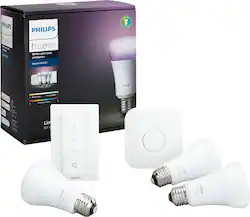
Philips - Hue A19 60W Smart LED Starter Kit - White and Color Ambiance
Model: 556704
SKU: 6370363
This item is no longer available in new condition. See similar items below
The vast majority of our reviews come from verified purchases. Reviews from customers may include My Best Buy members, employees, and Tech Insider Network members (as tagged). Select reviewers may receive discounted products, promotional considerations or entries into drawings for honest, helpful reviews.
Ah, the enigmatic world of HUE—where light meets code, and bulbs dance to the binary beat. Allow me to dissect my recent encounter with this luminescent marvel. Brace yourselves, aspiring tech aficionados, for we’re about to dive into the depths of HUE bridge technology. Simply overpriced HUE, I muttered as I unboxed my latest acquisition. The deal was sweet, sprinkled with an extra reward—a digital pat on the back for my purchase. But wait, rewind to a time when I, too, was a fledgling HUE enthusiast. Back then, I naively believed that HUE’s brilliance would illuminate my entire castle. Then, reality struck like a syntax error: the bridge—a critical node in this digital symphony—fell short of orchestrating a complete residence of HUE products. Cue my forehead slap—I should’ve completed my degree pre-requisite: pre-purchase code review. Fast-forward to seasoned users, perched atop their binary thrones. They scoff at my bridge woes, for they know that multi-bridge conundrums are unavoidable like evil deprecated APIs. You see, my friends, growth in the HUEverse demands investment—a capital infusion of both lumens and brainpower. And yes, brace yourselves, for you’ll find yourself yearning for a degree in HUEology (if such a field existed). Support Team Saga: Ah, the support team—the Gandalfs of our digital Middle-earth. Alas, their magic wanes. Frustration mounts as we navigate their labyrinthine ticketing system. But fear not, dear reader, for this tale mirrors that of APPLE’s devotees. We clutch our wallets, torn between reverence and rebellion. The product beckons, whispering sweet nothings about color gradients and smart routines. Resistance futile, we succumb. Wallets open, hearts conflicted—such is the way of the techno-nerd. Verdict: In the grand binary scheme, HUE remains a beacon of brilliance. New users, heed my bytes: embrace the glow, revel in the ambiance. And yes, those 60 W vs 75 W bulbs? They hum in harmony with their LED brethren. A difference? Oh, indeed. I prefer the 75 v 60, but the 60 are still worthy. As for your bank account, well, consider it a digital sacrifice at the altar of illuminations Conclusion: So there you have it, fellow HUEmans. HUE—a symphony of photons, a dance of diodes. May your bridges be stable, your code bug-free, and your pockets ever ready. Good luck, and may your lumens forever shine! (you don’t need code, but you might reach needing a 2nd HUE Acct. - that’s in the works to be fixed) BEST BUY asked me to remove my “emojis” - no fun! I have just “1” emoji for BB. I bet you can figure out which one.
Posted by product19
The Hue hub itself was easy to set up with all 3 of my voice assistants. Setting up was so easy in fact that I didn’t get to choose how many bulbs I wanted to use. It just defaulted with 3, even though it could never connect to the 3rd. That’s not really an issue, ‘cause I was able to easily delete it from the Hue app. The uses and setup are quite convenient. I can use the lights with only my voice, and I put a guard over my last switch, so I can’t accidentally shut the power off. Because of this, the dimmer switch has entirely replaced my old light switch. Speaking of the Hue dimmer switch, I feel that it could use more customization. Most apps I pair it to state that it requires a hub in order to work. I do not see then why I can’t set my multiple clicks to custom scenes. I can only pick from the quite unsightly pre-made light recipes. It is only my opinion that they’re unsightly, but it means that, because I do dislike all the default options available, I basically can’t use the multi-click function. Please update it to work with custom scenes, even if it has to be a hardware update I have to buy separately. Many thanks for your consideration!
Posted by Palabiro
They’re an excellent way to streamline your life. Some benefits of having the Phillips hue system is that you can connect it to Alexa to control the lights include on/off and color. You can set up routines so that when you leave the lights turn off automatically so that you end up saving a little on the power bill and never have to remember to check all the light switches, another amazing PRO is that the lights can be synced with music, it has an algorithm that synchronizes the changing of the lights with the beat and tune of the music, creating the ultimate ambiance. There are endless color and brightness options you can set it to, and additionally you can set different light scenes to the Phillips hue switch, pressing the button twice to change the scene you have set.
Posted by Levi
Customers are delighted by the Hue A19 60W Smart LED Starter Kit's ease of use, wide array of colors, and straightforward setup process. Many appreciate its compatibility with popular smart home systems and the intuitive app. While some find the product expensive, most users report positive experiences with connectivity and remote control features. A few users mentioned needing a hub, but this was not a widespread concern.