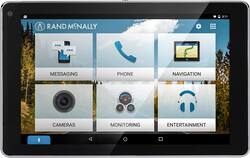
Rand McNally - OverDryve 7 Connected Car Tablet with GPS - Black
Model: OVERDRYVE 7
SKU: 5557700
This item is no longer available in new condition. See similar items below
Customers highly value the OverDryve 7's GPS and large, easy-to-read screen, frequently praising its user-friendly interface and reliable navigation. The built-in dash cam and optional backup camera are also appreciated features, although some users note limitations in battery life. Overall, the device receives positive feedback for its convenience and functionality.
The Overdryve tablet is packaged very well. All the components are separated and protected. There is foam inserts to keep the tablet and the screen protected. In the box is the Overdryve tablet, Smart mount, bracket with suction cup, Car charger, USB Wall Charger, Dash mount disc, FM transmitter Antenna, AUX cable, and even an anti-glare screen protector which is nice. The mount is very easy to install, but you need to decide where you want it. In my case I have a velour dash mat so it wouldn't stick there, but thankfully they sell an optional Bean bag dash pad. It weighs about 2 pounds and the the dash mount fits right onto it. And it stays in place due to its weight. The Bean bag dash pad is optional and isn't included. Anyway for the install you just have to attach the 2 pieces of the mount together, then remove the film that covers the suction cup and secure it to the pad. Once you have the mount all installed and ready the tablet just locks into place via a magnetic connection. It self aligns and snaps into place with ease. I was surprised at how well it aligned. I didn't even have to look close to make sure it was in the right place. The strength of the magnets force it into perfect alignment. The tablets initial set up is also easy. There are 4 easy steps to get it going. 1) Connect to the internet. For me this was connecting to my T-Mobile Galaxy S7's hot spot. 2) Register the device. This allows you to get updates and support. 3) Connect to Bluetooth. Again I did this by connecting to my S7's Bluetooth connection. 4) Connect to the car stereo. There are 2 ways to do this. The recommended way is using the included AUX cable, but of course this depends on if you car has an AUX port. In my case I have a 2012 Honda Civic that as an AUX port. You connect the AUX cable to the Smart mount not the tablets input. But if your car does not have an AUX port you can connect through your cars FM stereo. To do this you connect the included FM antenna to the Smart mount. You then tap “Entertainment” on the screen, then “FM transmitter”. It will walk you through the connection steps. Its basically just choosing an open FM station, then connecting the Overdryve to that same station. That's it. You are now done with the initial set up and ready to go. The main screen has 6 options. Messaging, Phone, Navigation, Cameras, Monitoring, and Entertainment. I was able to test most of these. The only one I didn't test was monitoring because it requires another optional item to monitor the air pressure in your tires and a few other things. However I was able to make and receive calls and texts, test the Navigation, as well as play music via Bluetooth from my phone (you can also use an SD card with music files on it. They all worked but I had an issue with static that came through my cars speakers whenever I used the AUX cable. There was a constant static when there was no audio coming through. This went away almost completely when I was playing music or during calls. Im not sure if this was the cable, or my car. This didn't happen if I used the FM transmitter connection type. The Navigation worked very well. After connecting through my phone I was able to get the Overdryve's navigation app working, and transmitting audio through my cars speakers. Its a nice system with points of interest, exits, split screen junction, and built in maps. Which is nice since you don't have to worry about data that way. If you are connected to Wi-Fi you also have live features such as traffic, pit stops, etc. I also tested the voice assistant features. Since I am using a Samsung device the first time I used it it asked if I wanted to use Google Voice, or S Voice. I chose Google voice. All the normal Google voice features worked but there was about a 2 second delay when I would say something before it would recognize it, then a couple more seconds to respond. I'm sure this will all depend on the strength of the Bluetooth connection. You can also buy an optional wireless backup camera that can give you the backup view right onto the Overdryve's screen. And since it is wireless you don't have to worry about running wires all the way to the back of your car, or paying someone to do it. Its as simple as mounting the camera to the back of your car and connecting it to the Overdryve. I didn't have this option, but just wanted to mention it for anyone wanting reverse camera features. So to sum it up this device does everything it says it does and does it well. If your looking for a Hi-Tech car this is a much easier and less expensive way to go vs. buying a whole new car. Thank you for reading.
Posted by Nate34
I purchased this unit for many reasons but it came apparent that once mounted on the gel pad this was not going to work. It was heavy, and bounced around a lot. Could figure out how keep the map while still taking video while traveled down the road. That was one reason I purchased the unit was for protection against being sued in an accident...
Posted by Sonny
First, I always have to comment on the packaging, a lot can be said about the way a company packages their products. The Rand McNally Overdryve arrived in a great box, everything was safely separated and covered for maximum protection. Once I unboxed the unit, I looked at the booklets and noticed Rand McNally supplies a anti-glare screen protector. I proceeded to install it, and it went on with ease, very high quality. Now it was time to dive into the tablet. It was sent with 60% battery which was nice, I was able to set it up fully without plugging it in. The tablet asks you to connect to wifi, register, which is painless, and asks for no credit card info, which I like. Next I had to connect my phone via Bluetooth and accept some prompts that it was ok to read contacts and messages. After that, I set the audio output to AUX and was all done. Now, that I have a working setup, I started out by going through the easy to navigate menu and settings. It runs off Android, which is all I use, so nothing new for myself, but anyone will be fine. There is two screens on the front pages, Overdryve’s main page and a separate app page. There is still the traditional Android app drawer as well. It comes with installed apps for music and what I really was happy with, the Navigation. First off, the navigation is the best I have ever seen, better than any competitor out there I have used, period. I took it in the car and hooked it up to the supplied mount with the GPS antenna and went for a drive. The GPS is just spot on, I know without data, it is going to get me where I want. I took wrong turns on purpose and it changed my route faster than any other GPS unit I have used. If you want a great GPS unit and that's it, this is still a great unit. The GPS was scary spot on, it have to be within 10 inches, I have never seen a unit that perfect. Next, the dash cam was tried out. You can record in HD quality, with or without sound. It has a 5mp camera and it works very well in daylight. Night time is great in lit areas, but in dark areas it is decent, it is just a tablet camera. I have included a short video with my review(only can be viewed by this link https://youtu.be/F9E8QZi6zLs) of what it looks like during my ride home. I did not have the backup camera to try with the unit, I wish I did, I will be looking into it in the future as an add on for my other car. The built in phone and messaging apps worked as they should. I was able to read messages and respond via voice recognition. All the buttons are large and easy to read and hit so you can do it fast and keep your eyes on the road. The voice button is on the lower left corner for easy access and keeping your reach to a minimum. The bluetooth audio app works great via the AUX cord. The app displays the song and artist information very large and has big buttons to skip back, forward, and pause. Sound quality is great when used with the AUX cord. When switched to the FM Modulator, it cut down sound quality and max volume to about 60%, which made it hard to hear with the windows open. Also, the built in speaker was surprisingly loud. I tried it with music and a phone call, I had zero issues hearing the person I was talking to, I am very impressed. The points of interest seemed to work well once you setup a travel plan in the app, without, it kept asking for a wifi connection. This is one area where I felt they fell short. The unit would be great if you could slip in a sim card and have its own supplied data, instead of having to hit a wifi hotspot or using your phone. The travel planner also works well, you can set up an entire trip and where you want to stop and it will adjust your routes accordingly. You can add stops for many categories, from amusement parks to sports, to shopping, it's all there. The monitoring app is useful from what I can tell, I did not have the tire monitor setup to test, which I plan to add for my other car. For the performance section, it uses one of the best softwares in the industry, Dash Command, which is a well known name and just works, simple as that. The unit comes with a 10 minute trial and for $10, it unlocks it. You can have live performance results, use it as a code reader, and more. I have a OBD2 Bluetooth dongle already, so I gave the 10 minutes a whirl in my wife’s 2009 Traverse. It worked great for what I had time to use it for, so I plan to pay the $10 to unlock it. Now, to say some techy stuff that some will care about. The Overdryve does not include google play services on it. You cannot download apps from the play store, I did not like this personally but it does make the battery last forever, as google services do drain batteries fast. You must use one of the three app services Rand McNally recommends. I chose to download Amazon Apps. What is weird, some apps would work and some refused to install. I tried downloading the Gas Buddy app, which helps find the cheapest gas in the area you are in, needing data to do so, but it would not install. Overall, the Overdryve’s setup is one to look at, especially in a car without any of these features. I would highly recommend the unit to anyone wanting to bring their hot rod project into the 21st century without cutting their dash up, they would benefit so much from this unit. I plan on running this unit in my 1996 Camaro once I have it back on the road. I give the unit a 4.5 out of 5. The reason it is not a 5 is no built in data and not being able to download Google Play apps or having apps not install. I highly recommend the Overdryve to anyone wanting to bring their car up to date or just having a very powerful GPS.
Posted by ElectronicJunkie
The vast majority of our reviews come from verified purchases. Reviews from customers may include My Best Buy members, employees, and Tech Insider Network members (as tagged). Select reviewers may receive discounted products, promotional considerations or entries into drawings for honest, helpful reviews.