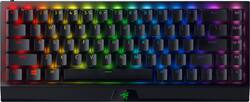
Razer - BlackWidow V3 Mini Hyperspeed 65% Wireless Mechanical Linear Switch Gaming Keyboard with Chroma RGB Backlighting - Black
Model: RZ03-03890200-R3U1
SKU: 6463499
This item is no longer available in new condition. See similar items below
Customers are delighted by the BlackWidow V3 Mini's high-quality build, responsive wireless connection, and excellent battery life. Many appreciate its compact size, customizable RGB backlighting, and satisfying key feel, with the linear switches receiving particular praise. However, some find the keyboard expensive, and others have experienced issues with the accompanying software. Overall, the positive feedback on the keyboard's performance outweighs the negative comments regarding price and software.
Razer had some bumps early on when it comes to wireless connectivity and the stability of their Hyperspeed options although they seem to be in a good spot right about now. At the time of this review I was using this device for a few days and only needed to charge it once maybe twice. I had read previous reviews on the full-size Blackwidow V3 Pro and people stated battery issues. For this device I tried to mitigate it as much as I could. I set the device to power down after 5 minutes of inactivity and I also set the brightness of the LEDs to 25%. The lighting was bright enough to see all the effects for my games and for my own personal designs set on Syanapse 3. I used other 60% boards but I missed the arrow keys far too much and I wanted to clear up some desk space. The 65% is a perfect fit and I access to all the keys I need. I hardly use the function row so this works out great for me. The switches are purely a preference and I enjoy silent switches and the yellows fit the bill to a 'T'. With the added thickness and density of the keyboard the device doesn't reverberate as much when hitting the keys with force thanks to that batter in the lower compartment of the device. I'm also taking advantage of the multi-device support that Hyperspeed has to offer. I have it paired with my Razer Naga Pro dongle and having that one dongle to control both I haven't noticed any stuttering or connection issues. Make sure to update the firmware for your older devices from Razer's own page (Mainly the Blackwidow V2/3 Pro, Naga Pro). Others noted that if you use two dongles nearby it can cause some issues to using multi-device is your best option to make sure your devices are working as intended. Can be a bit tricky to pair, you have to press a key as the pairing process is happening. One small peeve of my but completely negligible is the fact that compared to the Naga Pro the device doesn't turn off on it's own when it detects that the dongle is not active. I assume this is because of the Bluetooth capabilities so I'm not really that concerned over it. TL;DR Make some changes to light settings, pair multi-device if at all possible, turn off when not in use to keep charge on the device. Keep these in mind and you'll have a great wireless keyboard on your hands.
Posted by SentinelGT
Quick review: Good -Solid keyboard, buttons click is real satisfying and feels smooth, backlights are very bright and the rgb functions real well, setup was real easy just plug and play , can be used on Bluetooth or wire connection through usb-c in to usb-a out, battery life is long enough approx 3 days of heavy use before required to charge Bad: price is real high, no f1 - f9 dedicated buttons
Posted by Sacnak
TLDR Overview- This has been the most expensive keyboard I've boughten, but it was worth it. So I love wireless peripherals, I'm not competitive, but I do expect more for my gaming experience, I bought this with expectation to return due to the input lag stigma of wireless keyboards, to my surprise I got home and and fell in love with the performance, I couldn't tell a difference from my previous wired gaming keyboard. I was satisfied. Keys- I hate the clicky sound of a ton of mechanical switches, but this one, thankfully, does not have that. It has a plain silent tap. which I love. the keys are nice and comfortable and I got no complaints. However, I do not enjoy typing on it, and I do have a dedicated typing keyboard (flat chiclet) and a dedicated gaming keyboard (BW V3). Wireless- I tested as much to my knowledge and ability, and found that I did not notice a difference between my wired gaming keyboard and the v3 wireless. I did some mild tests on the input lag and both were the same. I love wireless and this one is good. However, I am not that much of a competitive pvp gamer, I like story games, so you might want to do further research on that. Battery- I mildly tested this feature, and seems alright. With full, dynamic RGB lighting, I get around 20% lost with 2 hours of gaming. But if you set the RGB to plain white, and 40% brightness (in my opinion is enough), then the battery is dramatically longer. doubling it. And yes, you can charge it and use it at the same time, and still works when connected to a wall for charging as well. Price- Now I know the price seems steep, at 180, but i bought this at 150, and even then that's a little steep for me. However, I did recognize that not a lot of companies are making 65% wireless keyboards with this level of performance, so I felt justified with this purchase, its capitalistic scarcity really won, and I paid that luxury. Hopefully we see a rise in this category of keyboards for a more competitive playing field in the market in the near future.
Posted by EnriqueM
The vast majority of our reviews come from verified purchases. Reviews from customers may include My Best Buy members, employees, and Tech Insider Network members (as tagged). Select reviewers may receive discounted products, promotional considerations or entries into drawings for honest, helpful reviews.