Customer Ratings & Reviews


- Model:
- R010111
- SKU:
- 10116427
Rating by feature
- Setup
Rating 4.8 out of 5 stars
- Range
Rating 4.7 out of 5 stars
- Signal Strength
Rating 4.7 out of 5 stars
Eero 6+ not the best
||Posted . Owned for 1 month when reviewed.This reviewer received promo considerations or sweepstakes entry for writing a review.Not a great mesh system. There are better alternatives
No, I would not recommend this to a friendNice router
||Posted .This reviewer received promo considerations or sweepstakes entry for writing a review.This is my first time buying this type of router. Set up was very easy and so far it has been working very well. My house is a little over 2000 sq feet and I have only had to link two of them.
I would recommend this to a friendFantastic Wifi 6 router
Posted .This reviewer received promo considerations or sweepstakes entry for writing a review.I recently got Gig ziply fiber installed. I live in a 1,000 sqft apartment thats one level. The router that ziply fiber gave me is $10 per month and its supposed to be a wifi 6 router. After days of testing, it was killing my experience with having fast internet because i was only getting 100-200mbps download. Not even close to a gig. I am a video producer so i need a router that can pump out the fastest and most reliable upload speed. The range this router from ziply fiber sucked so bad that i started looking for a more modern and stable router. The eero 6plus has trippled my internet speed at a far distance ans even faster when closer ro the router. It was easy to set up too.
I would recommend this to a friendReliable WiFi!
||Posted . Owned for 10 months when reviewed.This reviewer received promo considerations or sweepstakes entry for writing a review.Easy to set up and provides reliable WiFi throughout the entire house
I would recommend this to a friendPerfect product!
||Posted . Owned for 1 year when reviewed.This reviewer received promo considerations or sweepstakes entry for writing a review.Very easy to setup and works perfectly for our house
I would recommend this to a friendEero system
||Posted . Owned for 2 months when reviewed.This reviewer received promo considerations or sweepstakes entry for writing a review.I wouldn’t get anything else. Ever since I switched from a router to a mesh system; I have had no issues. Perfect for an apartment or a 5k sq foot house. Very easy to set up through the app. Customer support is amazing as well. This system hands down is one of the best things I have bought at Best Buy. It made my network issues and headaches disappear. I highly recommend this for anyone that is looking. Also, I have no issues with gaming as well. I can run 3 consoles, 3 computers, 5 TVs, and smart lights and phones all at the same time and have no issues.
I would recommend this to a friendGood product, super easy to set up.
||Posted . Owned for 2 weeks when reviewed.This reviewer received promo considerations or sweepstakes entry for writing a review.Super easy to set up (it took me maybe 15 mins to set up all 3 units) and we now have rock-solid coverage throughout our house and I'm using the previous network and password, so there were no changes needed for connected devices. The price is quite reasonable, and because we have Best Buy Total Tech and my old wifi was covered under the plan, the out of pocket cost was even less!
I would recommend this to a friendRecommend
||Posted . Owned for 1 month when reviewed.This reviewer received promo considerations or sweepstakes entry for writing a review.So easy to set up. Purchases two and both not a problem.
I would recommend this to a friendGreat upgrade from my old system
||Posted .This reviewer received promo considerations or sweepstakes entry for writing a review.Just upgraded from Nest Wi-Fi to this system. I was having problems with one of my satellites not staying connected with old system. Eero was easy to set up and app walks you thru setup. Had new system up and running within 30 minutes of opening the box. Signal is strong thru the whole house. I also have 3 Echo Dots that now act as wifi extenders. I currently have 34 devices running on system with no delays or lags. All together with smart switches and other devices I have over 50 wifi connected devices in my home. I did take about 45 minutes for new software update to finish, even though it says 15 minutes. The only glitch I had was my MyQ garage door opener not working right away but it walks you thru the update procedure and now it works great. All my devices seem to work faster, have had no buffering on my 6 streaming tv's. App is very easy to manage and offers a lot of information and is very intuitive to use. Overall I couldn't be happier with my purchase.
I would recommend this to a friendWorked better than expected!
||Posted . Owned for 1 week when reviewed.This reviewer received promo considerations or sweepstakes entry for writing a review.I bought a three pack because my house has concrete walls and it works perfectly, from the first floor to the third floor terrace. Also, I now get to use the full speed of my ISP plan. Definitely recommend.
I would recommend this to a friend2 adjacent apartment units and 17 devices
||Posted . Owned for 1 month when reviewed.This reviewer received promo considerations or sweepstakes entry for writing a review.I live in an OLD brick apartment building in a downtown area and a buddy lives in a different building adjacent to mine. There's literally two units (approx. 50 ft) between us. Still, we put one node in his place and one in mine and somehow they connected with full signal strength, so now we're splitting one internet bill haha Two nodes, two separate apartments, and a combined 17 devices right now My place - Hue Bridge, lights, computer, phone, Apple TV, etc. His place - Hue Bridge (his own), lights, computer, phone, etc. I have a 500mbps package from the provider and this says its pulling 522 at the time of writing this So yeah, highly recommended. I got it for $189.99 and it will pay for itself in 6 months. Have not had to troubleshoot or performed a reset since purchase
I would recommend this to a friendChanged my Wi-Fi
||Posted . Owned for 8 months when reviewed.This reviewer received promo considerations or sweepstakes entry for writing a review.This product changed my Wi-Fi for the better. It was an easy set up and it always has updates to improve itself. So thrilled to have the range, cover and speed
I would recommend this to a friend
A much needed improvement over the older Eero 6
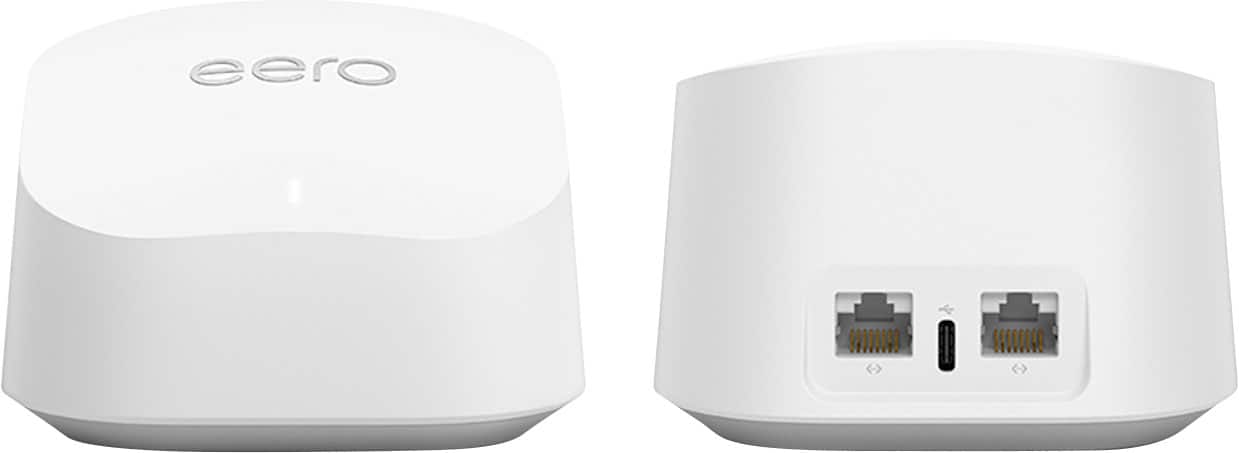
|Posted .This reviewer received promo considerations or sweepstakes entry for writing a review.The Eero6+ is the latest Eero Mesh Network. I have had the previous version of the Eero 6 and now have upgraded to the Eero 6+. What is the difference? Is it worth it? Well, in my case, yes, completely worth it. Physically the units look the same to me, barring that the 3-pack now has three identical units like the Eero Pro series, each with two ethernet ports and one power jack. The most significant change is in the internals, as the Eero 6+now supports 160 MHz channel in the 5 GHz band for faster data transmission. So should you buy this? If you have the original Eero that came out in 2016, then yes, as it will soon no longer be supported with updates but will continue to work. If you have a 2nd generation Eero or Eero Pro (tri-band) and have internet speeds greater than 500mbps, then the Eero 6+ or 6E makes a huge difference as they now support up to 1 gigabit. If you want to get into mesh networking, then you cannot go wrong with Eero’s and should get this, and I’ll tell you why. The core tenets of an Eero are its simplicity and stability. My Eero units have been stable internet mesh points that rarely require any rebooting or messing around once set up. The setup process is quite simple, and the app walks you through the step-by-step process. When connected and set up, the WiFi coverage is stable, fast and seamless and just that it works everywhere without dropouts. The onboard parental controls, as part of Eero Secure, are an extra cost. Still, they come packed with useful tools to help protect your internet experience and provide a margin of reassurance on data usage and reporting. I love the per-device restrictions and customisation available to the end user. This is significantly better than other options on the market, and Eero makes this part of the experience enjoyable, and it is detailed enough that one can pair it down to individual devices. In my situation, the new Eero 6+ allows me to expand the network easily. The availability of ethernet ports on the back of the mesh nodes means I can easily access and expand my wired network by connecting it over the WiFi network. Even though my internet speeds are far slower than the 1 gigabit, most of my data transmission is internal, and that's where the added bandwidth provided by the Eero 6+ comes in handy. The new routers support higher WiFi bandwidth that allows for greater speeds on my internal network, all while handling the internet. Internally the new Eero 6+ supports AX3000, which equates to about 600 Mbps in the 2.4 GHz band and 2400 Mbps in the 5 GHz band. This means more available speed to share between your devices and within your network. Overall WiFi transfer speeds doubled over the internal network, and the internet still was as fast as it was before, but that's because I have a 200 Mbps internet connection. So should you get it? It's an unequivocally yes. The Eero mesh systems are some of the easiest to set up, stable, reliable and feature-rich mesh routers I have used. They support Zigbee, so home automation is helped out by improving your WiFi connectivity. Each Eero mesh unit can support up to 50 devices on the Zigbee network, and if you use amazon smart speaker devices, you can control your home via voice. Zigbee allows you to use smart lights, locks, switches, plugs and sensors, allowing a lived-in look when not at home. Overall this is a must-have for anybody working from home. The ability to extend your WiFi network across your home and provide a stable internet connection anywhere is a godsend. I highly recommend buying it. Improve your internet experience by having wifi everywhere. Eero is the only hassle-free way to do mesh WiFi for the non-technical consumer.
I would recommend this to a friendWEFEF
||Posted . Owned for 4 months when reviewed.This reviewer received promo considerations or sweepstakes entry for writing a review.WORKS GREAT, EASY TO SETUP WITH MULTIPLE ALTERNATIVES.
I would recommend this to a friendGenerally Happy
||Posted . Owned for 1 month when reviewed.This reviewer received promo considerations or sweepstakes entry for writing a review.I purchased the eero 6+ AX3000 to replace a failing Netgear Nighthawk R8000P. I live in a 25' X 45' raised ranch with the router installed in the middle of the finished basement. Most of the house was well covered except for one of the bedrooms. The reason I purchased this product (a 3 pack and a 1 pack) was because of the raving review on one of the Bestbuy employees. It was very easy to install and it does easily solve some of our signal strength issues. Connectivity speed to the main device that is wired to the modem is as fast as it should be for my service. But when connected to any of the other devices, the speed is only at a quarter of the speed of the main device. So as far as I can tell, this product is not any better then any other mesh product. I gave the product a 4 star rating because it improved the total speed in the bedroom that was lacking and for the fact that I can no move my Arlo base station to a location in my house closer to the cameras. The Arlo base station must be wired to a router and these devices allow for a ethernet wired connection.
I would recommend this to a friendLove the ease of setup and install of this item.
Posted .This reviewer received promo considerations or sweepstakes entry for writing a review.Way simple to install and setup. The app is good for the most part. Range is excellent. The only drawback is the lack of extra ethernet connections. Using switch hubs to remedy this.
I would recommend this to a friendReplacement of older Orbi setup with Ax30000
||Posted . Owned for 3 weeks when reviewed.This reviewer received promo considerations or sweepstakes entry for writing a review.Very easy to setup via an Iphone - an iPad setup hung and was not successful. However, worked immediately via an iPhone and was very fast and smooth - very impressed as it was very Apple like with almost no direct intervention required. Install was almost seamless. Single over a large 3,500 ft house is excellent across 3 floors with the signal being strong throughout. It successfully identified a large range of devices, the Admin App is very straight forward. The app telling you where to place sensors was an interesting feature, very pleased.
I would recommend this to a friendExpanded wifi coverage
||Posted . Owned for 2 weeks when reviewed.This reviewer received promo considerations or sweepstakes entry for writing a review.Drastically improved coverage on the far side of the house that was previously a dead zone. Set up was fairly easy and it helps you pick a good location to place the unit from the router.
I would recommend this to a friendAwesome mesh system
||Posted .This reviewer received promo considerations or sweepstakes entry for writing a review.Coverage is excellent, speeds are consistently fast, and everything from streaming to working from home runs smoothly. I have multiple devices connected at all times, and the system handles it effortlessly.
I would recommend this to a friendthe distancce
||Posted . Owned for 3 weeks when reviewed.This reviewer received promo considerations or sweepstakes entry for writing a review.The eero is working great. I'm in the perfect spot to lose all signal on any device. in the house with cell phone data and out. This unit keeps me going inside and to the street where the service picks up again. so, I can stream my music uninterrupted by the buffering pause. So, two thumbs up and 5 out of 5 rating for me
I would recommend this to a friend