Customer Ratings & Reviews
 See more images
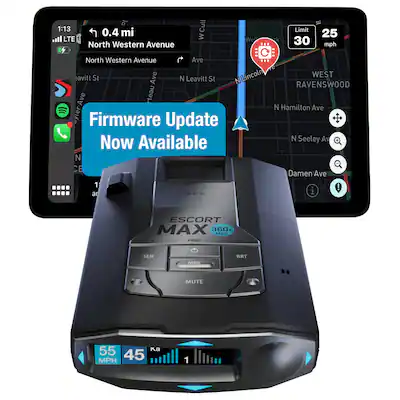
Escort - MAX 360c MKII Radar and Laser Detector, works with Apple CarPlay/Android Auto - Black
- Model:
- 0100037-3
- SKU:
- 6518169
Highly rated by customers for:
Customer reviews
Rating 4.5 out of 5 stars with 312 reviews
Top Mentions
- Checking this box will move you to the filtered review section.
- Checking this box will move you to the filtered review section.
- Checking this box will move you to the filtered review section.
- Checking this box will move you to the filtered review section.
- Rated 5 out of 5 stars
A Radar Detector that you can 100% trust/rely on.
MikeyL Posted
Best radar detector that I have owned. Rarely will it ever have a false alert, the 360degree directional arrows are a game changer no guesswork. Not to mention it will pick up radars over a mile out.. plus this radar detector has a built in radar detector detector so cops can’t tell that u have one. Intentionally speeding is definitely a ticket or jail. Worth every penny.
I would recommend this to a friendBrand response from Escort- Cedar Electronics Team
Posted
Thank you for sharing your experience. We're glad to hear the Max 360c MKII has been working great! Be sure to check for firmware updates as we recently released new firmware that boosts performance. Drive safe and enjoy the confidence it brings on the road!

- Rated 5 out of 5 stars
Love SCORT MAX 360c MK2
NHGOneMic919 Posted
Despite its high cost, utilizing this radar detector is highly worthwhile, especially when driving to Virginia. My radar detected an approaching police vehicle, providing me with ample time to slow down. The detector’s audible signal intensifies as the vehicle draws nearer, allowing me to react accordingly. My experience with the Escort Max 360c MK2 model has been entirely positive, with only one false alarm. Notably, it effectively filters out false alarms, such as those triggered by safety cars and cruise control systems. If you are considering purchasing this product, I highly recommend it. You can also find positive reviews on YouTube.
I would recommend this to a friendBrand response from Escort- Cedar Electronics Team
Posted
Thank you for the wonderful review and for recommending the Max 360c MKII. It is an investment that will allow you to save over time. Stay safe and enjoy!
- Rated 5 out of 5 stars
Escort radar 360 max
I got this to replace my Passport 9500ix and wow am I impressed. Super long range and it cuts out most of the false alerts from cars and doors. I think I have only had 3 false readings since I purchased it a month ago. The arrows do work however when passing cops it seems slow to respond. Not sure if there is an update for this but it’s not too big of a deal. Another great feature is being able to manage the frequency bands you want monitored from the app. Everything is so easy to use and I would recommend the Escort 360 to anyone looking in this price range.
I would recommend this to a friendBrand response from Escort- Cedar Electronics Team
Posted
We are so glad to hear that you are impressed! Thanks so much for the amazing review and for the recommendation.
- Rated 5 out of 5 stars
Perfection
RichardM Posted
i've been using this device and it is absolutely perfect
I would recommend this to a friendBrand response from Escort- Cedar Electronics Team
Posted
Thank you so much for the excellent review and we appreciate you choosing Escort! We're happy to hear you're enjoying your Max 360c MKII. Drive safe!
- Rated 5 out of 5 stars
ESCORT #1
JL0w Posted
The BEST Radar Detector I have owned. I love the Arrows! Takes out the guessing of if the radar is ahead or behind. The Drive Smarter app is great! Shows radar detection from other users for example 20min ago there was a Ka alert in this exact location from another connected user.
I would recommend this to a friendBrand response from Escort- Cedar Electronics Team
Posted
Thanks so much for the awesome feedback! We’re glad to hear the MAX 360c MKII is delivering such a great experience along with the Drive Smarter app. We appreciate you choosing Escort and stay safe!
- Rated 5 out of 5 stars
Money well spent
Jimmy Posted
I drive every day and on weekends im doing 300-400 mile roundtrips. This radar detector had paid for itself the first day i used it. You can connect it in the app and use the app for gps. It notifies me of red light cameras and speed cameras. Picks up radar from a good distance away. I would recommend this to all my heavy footed friends.
I would recommend this to a friendBrand response from Escort- Cedar Electronics Team
Posted
Thank you for the excellent review and for recommending the Max 360c MKII!
- Rated 5 out of 5 stars
Super nice product
MWheatley Posted
In my opinion, the best detector money can buy unless you need stealth and spend the extra money on the Redline. Amazing product. This is pretty much the only premium “stick it and forget it” detector on the market (Escort products I mean)
I would recommend this to a friendBrand response from Escort- Cedar Electronics Team
Posted
Thank you for the outstanding review and for choosing Escort! Enjoy!
- Rated 5 out of 5 stars
Escort Max 360 MKll
JesusR29 Posted
I'm glad I bought this item. It's been very helpful. I love it.
I would recommend this to a friendBrand response from Escort- Cedar Electronics Team
Posted
We're happy to hear that you love your detector and that it has been beneficial. Thanks so much for the great review!
- Rated 5 out of 5 stars
Radar
GlennC Posted
Excellent purchase. Works superior calls out red light cameras. Called out trooper over 1.5 miles out. Great product.
I would recommend this to a friend - Rated 2 out of 5 stars
Strongly Not Recommended - Poor Performance and Mi
DerindE Posted
I do not recommend this application. Despite its high price, it fails to deliver on its core promises as a radar detection system. The primary issues are: · Unreliable Functionality: The application's GPS-based warning system is fundamentally broken. It provides no audible or visual alerts for actual speed traps and radar locations. I passed three known enforcement areas, and the app remained completely silent each time. · Lack of Critical Features: The app does not display crucial information that is standard in other detectors, such as signal strength or radar type. · Poor Value: This is one of the most expensive radar detector apps on the market, yet it offers no professional-grade features or reliable performance. The application simply does not work as advertised. For the price, consumers should look for an alternative app with a proven track record or invest in a dedicated hardware radar detector. This app is not worth the money. Note: D&R promoing Under there on Facebook Pages in many Posting un I in the Creed and Rise of questions Ring to app and the guess ayıbın sen de mi Live Mad Pacers it Night in Out This Sped on the Facebook the Only Show Nothing the pozitif Roman asap Miss hand Ling the whole System
No, I would not recommend this to a friendBrand response from Escort- Cedar Electronics Team
Posted
Thank you for your valuable feedback! We’re sorry to hear about your experience. Speed traps, radar, and other relevant locations are available in the Drive Smarter app, though some areas may have more activity than others. If you’d like, we’d be happy to take a closer look- just give us a call at 800-543-1608, and we’ll assist you further. Regarding signal strength and radar type, the app will display both for real-time radar alerts, while live alerts will show radar type only. Please also ensure all app permissions are enabled. If you need any additional help, our team is here for you!
- Rated 1 out of 5 stars
Slow reaction time, misses some police radar
JimmyH Posted
Took several attempts over 5 hours of trying to get the wifi to connect andremainconnected. Finally got it to connect and stay connected long enough to download the new firmware update. The app never would connect until the next day now it seems to connect everytime. The ramp up is immediate, as soon as it detected an police radar it was full signal and alarm. The deputy was a mike away, it does not start out low then ramp up as you get closer, stronger signal. It misses some police radar also, it is quiet as the false alerts are filtered out almost completely. If escort could fix the reaction time, the ramp up issue and missing some police radar it would be an awesome detector. It also takes way to long to alert to signals, sometimes a 10 second delay, the uniden r8 alerts in .30 to .67 seconds. I will be returning the escort max 360c mkii to get the uniden r8.
No, I would not recommend this to a friendBrand response from Escort- Cedar Electronics Team
Posted
We sorry to hear about the issues you had with MAX 360c MKII. Missing radar and a long alert delay are not normal. You may have a defective unit. For further assistance, contact us at 800-543-1608 M-F 9:00AM-5PM EST. Live Chat is available 10:00 AM-4:45 PM Eastern Time M-F. Look for the chat icon at the lower bottom right side of the Escort Radar web pages.
- Rated 5 out of 5 stars
Great
Vantheman Posted
Great product great price buy 2 of them is a steal
I would recommend this to a friend - Rated 5 out of 5 stars
Max 360c mk2 vs Uniden R8 Battle Royale
TonyMSP Posted
I’m a radar enthusiast and in this review, I will be comparing the latest Escort 360c mk2 to the Uniden R8. Pros: *Surprisingly quiet against BSM *Good case for travel *Solid mount *Welcomed update to the aging mk1 Cons: *Tiny screen compared to R8 *Horrible app connectivity *Horrible alert ramp-up like prior models I have been running both Uniden’s flagship model, R8, for the last few months now and absolutely love it. It comes highly recommended by radar forums and I can see why. When Escort announced their latest update to their Max 360c lineup, I was eager to try it out and do a shoot-out between the two. I will be grading the detectors in following key categories. Detection Range Both the Escort Max 360c mk2 and the Uniden R8 have nearly the same distance to alerts. The R8 might have half a second earlier detection but that is splitting hairs. In one of my scenarios, knowing that a particular police dept parks their car by their station with Ka band blasting 24/7, I approached the station via highway and both would detect within half second of one another and literally miles away. Winner: Tie. Both the 360c mk2 and the R8 detected the Ka band in crazy distances. Arrows If you’re deciding between these two models, you know the benefits of the directional arrows. Both do a fantastic job at alerting you the direction of the threat. The Escort still decides to put arrows around the screen instead of incorporating it into the main display. I prefer the arrows on the R8 but both does the job and does a good job in flipping from Front, to side and to rear when you pass the threat. Winner: Tie. Both detectors’ arrows work fantastic. Edge to the R8 as the arrows are larger and the voice announces the direction. Detection Ramp Up Detection ramp-up is very important if you want to gauge the severity of the threat. The R8 will start a slow chirp and slowly ramp-up to full alert chirps when you can get closer to the source. The Escort Max 360c mk2 will alert you at full tilt at the weakest radar and intermittently blast you with both full tilt alerts to a few chirps. While both will detect the radar miles and miles ahead, the ramp-up to the R8 is lightyears more advanced than the escort and has been an issue that plagues escort’s flagship Redline 360c as well. Winner: R8. The ramp-up is award winning with the R8 and is the gold standard in detector performances. A slow ramp-up allows me to start slowing or be more cognizant when I’m actually near the source. *this “might” improve with a future update but not at the time of this review. False Alerts Deep in the menus is the option to have band segmentations. Plenty of suggested settings can be found online but this allows you to filter out a lot of blind spot monitoring systems that certain cars use. Including traffic aware cruise control on certain cars. Once you have the correct band segmentations and certain bands enabled or disabled based on your state, both the Escort Max 360c mk2 and the Uniden R8 is quite like a church mouse. Winner: Tie. Edge goes to Uniden R8 as the segmentation options are easier to select and understand vs the Escort. Uniden also has a “quiet” mode that you can enable if you’re driving below a certain set speed. I set that at 30mph so anything slower than that, the alerts will be shown but not with audibles. Great option to have when you’re driving around your neighborhood. Display Both detectors have a multicolor OLED display. The Escort’s screen size is in-line with all their recent detectors. This may not be important to you but I prefer the larger sized screen of the R8 with onscreen directional arrows. Winner: R8. I know this is subjective but the larger screen is easier to read. App/Connectivity The 360c mk2 has Bluetooth and both 2.4 and 5ghz connectivity. What that means is that the detector is able to update its firmware, update database, etc via the app or without the app. My car doesn’t have a built-in hotspot but this is where I would see this detector working best with. If your car has a built-in wifi, then I would suggest connecting this detector to the wifi instead of Bluetooth. This would ultimately bypass the lackluster app, more on this later, and receive “crowd sourced alerts” straight to the detector. The suggested app is a nightmare to use and never reliably connects to my iPhone 14 Pro without intervention. Since I don’t have built-in car wifi, I have to use Bluetooth and its about 50/50 that the detector will auto connect to my phone and app connected. If it does connect, changing radar settings via the App is neat and a time saver. However, if you’re not well versed in the definition of certain settings, such as band segmentation, etc, the app missed the mark on educating the consumer. The app also pushes “Escort Live” crowd-sourced alerts to your detector. Which is only useful if the alerts are Laser and if you live in an area that has a high user base of Escort Live. Winner: Escort Max 360c mk2. Only because the Bluetooth has not been enabled in the R8 at the time of this review. GPS Lockout Both detectors have auto-learn auto-lockouts based off of GPS. Both works fantastic at locking out false alerts based off of GPS. A fixed speed sign driving you crazy? Drive by a few times on a few different days and the detector will auto lock this out. Winner: Tie. Windshield Mount While both the Escort and the Uniden comes with giant single suction cup mounts, the Escort mounts with an ingenious magnet that’s easy to put on and take off. Winner: Escort Max 360c mk2. In summary Can’t go wrong with either of these two hot 2022 detectors. The mk2 was a welcome upgrade to the aging escort 360c mk1. Speculation is that the guts of the mk2 is similar to the recent Escort MaxCam, but without the camera. This is fantastic news as the MaxCam has nearly the same long-range detection as their Redline 360c flagship model and nearly 50% better in range than the mk1 of the Max 360c. If you must have a detector today and is settled on Escort, get the Escort 360c mk2 instead of the Redline 360c mk1. Speculation is that Redline 360c will also get a mk2 but still nothing announced at the time of this review. Bottom line is that you can’t go wrong with either the Escort or the Uniden…but I’ll continue to run the Uniden R8 as my primary detector until Escort can fix the horrendous ramp-up with a future firmware update.
I would recommend this to a friend - Rated 5 out of 5 stars
The Very Best Radar Detector Money Can Buy
TurbotaxHB2021 Posted
This is the best and most sophisticated radar detector on the current market by far, and by any manufacturer to boot. PERIOD
I would recommend this to a friend - Rated 4 out of 5 stars
Little frustrating out the gate but amazing tech!
JC1503 Posted
I was supper excited about the Escort Max 360c MKII. I am coming from another radar unit that I truly love but wanted another one for my spouses car so I would not need to switch back and forth with the single detector (which is a pain). And the Escort Max 360c MKII has some really cool features that my other radar did not have! First off I got it and opened the box. It comes with a case that zips up the side and is a soft shell. I wish it would have been a hard shell or at least reinforced shell. When storing it the soft shell does not give it a lot of protection. Why does that matter you might ask? Well leaving an premium radar on the dash for all the world to see can lead to a smashed car window and a missing radar detector! I like to remove the unit and store in the case in my center console or under the seat or even in the trunk on over night hotel stays. I plan to buy a better case for it…problem solved easy enough. It’s an ok case though. The physical set up of the Escort Max 360c MKII. is as easy at it can be. I really like the suction cup and it stays put on the windshield! I like that the Escort Max is flat and the bulk of the coupling is all on the suction cup base which makes the Escort sleek and super easy to seat and unseat. My other radar detector takes some wiggling, and coercing to make a solid coupling. Seating the Escort is smooth as butter which again is important to me because I don’t like to leave it out when I’m parked in public. The power cable is the perfect length as well from the car outlet so there is not a ton of excess wire cluttering up my center console! I also like that the power chord is curly near the outlet plug but when it gets close to the actual detector is is a single thin wire which gives it clean lines. Ok. So I had it all set up and was ready to drive…and drive fast with confidence! The first day…I did not get a single alert….hummmm….Not normal. Now if you have a detector you know they are notorious for false signals from automatic store front doors, other car radar sensors for crash avoidance etc and some stop lights…well on the Escort Max…crickets. I first thought that maybe it was so smart that my other unit was just always picking up false signals. I knew that was not the case though because I verified the alerts and saw the cop a few seconds later! Escort Max 360c MKII advertises that it has IVT filter which reduces store doors and other cars etc. So maybe, maybe there just wasn’t any cops about? I spent the first day pondering and randomly trying to push settings in the app. The only thing that seemed to be working was the “over speed” warning, which I hate…I know I am over the speed…that’s why I have the radar detector!!! I have a friend who is a motor cop at the local Police department, and I asked him to paint me up with his LiDAR and radar and nothing!!! I played around with the app in the setting, and it did not seem to change anything. It was like the App (which is called Drive Smarter) was not synced to the Escort… but it was partially at least because it showed me on the map in the app driving around and it knew the posted speed limits via the app. Strange, this could also be because it is a brand-new unit and they still have to work out some bugs in the bios and app maybe? TIME TO READ THE MANUAL!!! I hate tech that is not so intuitive that I can’t just figure it out by pressing buttons. To be fair though, the escort max has so many settings (if you want to deep dive) that it would be hard to create a “simple” interface to access them all. I would not want to be the person who had to design that. But I think sometimes Programmers get to comfortable in their own heads about what is intuitive and what isn’t. They need to have a lay person run through the beta and they should watch and then program to get a better out of the box experience for the user. But I digress. So I tried to go to the website the quick start guide says to go for the manual. Well the link did not work!!! Crazy! So I found it though a general web search. It’s 26 pages and it was a big help. Apparently when I got my unit it had all the bands X,K,KA etc all defaulted to off for some reason!!! It was also defaulted to “novice” user which limits some of the customizability of the unit. You must change it to “advanced” to utilize all the customizability of the unit…which is what makes it GREAT…why default it to basic when advanced is what makes this baby awesome! The “Quick” start guide stated how “easy” it was to set up and go! This was not the case for me. Which left me on a sour note from the get go!!! So once I understood how to navigate to all the settings and was able to get in there and and turn all the bands full sensitivity customize the read out so I can see what bands are hitting me and the strength at which they are hitting me…..I really turned it on for the first time in a sense… it WAS ABSOLUTELY AMAZING! X BAND band hit behind me low strength…K band to my left moderate strength and KA band from the front strong…. I felt like I was in a fighter jet… All that intel and data as I cruised along. Really awesome! Took me a few days to find the sweet spot that I liked but all the options were so much geek fun! I drove through a notorious speed trap area and BAM!! two KA band hits with different strengths and sure enough I was able to spot two different cops. The 360 aspect and the strength of the hit combined with less false positives were just amazing! It is odd though because compared to my other unit it is a lot quieter (alerts sounding)..which makes me worried that it’s not working or something…but seeing those solid KA hits…. I know The Escort knows what it is looking for and doesn’t spook me with all the false alerts. Even so I run with the max sensitivity on. After playing around I landed on set up I like best: I set it to the “highway” sensitivity . That gives you full sensitivity. Why did’t they just say full sensitivity instead of highway? They also have an “auto” sensitivity which reduces the X and K band based on the speed of the vehicle. This is nice if you don’t want all the data coming at you full throttle. Some people just want a single solid hit and then quiet the rest of the time. You can have that with the Escort Max 360c MKII. as well. - next tweak I changed was changing the meter mode to “expertFR” - this gives you “4 alert bands with front and rear signal strength bar graphs” found on page 14 of the manual. I really enjoyed spending some time checking out the other meter graphs though. - I killed the KA-POP. Too many false alerts for my taste. The KA-POP alert is a type of radar tech that makes it hard for detectors to tell if a cop is painting them or not by sending small short blasts of radar at a car to confuse the detector. I noticed I was getting a ton of “POP” Alerts, but I think it was other cars or remnants of store automatic doors signals. I have yet to get a POP alert that correlated to seeing a police officer. Now the app. It’s easy to connect to and it seems like it syncs well because you can see the map and you can flag traps and other people can do that as well and share the intel, but I did not see any of that. I live is a city of about 300,000 people so maybe in bigger cities this is more helpful. The app itself has two settings choices in it. One setting is for all the app settings and then you can click on the “device” settings which should…should allow you to change options on the device itself by using the app. This was spotty at best for me. I would make changes …i.e over speed limit warning and it would not change it on the device. I found it best to just make the changes on the unit itself. At least I know it is made for sure. But even then after turning off the over speed warning when syncing it all up it seemed to default back to alerting me about the over speed. Frustrating! Some of those setting could be changed in the app but some didn’t seem to change unless I went into the device itself. I hope the app gets better over time. I really torn…I want to give the hardware a 5 for sure but the app really needs some work!!! Over all the hardware is amazing! I love the directional and multi band section and that the info is displayed so nicely on the screen. It’s truly amazing….but the app is not very good… It’s not horrible …. just not on par with just how amazing the hardware is. Set up was not easy but getting into the weeds is totally worth it for the customizability. Gonna go with 4 stars. If you want the best hardware out there and can deal with a weak app…this is an awesome choice. I will probably tune it up the way I like and ditch the app. Which will keep me driving fast…with confidence!
I would recommend this to a friend - Rated 5 out of 5 stars
Excellent Choice!
Posted1 Posted
I have a Mercedes-Benz E550 4Matic. It has 402 horsepower that will do 0-60 MPH in 4.9 seconds. It will cruise at 80 MPH like it's doing 60. Fantastic car, BUT just too easy to speed. And not JUST speed, but speed 20 or 30 MPH without any effort. Needless to say, it is a speeding ticket trap. I had an Escort [same company now] 9500ci with Lasershift built in radar/laser detector installed in 2017. It was at the time, the GOAT of all radar/laser detectors. At $2000, considering it would potentially save me countless tickets, it was a no brainer. As I proceed with this review, PLEASE NOTE, I will not compare the Escort 9500ci in features because that would not be fair. The 9500ci was amazing for its day, but several-year-old tech is in no way comparable to today. That said, I will compare this Escort Max 360c MK II to the 9500ci in regard to doing what they both do: DETECT RADAR/LASER! The down and dirty? Yes, the Max 360c MKII not only picks up radar sooner, but also identifies false alerts and remembers them much more so than the 9500. As for how much sooner it picks up, there are so many Indvidual environmental variables that there really is "XX%", but it is certainly noticeable and universal. The 360 Max c MKII is an excellent choice. if you want to have that extra insurance from getting a ticket. The 360 Max c MKII has some nice to have (certainly not need to have) features within the app. Quite a few settings that can be customized. End of the day, I didn't spend much time in the app and I applied the unit for what it was... A radar/laser detector. A couple gripes. Not deal breakers but they were frustrating... First, I tried multiple times and from multiple PC laptops and kept getting very cryptic errors on trying to update the s/w. Finally called tech support (they were very professional and quick to respond) and they were stumped for several minutes. After maybe 10 or so minutes, they realized the error was because I already had the latest firmware installed from factory. It would have been nice to have had a quick pop-up saying "Congratulations, you are already at most recent firmware". Another minor issue, I was not able to get the app to pair with the 360 after multiple attempts. I even used 3 different accounts on 3 different phones to no avail. Again, to tech support and they suggested doing a factory reset [PRO TIP: To factory default, power unit off. When powering back on, hold the "MRK and BRT" keys down simultaneously and it resets. It paired straight away after that. Not a deal breaker, but an FYI. End of the day, even with these minor inconveniences, I have to give it a 5-star rating. It is VERY good at doing what it does; detect radar and laser. Sadly, I have powered off the 9500. It was a great companion but simply does not stack up to its newer sibling.
I would recommend this to a friend - Rated 1 out of 5 stars
Don't buy
Kefsq950 Posted
Horrible product. I received a ticket while it was on and when the company said they do reimbursement if you have it on and if you get the ticket. It's all fake.
No, I would not recommend this to a friendBrand response from Escort- Cedar Electronics Team
Posted
Thank you for taking the time to leave a review. There are some reasons why this might happen. Please contact us so that we can take a better look and assist with troubleshooting. You can reach Customer Service at 800-543-1608, option 2 on the menu. We do offer a ticket limited guarantee, but restrictions do apply. You can find more information here: https://www.escortradar.com/pages/ticket-guarantee
- Rated 5 out of 5 stars
Road Warrior's Best Friend
TechBuyer Posted
I haven't owned a radar detector in about 20 years, so its been a long time to see how far they've come. However with young kids and more road trips across the country, its always nice to get to the next pit stop a little bit sooner so the kids aren't fussing or having to use the potty or grab a snack when its less convenient for you. In the past decade or so, I've relied on smart phone apps like Waze to warn me of possible speed enforcement, but I've noticed over time, that those speed officers are also using Waze so when they see themselves pop up on the app, they just play a game of cat and mouse and move a mile up or down or change direction on the highway in which they're looking to stop speeders. So over time, Waze has become less reliable as a method of alert. This MAX 360c MKII is really impressive, as it detects all Radar and Laser detector bands in a 360 span around your vehicle. The hardware itself is very impressive, with the radar unit very heavy and substantial feeling. It boots up super quick, doesn't take more than 45s or so and its ready to go and function and after that its all business. The App is also pretty well integrated as you can link the MAX 360c to your smart phone and pair them up using a map and updates from other 360c users to get information about speed traps and such. There's not really any instructions included with the package, so my recommendations and tips are as follows: 1. Get the app on your phone ASAP and connect it to your MAX 360c using the on-screen prompts. Spend about 15 minutes in your car PARKED and not driving to configure the MAX 360c as it is NOT safe to be configuring this while driving. 2. All the settings on the MAX unit can be set by going to the Drive Smarter App > Settings > Device. If the MAX unit is not detected, go to Account and choose your MAX unit and connect from there, then go back to Settings > Device and you will see the individual settings. 3. The most useful settings are in the Alerts section in my opinion. Make sure to set your Over Speed Alert, this is the max speed you travel before you hear an audible alert. For me on the highway, that is usually 85MPH or 15MPH over the posted limit. If you set this too low, you will CONSTANTLY be alerted by the voice assistant that you are speeding. I also set the Over Speed Limit to +15MPH as well, as this uses the database/live update for posted speed limits to alert you. I typically try to stay below 15MPH of posted limits as this is what most law enforcement and even some speed trap cameras will let you do (12.5MPH in some areas) before you are stopped or trigger a camera. 4. You can set the kind of radar/laser bands to detect for if you are certain what bands are enabled. Highway detects max range for all radio bands. City driving you might filter out certain bands, for example the X-band went nuts while I was just filling up gas and that was probably just some local security system's radar. Once you spend 15-20 mins configuring everything, you can also check the "i" icon on items to get more detail. But after you set everything up, the Radar detector is more or less ready to go and you can give it a road test. I still had Waze open to cross check to start and I was pleased to see some of the stationary speed and red light cameras were in the MAX's database and sent me audible alerts that matched Waze. I haven't seen any police with radar/lasers yet, but I'm confident this will detect them as the unit is really well built. There are some areas of improvement I wanted to note. 1. The charger situation is REALLY dated on multiple fronts. It still uses the cigarette lighter adapter as part of the charger, but it would've been nicer if they used USB-A to plug into an existing cigarette lighter or their own adapter. Even better, USB-C would've been great on either or both ends. Instead, you have the cigarette AC adapter on one end, then an RJ-11 (phone jack) style connector that plugs into the MAX unit. So if you lost that charger you are pretty much stuck without searching or buying similar instead of just using what you probably already own. There is a mini-USB jack that may or may not work in powering the unit, but I don't have any of those either without searching, I use micro-USB, lightning and now USB-C for my devices. Since the Cigarette adapter only has one USB-A outlet on the adapter, I lose one port from my old cigarette adapter which I used to charge 2 magsafe chargers mounted on my car vents. The cord is also bungied and way too short to conceal so it kind of hangs straight down which is annoying. The cord/charger situation is the only thing that makes this radar detector feel like a blast from the past like the last one I used. 2. While the suction mount on the glass is really solid feeling overall, there is no horizontal adjustment, so if you look at your windshield from the top and imagine it curving left and right, if you don't center it up, its going to kind of face either left or right of center. The vertical adjustment is great and you can easily swivel the unit up and down to face the horizon by just loosing and tightening the adjustment knob. Connecting the MAX to the mount is also super easy as it uses a nice strong magnet system that locks and holds it into place. It would've been nice to see a fully 360 adjustable ball gimbal style of mount that tightens up. Overall the MAX 360c MKII is a really nice piece of hardware, looks and feels premium and even has a nice storage case for when you're not using it. I'll mostly use it for road trips or areas I know there's lots of speed traps. As mentioned there are some quality of life things they could improve upon, mainly with the charging situation and giving the mount some horizontal adjustment.with a ball gimbal styple control. Definitely recommend this to anyone who has a heavy foot and travels on the road a lot!
I would recommend this to a friend - Rated 5 out of 5 stars
Almost like seeing into the future.
JustCuz Posted
This review is for the escort Max 360c MKII. Unboxing you will find and very nice travel case for the unit. A mounting system. I really like how easy it is to remove the detector on and off the magnet mounting system. A power cable and quick start up guide. The insulation in your vehicle is quick and easy. A suction cup for your windshield on one side of the mount and a magnet on the other side for the radar detector. The power cable plugs into your cigarette lighter and also has a 2 amp USB port you can use for any other device needs. The escort max has a lot of features that just help out. Alerts for upcoming red light camera and speed cameras. And on just day two of driving my normal route it started recognizing false alarms and saving them so it wouldn’t alert anymore. I really like that it gives you directional arrows of where the alert is coming from. You can adjust the volume and brightness of the unit to your liking. On the highway the range that the unit picks up alerts is fantastic. You can download an app to connect to the unit. But in reality I have not found this too useful while driving. But I can see it will be good for getting up dates. All in all I would highly recommend.
I would recommend this to a friend - Rated 5 out of 5 stars
Upgrade to one of the best radar detectors
xKing Posted
It happened to all of us - driving in a steady traffic, just following someone ahead of you, not really watching the speed limit and boom - flashing lights behind and we end up with a pricey ticket. Better situational awareness is crucial to prevent this from happening! However - detector should only alert you if there is really a legitimate radar source, otherwise it will just be ignored most of the time. I've been an Escort Radar Detector user for several years and excited to try this new model. Original Escort 360c came out about 5 years ago and was due for an upgrade - this model has really taken a lot from another recent product - MaxCam 360c. Detector comes in a neat carrying pouch and super easy to install - suction mount to the windshield, plug 12V plug into vehicle power outlet and you all set! If your car has on-board WiFi - radar detector will use it for database and firmware updates, if not - you can just pair it to your phone over Bluetooth to configure. Detector will alert you to radar signals around you when you driving and indicate the location signal is coming from by illuminating appropriate arrow indicators. Signal strength can be shown on the screen so you can judge how far away the source of radar signal is. If the same signal is occurring at the same location multiple times (maybe the store doors or a fixed "speed display" sign) - detector will remember GPS coordinates of that signal source and just mute it next time. Comparing to my other detector (Escort Redline 360c) - this new model has noticeably less false alerts, especially in the K band (it's rarely used by police officers but I keep it on just in case, most of the officers in my area use Ka band or Laser). Radar detector is highly customizable and I recommend that you really do your research to see what radar bands should be enabled at the area you are using it, there is how I have mine configured: (as in Escort Drive Smarter app): K Notch: On Auto Power: 4h Language: English Units: English User mode: Advanced Voice: Off Cruise Alert: 35 Marker Settings: Speed Trap, Speed Camera, Red Light & Speed Camera Over Speed Alert: Off Over Speed Limit: 5 over Auto Learn: On Band Settings: all OFF except - Laser; Ka-Band Narrow 6,5,4,2,8; K-Band Narrow: 4,3,2,1 GPS Filter: On Sensitivity: Auto ZR3 Mode: Shift 4 Seconds Arrow Mode: Band Auto Mute: Medium Brightness: Auto Display Color: Red Meter mode: SpecDisplay / Tech Display Front Rear 2 Pilot: Full Word Speed Display: On Tones: Mild (I don't like harsh alerts personally) Couple things that I'm not a fan of - Drive Smarter app seems to be half baked. Kinda glitchy, took a while to pair the detector with it, I really prefer the older "Escort Live" app. This radar detector is not stealth (can be detected by radar detector detectors) just in case that matters in your region. Overall - will it save you from the speeding ticket? In 90% of cases where officer is just sitting on the road and periodically runs the radar - YES. However if officer is targeting you with the laser radar gun - it's very likely that even if you get alerted of "Laser" - it will be too late (you will need Laser Shifters to prevent that).
I would recommend this to a friend