Customer Ratings & Reviews
- Model:
- TW-Q200DCHG
- SKU:
- 6576703
Rating by feature
- Value
Rating 4.5 out of 5 stars
- Quality
Rating 4.5 out of 5 stars
- Ease of Use
Rating 4.4 out of 5 stars
Customers are saying
Customers enjoy the Q200 2K Front & 1080p Rear Dash Cam with GPS and Wi-Fi for its excellent video quality, overall performance, and ease of use. Many appreciate the GPS feature, parking mode, and discreet size, as well as the straightforward installation. However, some customers have noted concerns regarding app connectivity and the absence of a screen. Additionally, a few users mentioned the rear camera might require some extra attention.
This summary was generated by AI based on customer reviews.
- Cons mentioned:App connectivity
Dash cam
||Posted . Owned for 2 months when reviewed.This reviewer received promo considerations or sweepstakes entry for writing a review.Don’t like it , always have issues with app . Won’t recommend to anyone waste of money
No, I would not recommend this to a friendBrand response from Thinkware Product Expert
Posted .We apologize for the inconvenience but is it not connecting via bluetooth pairing? You can reach out to us via email or phone at support@thinkware.com or 1 (844) 865-9273 so we can assist you further. Thank you!

- Pros mentioned:Video quality

Top notch two cam system
|Posted .This reviewer received promo considerations or sweepstakes entry for writing a review.The Thinkware Q200 front and back combo dash camera system is not the first system I have had in one of my vehicles. In fact, I have had dash cameras in both my cars for the last 7 years and they have helped me out a few times. I am a firm believer in the importance of documenting your driving, and if for no other reason at least it documents the crazies out there. That said, this is the first time I have had a front and back camera setup. To start, before you install the camera system you need to make sure it will work on your vehicle. If you are on the Best Buy website and look at the Q200 page, it will have an option at the top of the page to enter your vehicle identifiers. I have a 2020 F-150, and it will work on my truck. Out of the box the camera looks and feels substancial. It comes with all the cords you need and they are long enough to actually use. I say that because I have had cameras that would not reach around the front window of the car (I was wiring it so the wires were hidden) and the wires were exposed. Sort of like the old radar detectors. But with this everything is perfect. So I will kind of just go by the numbers here, and go from the front to the back and talk about the features I like the most. Front camera: The front camera has a fairly wide angle lense, but with the width you are not getting any associated distortion. I think the literature says it is a 125 degree angle for the lense. It is also 2K, which I think is the equivilant of HD. It has a built in microphone and speaker in it. I never like to have the microphone on, as if I am on the road and something happens, but vocabulary tends to get a bit more "colorful." But it is smart to have on as you can describe what you are seeing as an event happens. For instance saying a license plate number in case the camera is not picking in up. I have it attached to the back of my rear view mirror. Also an important note is that is works well in day or night. Yes, that means it has night vision. Back Camera: The back camera is not quite as sharp, but that just means lower on the HD video scale. Still shoots great video and it was super easy to install as well. Another cool feature is impact detection mode. So if you are parked and you are out of the car, it will record for a period of time to watch what is happening. Front and back cameras. It then saves the footage automatically. Also, there is a driver's assistance mode too. The video quality is excellent and the integration with the app is very user friendly. Once you get things set up, it is really easy get started with the app and manage everything right from your phone. Worked great on my iPhone 15, so I cannot speak to android users. At the end of the day, I was expecting a dual camera system that has decent video quality and a user friendly app. I got way more than that. There are more features for sure, I am just speaking to what I used so far as well as what features impressed me. So if you want a great camera system with solid vehicle integration and tons of extra features for a reasonable price, look no further. It take a little bit of work to get it installed, and may take longer if you have never done something like that before. But once you get it done, it is really a good "eye witness" to all the crazy things that happen on the road. You never know, so you might as well protect yourself. I recommend this for anyone that is looking for a two camera system for their car. Tons of bang for your buck
I would recommend this to a friendBrand response from Thinkware Product Expert
Posted .Hello, thank you for taking the time to write to us a feedback.
Nice camera, great service.
||Posted . Owned for 2 months when reviewed.This reviewer received promo considerations or sweepstakes entry for writing a review.This camera is useless at all, yesterday I went to the store to help me and they told me that they could not do anything, that going to the workshop would cost me 100 more.
No, I would not recommend this to a friendBrand response from Thinkware Product Expert
Posted .Hello! We apologize for the inconvenience but if you need help with the dash camera, please reach out to us via email or phone at support@thinkware.com or 1 (844) 865-9273 so we can assist you. Thank you!
Patricia
||Posted .This reviewer received promo considerations or sweepstakes entry for writing a review.It doesn’t work as I expect, I come back to the store to returned, they did not want to give me the money back just store credit because the return was over 15 days, I bought it the 10 and I returned the 30. I thought I have 30 days to return it.
No, I would not recommend this to a friendBrand response from Thinkware Product Expert
Posted .Hello Patricia, we do apologize for the inconvenience that this has caused you. Upon purchasing the item, was there a brief explanation regarding the return and refund policy?
Not recommended.
||Posted . Owned for 3 weeks when reviewed.This reviewer received promo considerations or sweepstakes entry for writing a review.Returned it to Bestbuy. Did not work right. GPS would not connect. Safety features,although I did not need them ,did pay for them.Also ,they don't tell you parts required subscription. Support is lacking .
No, I would not recommend this to a friendBrand response from Thinkware Product Expert
Posted .Hello James, we do apologize for the inconvenience. Q200 doesn't require any subscription to work. If you are still willing to know more about the Q200 features, please don't hesitate to reach out to us so we can clarify for you. Email or phone at support@thinkware.com or 1 (844) 865-9273 so we can assist you. Thank you!
- Pros mentioned:Installation, Video qualityCons mentioned:Rear camera
A solid companion for your daily drives
|Posted .This reviewer received promo considerations or sweepstakes entry for writing a review.I just recently got this Thinkware Q200 dual dashcam, and I can say it's a very good contender in the market, particularly for those looking for comprehensive road coverage. While it may not be the very best, it stands its ground for the price. What I like about this device is that it has robust construction and brings HD video with clear recordings. The installation process is simple enough to accommodate those without deep technical expertise - such as myself. It comes with an app that manages things but like what other reviewers have mentioned, an update to modernize the app would be beneficial. The app does its job so I didn't care much. I also didn't care much that the box did not include a manual but only a QR code you can scan to go to a website where you can find the details. The one thing I needed help with is installing the rear cam. Yes, it's a pain, the cable is long and I had a hard time hiding it. I had to ask my dad, who knows about cars, to assist me. The rear cam itself is also a bit tricky to install on my SUV since the window is part of the door so when it opens, we have to make sure the cable is not too tight, just loose enough to open the door comfortably. After everything is set up, the dashcam does its job silently, with cool add-ons like crash alerts and lane warnings. Although I wish it has an LCD screen so I can easily see the footage real time. To view the videos, I get the SD card from the device and insert it into my laptop - another option is to view them via the app. Perhaps an improvement in the future could be cloud storage so access to the videos will not be as much hassle. The video quality is exceptional at daytime, but quality decreases slightly, as expected, at night and particularly when driving in low lit areas or when the weather is poor. So far so good, the dashcam does the job well, reliable, and I am feeling more secure knowing that my daily drives are being recorded, as well as when the car is parked - very important feature for me as I usually use street parking in busy urban areas. Just the peace of mind on the road it provides makes the investment worth it.
I would recommend this to a friendBrand response from Thinkware Product Expert
Posted .Hello, thank you for taking the time to write to us a feedback.
Garbage
||Posted .This reviewer received promo considerations or sweepstakes entry for writing a review.Bought this device today. Dash cam will not connect to my phone. I've powered both the dash cam and my phone off and on multiple times, pressed the buttons, gotten the blinking blue light. NOTHING.
No, I would not recommend this to a friendBrand response from Thinkware Product Expert
Posted .Hello! We apologize for the inconvenience but regarding this, please try disconnecting other devices connected on your bluetooth settings or you can reach out to us via email or phone at support@thinkware.com or 1 (844) 865-9273 so we can assist you further. Thank you!
- Pros mentioned:Gps
Thinkware Q200 2 channel
Posted .This reviewer received promo considerations or sweepstakes entry for writing a review.My first dash camera purchase. It’s okay, but not exactly what i was really looking for and disappointed. The camera cost $212 w/tax, hardware $32 w/tax and $99 installation. It did come with a 32g micro sd card. I purchased an additional card with more memory, total cost about $400. The files are only available to see and download to your iPhone or computer though the app and sd card while you are in vehicle, car running and camera WiFi turned on. Does not have the ability to view remotely from your device when not in car and car camera wif not turned on. It does have the parking mode and will capture any incidents when parked, but you are unable to see files or pictures remotely. Only able to view and access the sd card while in vehicle, car on and camera wifi on or trmove card and downloaded to your pc with a sd card reader. I am disappointed. I was looking for a car camera with front, rear and side views with the ability to view remotely on my phone through an app or website when not in vehicle without a paid subscription. The camera is okay if looking for a camera to record while driving, but not a good option if desire a camera with remote access and better security options when not in vehicle.
No, I would not recommend this to a friendBrand response from Thinkware Product Expert
Posted .Hello, we're very sorry to hear about your expectations. As advertised, Q200 doesn't support remote live view or cloud features. It shows all the specifications and features so that the customer will have am insight into the dash cam's capabilities and features.
- Pros mentioned:Video quality
Entry-level dash cam with advanced camera features
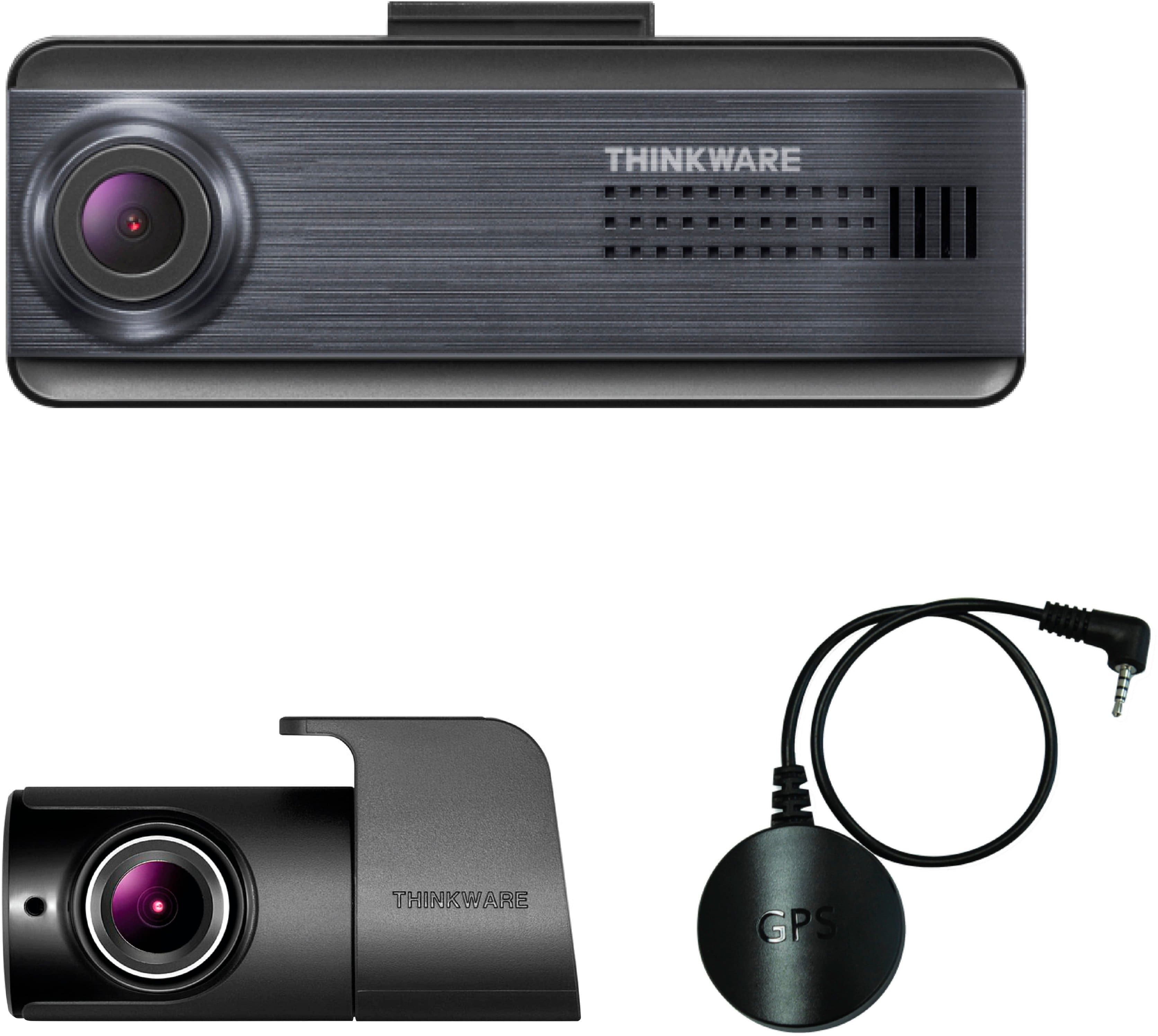
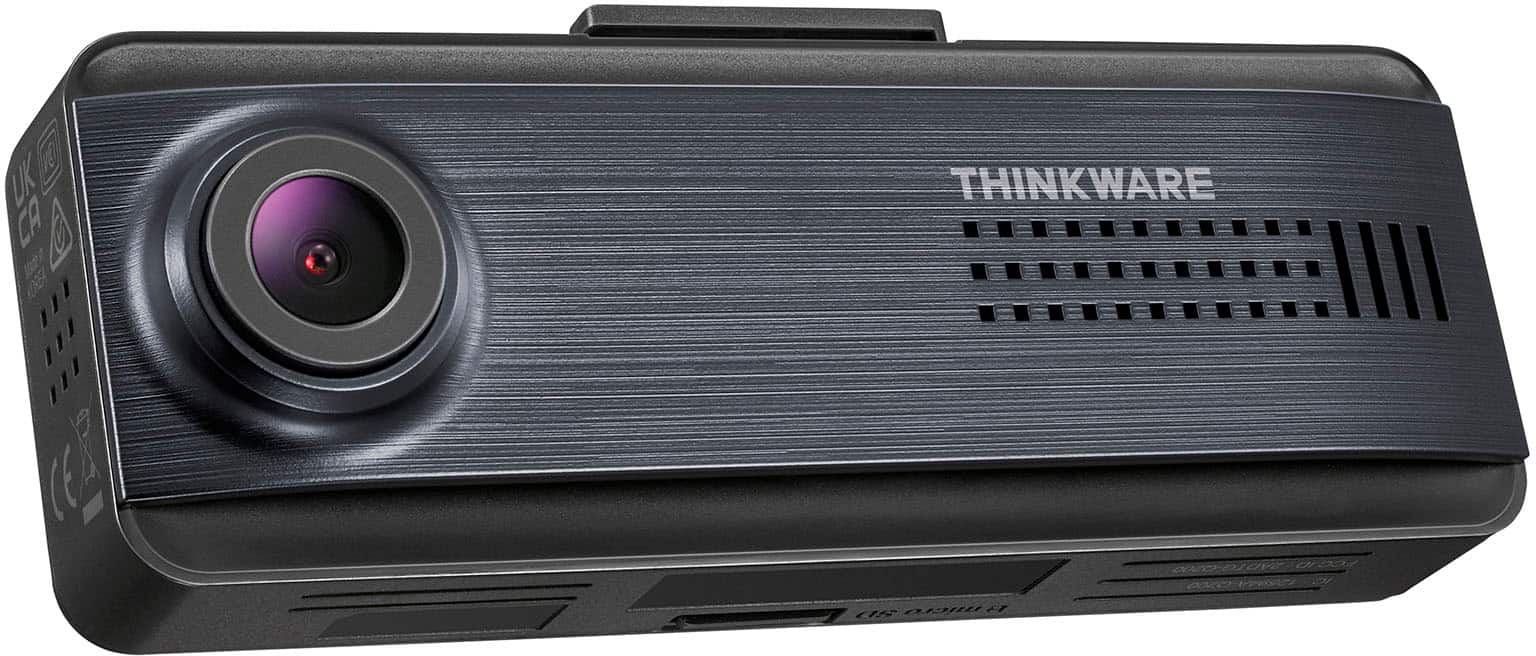
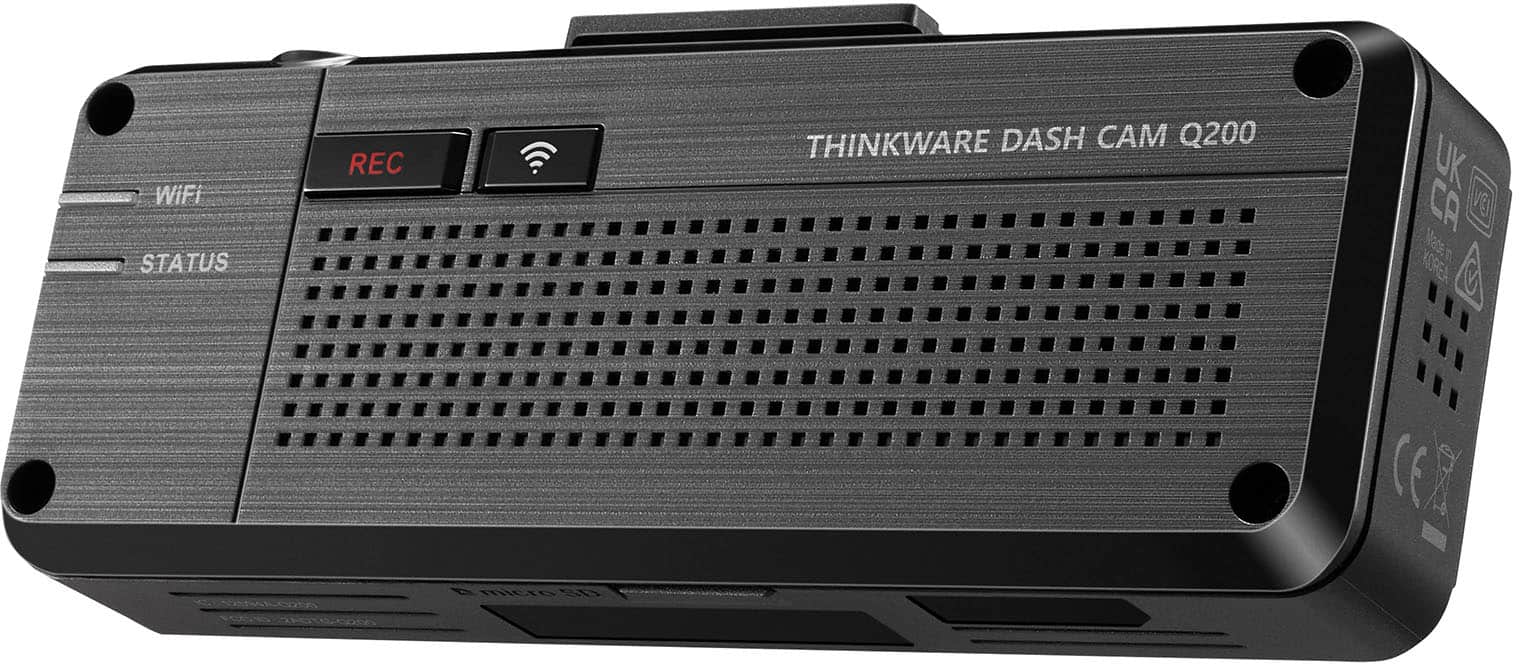
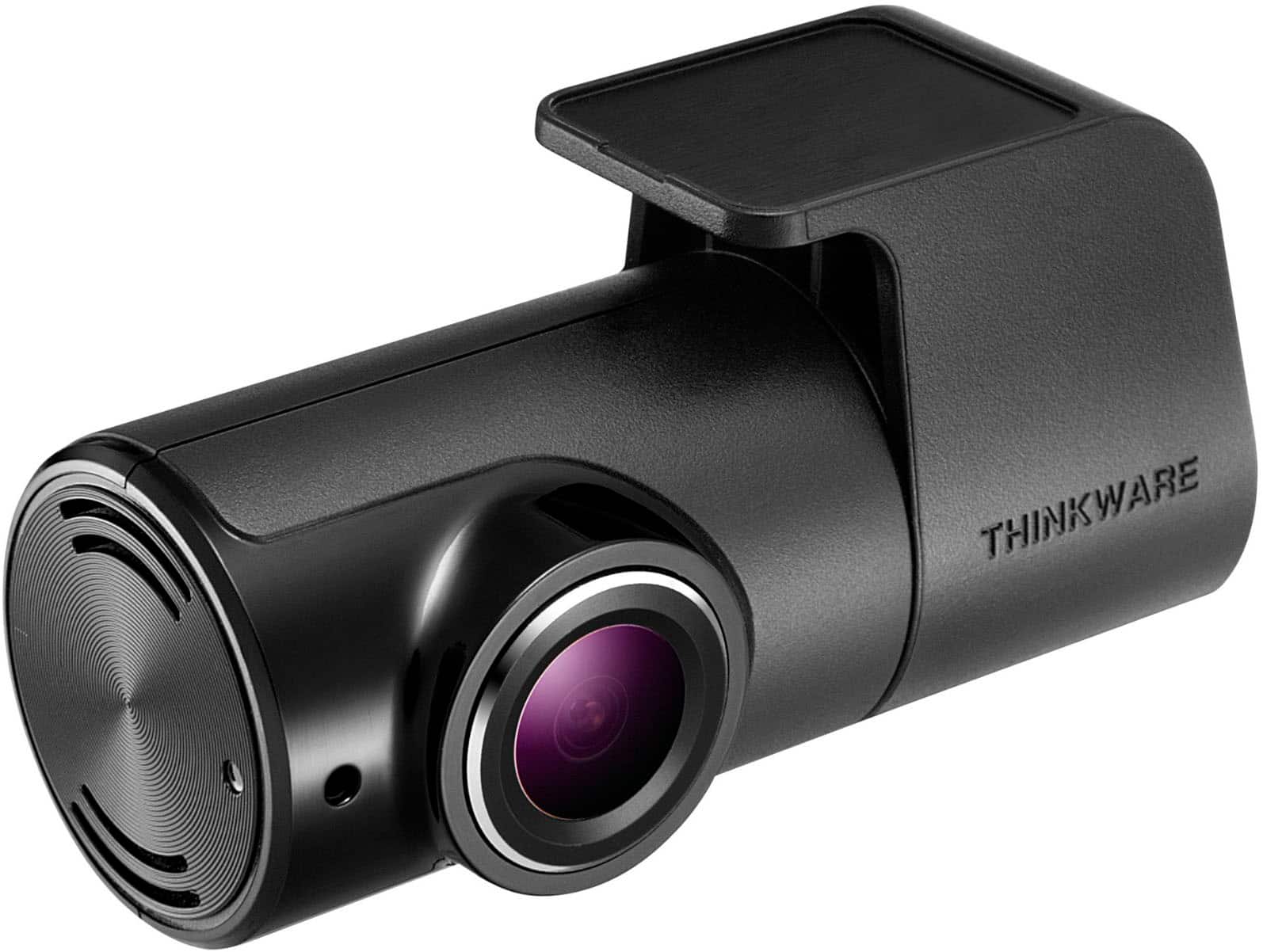
|Posted .This reviewer received promo considerations or sweepstakes entry for writing a review.First impression: My first impression of the Thinkware Q200 Dash Cam is that it is an attractive, well-made dashcam. It is packaged well, and the packaging is very efficient, and it contains a lot of things in a small box. The Q200 is an upgrade to the F200Pro; it is the new entry-level 2-channel model. Even though it is an entry-level model, it is packed with features not included on others entry-level line. I was quite surprised that with the 2-channel kit, they give you everything you need to install the two cameras, including a GPS, the permanent hardwire power cable, the OBD II power cable, and a 32 GB micro-SD card. In most kits, those are all optional purchases. The Thinkware Q200 is a clean design, meaning that it doesn’t include a lot of buttons or a screen. This is because the dash cam is configured and controlled by the app, reducing the body buttons to a record button and a Wi-Fi button. The lack of a screen is a first for me with dashcams, and I found that I prefer not to have the screen. I didn’t realize how distracting the screen was before, now I don’t even think about it, but the protection is still there. Specifications: • Front Resolution 2K QHD @ 30 fps. • Rear Resolution 1080p Full HD • Front Image Sensor 4MP Omnivision OS04C20 • Rear Image Sensor 2MP CMOS sensor FHD. • Viewing Angle 125° front and back. • Super Night Vision 2.0 • Parking Surveillance Mode Smart Parking Mode, • Capacity up to 256 GB What’s in the box: • The front camera. • The rear camera. • External GPS. • Front camera window mount. • 12 VDC power cable. • Hardwire Cable. • Interior Infrared Camera Cable. • Rear camera cable. • Spare mounting tape. • 32 GB micro-SD card. • Cable clips. • Trim tool. Features: • Super Night Vision 2.0: Enhanced video brightness in low-light conditions. • Wide Dynamic Range: Color balance adjustment in strong sunlight. • Smart Auto Exposure: Adjusts the exposure to record clear footage in strong sunlight. • De-warping Video Technology: Minimizes image distortion caused by a wide-angle lens. • Parking Surveillance Mode: capture video evidence while your vehicle is parked. • Smart Parking Mode: Prevents heat damage by switching the dash cam to low power. • Energy Saving Mode: Records footage triggered by impacts only to reduce power use. • Time Lapse Mode: Records footage at 2fps, allowing extended periods of video storage. • Motion Detection: Initiates a 20-second recording when there is motion or impact. • ADAS: Safety systems that aid a driver while driving. Dash Cam Link App: The setup and configuration of the Q200 is done through the Thinkware Dash Cam Link App. The app can be downloaded through your phone app store, or through a link on their website. With the app, you can manage your dash cam, such as configuring the various cameras, micro-SD card, recording, and road safety settings. You can view videos in real-time and download or delete videos on your smartphone, all without having to remove the micro-SD card from the dash cam. The settings mode in the app is extremely detailed. You can adjust every setting for every aspect of this system, including both cameras, the micro-SD card, and the GPS. And if you get into an accident, the app will allow you to create clips of the accident right there on the spot for your protection. GPS: The GPS is an optional unit unless you get the 2-channel kit, then it is included. It is not required for dash cam operation but adds features to your recorded video such as recording the speed you are traveling, your location, distance traveled, and speed/redlight camera warnings if you download the database from Thinkware. You can opt to have all of this information displayed at the bottom of the video. This could help you if you are in an accident by showing you weren’t speeding or driving recklessly. Performance: The quality of video produced by the front camera is better than average for a 2K camera, especially an entry-level 2K camera. I expect this is due to the Wide Dynamic Range and Smart Auto Exposure features. The video is smooth and clear, and the colors are better than any dash cam I have used in the past. It is easy to read the license plates of vehicles in front of you, provided they are not too far away. And at highways speeds, there are no signs of noise of motion blur. On very bright sunny days, you can still see reflections of the dash and the front windshield. This is not the camera’s fault, but intense light creating the reflections. The camera is just picking them up. If you live in an area that deals with bright sunlight, like here in Florida, the optional CPL filter reduces glare and improves the video in bright sunlight situations. Even in cloudy, overcast, or rainy conditions, at highway speeds, the front camera is fully capable of capturing the license plates of the vehicles in closely front of you. When the vehicle in front of you is a few car lengths ahead of you though, it is more difficult to see the license plate clearly. The colors are natural and there aren’t any dark areas or shadowing due to underexposure. Thanks to the Super Night Vision 2.0 technology, the front camera has excellent night vision. Bright lights such as headlights and emergency vehicles still have fuzzy video, but that is to be expected with a 2K camera. Vehicle make, model, license plate, and even color is easy to see at nighttime. The rear camera does a really good job for a 1080p camera. The image is clear and the colors natural. While it doesn’t have the clarity and capture of the front camera, it does a great job as a rear camera. Both the front and rear cameras provide clear and smooth video. The Thinkware Q200 comes with a 32 GB micro-SD memory card. I was getting less than an hour of recording using two cameras before it started to overwrite. The Q200 can use cards up to 256 GB If more space/time is required, and I recommend upgrading to a card with more memory to be able to keep more video. Speaking of the micro-SD card, one feature of the Q200 that I really like is mounting the micro-SD card at the bottom of the camera. On my dashcam in my other vehicle, to get video off of the camera, you have to remove the card. And unfortunately, that means removing the camera to get to the card. With the Q200, you can easily remove the card from the bottom of the front camera. Conclusion: I think it’s obvious that this is not an ordinary entry-level dash cam. While the price is definitely entry level, the features are not. The quality of the recorded video is good for an entry level camera, and the features included with this camera are definitely above most entry-level cameras. If you need a high-quality camera at a good price, and you don’t need to read license plates on vehicles at a distance, then I highly recommend this dash camera.
I would recommend this to a friendBrand response from Thinkware Product Expert
Posted .Hello, thank you for taking the time to write to us a feedback.
- Pros mentioned:Video quality
Advanced app controls with basic hardware
|Posted .This reviewer received promo considerations or sweepstakes entry for writing a review.I have been using this dashcam for close to 10 days now so this is not an early assessment. I have had a dashcam from Yi and a 1080 Dashcam with ADAS from Transcend in past so that is what I will be using as a reference point. First the negatives. The setup could have been much better, There were no paper instructions in the box and the scanned QR code took me to a link which did not work, so off to internet I went. As there is no screen you will need to download an app on your phone. There are a couple of application from Thinkware in play store but the one you need is "Thinkware Dashcam Link", this was also not mentioned on the box or inside the box. If you also have the GPS connected and want to grab the micro-sd card to watch the footage in the PC, it shows the GPS sensor data over the video instead of actually calculating speed from that data. The same works fine in the Phone App, which I am guessing is calculating it on the fly. There is a PC app which shows the GPS speed correctly but unfortunately ask for administrator rights every time it is launched. The app does not offer much customization with the volume, there is a welcome message at the start, and I could not find a way to disable that unless I turn off the volume but when I turn the volume off, I am also turning off any advance road safety features. There is no volume button on the device itself, but you can turn off the voice recording if you hold the recording button. Do note that the manual states that "Select the desired volume level for each feature (Safety Cameras/ADAS/System)." but the app itself just shows on and off. Done with the negatives, lets continue with the review. It is a small device which can easily hide, if you want you can add a GPS module to it and the rear a rear dash cam. I got the full package along with the OBD2 cable but I have not yet explored the parking features, I will update the review once I get to that. The video quality is good but not great, my Yi 2k dashcam looks similar but that is probably 7+ years old. If you use the super night vision it shows shimmer in daytime video. I did not like that and have turned it off. You CAN see the number plate clearly from the front camera. I tested ADAS and noticed that the feature which tells me that the car ahead moved works reliably. I am yet to hear a beep for lane change and I did try lowering the speed in the settings. My Transcend dashcam does it every time I change the lane and I hate that, so I am not sure if Q200 is just smart or not working at all. Do note that the manual states that, "To use the road safety features, you must install an external GPS receiver". I do not drive a lot now days so have not yet tested the parking features, but I will update when I will. It came with extra mounting tape for both front and rear dashcam with a long enough cable for both power and rearcam. The rear cam can rotate if you need it to record inside of the car. Build quality of the camera and the accessories is good. It is a good setup, with lots of options in the App, I think what makes it a bit lackluster is the camera lens itself, it is really basic even when I compare it to the dashcams I have used in the past. The PC apps can change the settings of dashcam, which should mean that they are saved in a file on the MicroSD card. I think it is a good entry point if you want to do more than just the very basic dashcams in your car, with front cam capable of recording plate and more than decent in App control with some really advanced features like parking mode. I really hope thinkware will bring the volume option in the app in future.
I would recommend this to a friendBrand response from Thinkware Product Expert
Posted .Hello, thank you and we appreciate your time to write to us long feedback.
- Pros mentioned:Video quality
Packed with nice features, but the wires are weird
|Posted .This reviewer received promo considerations or sweepstakes entry for writing a review.The first big disclaimer to give about this dash cam is that to get all of it's benefits, you need to use the Thinkware phone app to configure it. There isn't really anything you can configure from the device itself. That being said, it's got a lot of nice options. There's an impact detection setting, where it'll start recording and also flag the recording in the app if if it detects you've been hit, whether on the road or in the parking lot. You may want to fine-tune this one, since I've triggered it once by closing my hood and three times by bumps in really terrible parking lots. You'll know it's flagging something, because it beeps. Aside from the impact detection, I also saw some settings for things such as lane departure warnings: while I didn't activate them myself, I did like the fact that they're there, and I also like that they appear to be configurable - you can adjust what speed they kick in at, etc. You can also adjust a bunch of things such as the night vision settings or the settings for the parking mode. So, again, do yourself a favor and grab the app. While you technically can just pull the SD card to look at footage, you're not going to be able to change any of the settings. The form factor of the camera kit is really nice. It's a pretty slim unit, and doesn't take up a ton of space on either your front windshield or your rear one. The front unit fits nicely above my rearview mirror. The one thing I don't like about the physical hardware itself is that there's a lot of wires that just sort of come off the side. I feel like if more of them connected to the top, it might look better? I'm not really sure, the wires are just... very visible. They're not placed quite right to blend in. As far as the video quality goes, it's pretty decent. The night mode is actually pretty alright, headlight glare notwithstanding. It's surprisingly easy to see the nighttime footage. The framerate isn't choppy, either. I don't think it records sound, though - if there's an option to enable that in the settings, I missed it. The rear camera is also surprisingly good - in my experience the rear camera in dash cam kits has always been a fuzzy mess, so seeing a video feed clear enough to read plates and signs was a bit of a pleasant surprise. If you want to view the recordings on something that isn't a phone, you can put the SD card in your computer. While you can just look at the videos themselves, there is a piece of software you can get from Thinkware's website that will play both front and rear cameras simultaneously, along with GPS information. There's also a package on their website you can install to the dash cam that has data about speed cameras, to warn you about those. I do appreciate that being available. Overall, it's a pretty good dash camera with a lot of nice features. The only thing I just don't quite like about it is the wiring placement, which honestly feels like nitpicking. This is a pretty good dash cam and I would definitely recommend it, especially for the night vision function.
I would recommend this to a friendBrand response from Thinkware Product Expert
Posted .Hello, thank you for taking the time to write to us a feedback. We appreciate your long writing review.
- Pros mentioned:Ease of use
High quality recordings, no-nonsense interface
|Posted .This reviewer received promo considerations or sweepstakes entry for writing a review.The Thinkware Q200 dash cam has a compact, no-nonsense design and user interface. It features high-quality recording from the front and rear camera. I had a bit of trouble getting my Android phone to connect to the device’s Wi-Fi network, but the Thinkware customer support team was very quick to respond to my help request, and I was able to get things working easily after following a few troubleshooting steps (manually “forgetting” the Thinkware network in my phone’s settings and then re-installing the app). Installing the camera was straightforward. The cables are long enough to reach from my power source to my windshield, and from my front windshield to the back, with plenty of slack to tuck and hide cables behind molding. I tried to use the ADB plug to use the camera’s record-incidents-while-parked features, but my vehicle has a little door that won’t close when something is connected to the ADB port. For now, things are working fine in the cigarette lighter, and I’ll probably switch to direct wiring to the fuse box soon. Almost all the settings are controlled via the companion app, which was a change from my last dashcam which had an LCD screen and a whole bunch of buttons. As it turns out, doing things on my phone’s touch screen is MUCH more intuitive and convenient than craning my neck to see a tiny screen mounted to my windshield and sorting through a bunch of tiny buttons. So I’m happy with the no screen/just two physical buttons approach. I will note that that the Q200 records video in one-minute increments, and there doesn’t seem to be an option to change that. It probably reduces the likelihood of problems with the recordings, but it also means it can take a bit to navigate through all of the recordings to find what you’re looking for. That said, all of the recordings have the date and time in their filenames, so if you know *when* you’re looking for, you should be able to find *what* you’re looking for. Also, I’m still getting used to the various beeps that go along with the safety features and what each one means. For now, I have the volume set somewhat low and just assume a beep means something I should be taking note of, which is better than nothing. Overall, the Q200 is a helpful dash cam that nicely captures my experiences on the road, both forward and back, in daylight or at night time. I’m happy with it and would recommend it to others.
I would recommend this to a friendBrand response from Thinkware Product Expert
Posted .Hello, thank you for taking the time to write to us a feedback.
- Pros mentioned:Video qualityCons mentioned:Rear camera
Great Main unit, but Rear Camara Does Not Work
Posted .This reviewer received promo considerations or sweepstakes entry for writing a review.I needed a rear view camara to supplement my front camera which is a Cobra. Initially was going to purchase this to replace the cobra, but when I unboxed this and set it up, it kept saying that the rear camara was not connected. I checked all the setting and tried multiple times, but it absolutely would not see the rear camara. Not a huge deal, because I really only needed a quality camara for the rear. So, I used the main unit for that function. Set up (other than the rear issue) was surprisingly easy. The App connected the very first time and every subsequent time after with no issue. This is especially important since there is no built-in screen. This is far superior to the Cobra app which has never connected since day one. The only reason why I do like the Cobra is for the cabin view. This Thinkware camara does not have one.
I would recommend this to a friendBrand response from Thinkware Product Expert
Posted .Hello, thank you for taking the time to write positive feedback for us.
- Pros mentioned:Gps
Dash Cam Front & Rear View Thinkware Q200
Posted .This reviewer received promo considerations or sweepstakes entry for writing a review.The front and rear cameras are very small and you hardly notice them. So far I’m very pleased with the dash cam and the Geek Squad’s Reynaldo did a terrific professional installation. The dash cam is a small expense to have for extra security in case of an accident. It starts automatically when I start the car and the app is easy to use.
I would recommend this to a friendBrand response from Thinkware Product Expert
Posted .Hello, thank you for taking the time to write to us a feedback.
Just about perfect - Has some great features!
|Posted .This reviewer received promo considerations or sweepstakes entry for writing a review.This is not my first dashcam but it is the first one I have used with a rear facing camera and I really like the coverage this gives both front and back of the vehicle. As for installation, I think the average "tinkerer" will be fine if you are not choosing the hardwire option. It does come with a "tuck tool" to help hide the wires under trim and upholstery which is greatly appreciated. Considerably more skill is needed to do the hard wire option and for most, a professional should become involved. A hard core do-it-yourselfer should be able to successfully accomplish this. I would suggest reading the instructions and if your reaction is "oh this is easy" go for it. On the other hand if your reaction is "what is the fuse box?" professional intervention might be in order. Of course you get the best features with hardwiring as it will enable you to monitor what is happening even when you are parked. This was the main feature I was interested in. Luckily, I have a friend that does auto detailing and in a few minutes I was up and running. I was impressed that it came with a decent SD Card which at 32 GB should work well to capture enough video for good review. I might upgrade to a bigger capacity at some point but for now this should suffice. The form factor is quite small and sleek this is at the expense of no screen on the unit so, you need the app to make sure it and the rear camera are at the correct angle. Image quality from the front cam is very good with clear images of license plates of passing cars. The rear cam is not as good but does provide decent images. I think one reason it is so compact aside from the lack of screen is the external GPS antenna. Although not a deal killer this does mean an added cable to deal with. The front camera easily slides off the mount but the GPS antenna is firmly attached with 3M tape. I guess in so far as I want to record when I am parked the need to remove the cam (and GPS antenna) would be low so I guess that is not a big deal. The only thing that I feel is really missing is a camera for the vehicle interior. Rarely has this been an important feature for me so I am willing to use this for the foreseeable future. All in all this is a solid entry level device that is packed with useful features. Stay safe out there!
I would recommend this to a friendBrand response from Thinkware Product Expert
Posted .Hello, thank you for taking the time to write to us a feedback.
- Cons mentioned:Sensitivity
F200 to Q200 = Happy
Posted .This reviewer received promo considerations or sweepstakes entry for writing a review.I bought an F200 that stopped working in 14 days from install date. Since I bought the protection plan, I went back and got it replaced with Q200. It has Bluetooth connection in app into Wi-Fi connection to view live or history. It’s a little sensitive while in mid sensitivity for accidents. It would beep on bumps and loud bass songs. Other than that, it’s working and doing what it needs to do.
I would recommend this to a friendBrand response from Thinkware Product Expert
Posted .Hello, thank you for taking the time to write to us a feedback.
Average at best
Posted .This reviewer received promo considerations or sweepstakes entry for writing a review.The positive about this dash cam is that you can sync it to your phone and watch the video segments. The hard part about it is the complicated menu of items to program so it works correctly. You also have to be in your car hooked up to the wifi of the camera in order to see the tape recorded segments. There isn't a screen on the camera, so unless you tap into app, you technically won't know if it is recording or not. The segments are also not as consistent as I would expect them to be. I would like to see the same amount of time per segment when it is on continuous mode, but I am reviewing segments that inconsistent in how long they record. I have also gone back through the recorded segments and the camera missed what I was looking for that happened while driving. It's just not user friendly and I would prefer a screen and a more user friendly way of making adjustments to the speech aspect and recordings.
No, I would not recommend this to a friendBrand response from Thinkware Product Expert
Posted .Hello, thank you for taking the time to write us a feedback but regarding the manual and issue you experienced with the dash camera, Please reach out to us via email or phone at support@thinkware.com or 1 (844) 865-9273 so we can assist you. Thank you!
- Pros mentioned:Installation
Great dash cam
Posted .This reviewer received promo considerations or sweepstakes entry for writing a review.Easy to install. Works well. Minimal space taken on the window
I would recommend this to a friendBrand response from Thinkware Product Expert
Posted .Hello, thank you for taking the time to write positive feedback.
THINKWARE - Q200 2K Front & 1080p Rear Dash Cam w
Posted .This reviewer received promo considerations or sweepstakes entry for writing a review.My dash cam system is exactly like they recommended and is working perfectly! THINKWARE - Q200 2K Front & 1080p Rear Dash Cam with GPS and Wi-Fi - Dark Blue
I would recommend this to a friendBrand response from Thinkware Product Expert
Posted .Hello, thank you for taking the time to write positive feedback.
Not user friendly
Posted .This reviewer received promo considerations or sweepstakes entry for writing a review.Please really consider before buying this camera. It is not user-friendly. In order to view the footage, you have to be in the vehicle, you have to disconnect from your Wi-Fi or Apple CarPlay, then you have to connect to the Camera’s Wi-Fi, then you can view the footage on the app. You cannot be outside of the vehicle or connected to CarPlay and view the footage. Also, my car was parked in my garage, and when I went to view the footage, it stated that there were several recorded incidences. Please note, that if you are not in your car When an incident records, you will not be notified. So if your car is hit or even stolen, you won’t know until you go back and connect to that camera. Also note that if your car is stolen. You won’t have a way to access that memory card or have a way to view that footage, because the only way to view the footage is from your phone to connect to that camera. So it is pointless. If someone steals the car, they will more than likely take the camera out, so that footage won’t ever be recovered. This camera is strictly for recording footage while driving, which is what it is intended for, but very limited features beyond that. If they Steal your car, you’ll never find out any of the video footage. I have wasted money having it installed, and I have to take it back and buy something else. Complete waste of money..
No, I would not recommend this to a friendBrand response from Thinkware Product Expert
Posted .Hello! We apologize for the inconvenience the dash cam had caused you but regarding this, yes you need to be inside the car in order to connect with the dash camera and access the recorded videos. All features of the dash camera is stated on our website. Again, we apologize for the inconvenience.