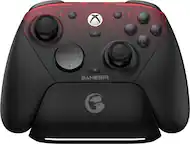
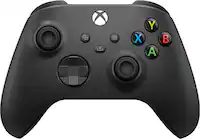
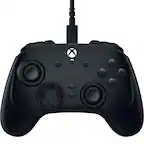
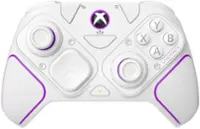
RIG - Nacon Revolution X Controller for Xbox Series X|S, Xbox One, and Windows 10/11 - Black
- Key Specs
- Wireless: false
- Compatible Platform(s): Xbox One, Xbox Series S, Xbox Series X, Windows
- General
- Brand: RIG
- Product Name: Nacon Revolution X Controller for Xbox Series X|S, Xbox One, and Windows 10/11
- Color: Black
- Features
- Product Type: Controller
- Headset Jack: true
- Button Mapping: true
- Connectivity
- Wireless: false
- Dimensions
- Product Height: 6.06 inches (The out of box height of the item. Height is measured as the vertical distance from the bottom of the item to the top as it would be primarily used or placed.)
- Product Width: 3.8 inches (The out of box width of the item. Width is measured as the horizontal distance from one side of the item to the other as it would be primarily used or placed.)
- Product Length: 2.2 inches (The out of box length of the item. Length is measured as the longest dimension of the item.)
- Product Weight: 9.17 pounds (The out of box weight of the item.)
- Compatibility
- Compatible Platform(s): Xbox One, Xbox Series S, Xbox Series X, Windows
- Warranty
- Warranty - Parts: 1 year
- Warranty - Labor: 1 year
- Other
- UPC: 850018522649
Designed for Xbox and PC, the Revolution X controller is built for competitive gamers looking for the ultimate in customization. Featuring a dedicated app from the Microsoft Store on Xbox Series X|S, Xbox One and Windows 10/11, the Revolution X App provides limitless customization options. Map buttons, set thumbstick sensitivity, trigger dead zones and much more. Create and store up to four game profiles in the controller to suit a range of games. Four programmable rear panel triggers for extra control. Seamlessly unlock Dolby Atmos for Headphones the moment you plug in your controller, giving you access to precise 3D Audio (headphones required). React faster and more accurately as you can detect the distance and direction of your threats.
- Precise 3D audio: Unleash 3D audio instantly on any Xbox console by accessing Dolby Atmos for Headphones when you plug in the controller
- Customizable: Map buttons, set thumbstick sensitivity, set trigger dead zones and much more with the Revolution X app that allows pro customization options
- Competition-grade wired controller: Wired to reduce latency, allowing for faster reaction times and greater accuracy
- Programmable: 4 programmable rear panel triggers provide an extra level of control
- Cable included: Long 9.8FT/3M nylon braided cable that is highly durable and ultra-flexible
- Precise 3D audio: Unleash 3D audio instantly on any Xbox console by accessing Dolby Atmos for Headphones when you plug in the controller
- Customizable: Map buttons, set thumbstick sensitivity, set trigger dead zones and much more with the Revolution X app that allows pro customization options
- Competition-grade wired controller: Wired to reduce latency, allowing for faster reaction times and greater accuracy
- Programmable: 4 programmable rear panel triggers provide an extra level of control
- Cable included: Long 9.8FT/3M nylon braided cable that is highly durable and ultra-flexible
Whats Included
- Revolution X Wired Controller
- Pair of concave thumbsticks
- Thumbsticks angle adapters
- Grip weights
- 3M USB-C to USA-A cable
- Storage case
- Cleaning cloth
- Dolby Atmos activation card
- Revolution X Wired Controller
- Pair of concave thumbsticks
- Thumbsticks angle adapters
- Grip weights
- 3M USB-C to USA-A cable
- Storage case
- Cleaning cloth
- Dolby Atmos activation card
Q: How can I customize the controller settings?
A: You can customize button mapping, thumbstick sensitivity, trigger dead zones, and more using the Revolution X app.
Q: How does the controller enhance audio for gaming?
A: The controller unlocks Dolby Atmos for Headphones when plugged in, providing precise 3D audio for better detection of in-game threats.
Q: Does this controller have a cable included?
A: Yes, the controller comes with a 9.8FT/3M nylon braided cable.
Q: What makes this controller suitable for competitive gaming?
A: This controller is wired to reduce latency, allowing for faster reaction times and greater accuracy.
Q: Can I create different profiles for different games?
A: Yes, you can create and store up to four game profiles in the controller.
Q: Are the abxy buttons back-lit?
A: Hi Xanth, No, the ABXY buttons are not back-lit. The only controller lighting is the light ring around the right thumbstick. This is the profile indicator light. Thanks for your interest in Nacon gaming controllers...
A: Hi disco4178, Yes you can. From the mapping menu of the Revolution X APP, you can ‘deactivate’ the Left and Right stick buttons, meaning that no action will happen if you press on them. To do so, go to the Mapping menu and select one of the stick buttons. Then, from the list, choose ‘Not attributed N/A’. The button is not attributed anymore (=deactivated aka Null). Close the APP and start to play! Note: the same process can be applied to every button from the Mapping screens. To learn more, check out the Revolution X app customization video on the RIG channel on YouTube: https://www.youtube.com/watch?v=DWfubjq7pb0 Thanks for your interest in RIG Gaming products from Nacon...
A: Perhaps ask under the PS4 console. This is the QA section got an Xbox controller. I'm not entirely sure if geek squad does consoles. If it won't turn on your best bet is either Sony or a small custom electronics shop if you can find one. Geek squad would probably need to send it to Sony anyways. Especially if the SOC is dead. It's either that, the motherboard or power supply. Hope it's the power supply because if it's the SOC they need to replace the mainboard (motherboard) anyways due to security and if it's the motherboard then same deal which means you're paying for the board, CPU/GPU (SOC), memory and various other chips.