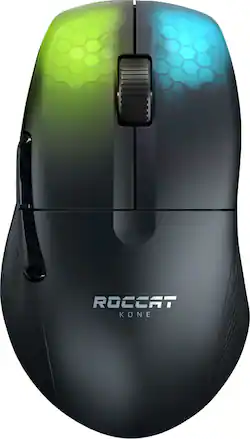
ROCCAT - Kone Pro Air Lightweight Wireless Bluetooth Optical Gaming Mouse With 19K DPI and RGB Lighting - Wireless - Ash Black
Model: ROC-11-410-01
SKU: 6459028
This item is no longer available in new condition. See similar items below
Customers are satisfied with the Kone Pro Air's lightweight design, long battery life, and responsive performance. Many appreciate the accurate scroll wheel, customizable RGB lighting, and comfortable ergonomics. While some users found the software less intuitive, the overall positive feedback highlights the mouse's excellent sensor and precise tracking. The price point is also frequently cited as a significant advantage.
The vast majority of our reviews come from verified purchases. Reviews from customers may include My Best Buy members, employees, and Tech Insider Network members (as tagged). Select reviewers may receive discounted products, promotional considerations or entries into drawings for honest, helpful reviews.
I initially picked up the Pro Air while it was on sale, and then the next week the Kone Pro went on sale and Best Buy sent me a $15 gift. Outside of the nearly $60 price difference, there is one key difference about the regular Kone Pro I do prefer and that's the weight. The Pro Air is by no means heavy, but the regular pro is about 8-9 grams lighter on my scale, which ends up being pretty noticeable to me. Another difference is the black coating is glossier picking up every smudge, and this probably a personal issues but made my hands sweat. I love wireless and had zero issues with it, but Roccat put a nice cable on the Pro and with a bungie you can't notice it. I'm going to stick it out with the Pro for those reasons, but I love this mouse and could have gone either way. Haven't had an ergo shape before, but I love the shape and larger size, while still being light weight. This mouse has become my new main. I don't have any serious complaints about it, but I do think the clicks are kind of muted and not my favorite sounding. The switches are also not what I would consider a fast, and I would consider more tactile. I also wish the side grooves by the side buttons actually had some grip, and I ended up ordering my own grips to help with it. It's kind of good and bad, but the Swarm software isn't the most user friendly, but offers a lot customization. I would recommend either of these mice, especially if you can get them on sale. Also, I would recommend the white edition for the coating.
Posted by Nick
After patiently waiting for a month for this mouse to be released at Best Buy, I finally got my hands on one. I can say, without a doubt, that this is the best lightweight wireless gaming mouse I have used to this day. With a price tag of over $120, I would consider this to be a “premium gaming mouse” and it does not disappoint in quality or performance. The mouse is made out of a black plastic, but it is very easy to grip in the hand and does not slip when making fast sweeps across the desk. Subtle grooves in the sides of the mouse assist with gripping. The heat-treated pads on the bottom of the mouse are a game changer. You can barely touch mouse and it will move across the desk with ease because the heat-treated pads eliminate almost all friction. Roccat Titan Optical switches are also one of the best features of this mouse. The titan optical switch’s completely eliminate double clicking, and I have never experienced this issue in the use of the mouse while playing competitive games. The aluminum scroll wheel is a premium feature, and works great with a subtle click when scrolling. All of the buttons of the mouse have good, crisp clicks and feel great to use. The Roccat SWARM software is the only place I experienced any issues. Those issues being that profiles sometimes did not save upon exit of the program. The simple fix was to just to re-open the program and save the profile again. There are only two zones of RGB lighting on the mouse underneath the right and left primary buttons, but they are quite interesting. The Roccat Sense AIMO lighting automatically adjusts to whatever task you are doing, and intelligently learns your habits such as clicking and scrolling. Every time you click or scroll the colors will change depending on what you were doing. Pros: Premium feel Wireless/wired usability Very lightweight Intelligent lighting Long battery life Superior maneuverability Titan Optical Switches Cons: SWARM software sometimes buggy (personal con: only 2 RGB zones, I like RGB to be on mice and keyboards) In conclusion, the Kone Pro Air is one of the best options for a lightweight wireless gaming mouse. It is a new product that has just released so there isn’t anything else new out that is better. Roccat has also stated that they spent years developing this mouse, and it really shows in the final product. Don’t spend $300 on some Etsy custom lightweight gaming mouse when there is already this for so much better.
Posted by Bu8s
I was a bit hesitant to purchase this mouse after having iffy quality control on my previous Burst Pro/Burst Core mice that use the same optical main switches that the Kone Pro uses, but these feel nice and do not require a lot of force to actuate. Left and right are close in feel and the shine through of the RGB on Mouse 1 and 2 are an interesting touch. The side buttons are fantastic and easy to press. Optical implementations over the years are usually not the best, but this is one of the better ones I've used. It also helps that they will not develop the dreaded double-clicking issues that have plagued mice over the past few years. The 100% virgin PTFE mouse feet are some of the best out of the box that I have seen, and they come with an extra set just in case you wear them out or have to take the mouse apart for some reason. The weight is perfect and the shape is just right for my 19x10cm hands. Wireless is spot on and I've noticed zero tracking or deviation issues. The bluetooth implementation has less lag than other mice I've used, such as the Razer Basilisk X Hyperspeed and Logitech M720. Battery life is decent, not great but not bad. It helps to turn the RGB brightness down. The scroll wheel is accurate and tactile, made of aluminum without being slippery. I've seen some reports of people having issues with the encoder skipping or bouncing but I have yet to encounter this issue with my copy. My only minor quibble with the mouse is the lack of a DPI button. It has a profile selector on the bottom, but not a DPI button. I ended up using Roccat's Swarm software to create multiple profiles with different DPI to sort of bypass the issue. I tend to use 800dpi for gaming and 1000dpi for desktop usage and I like to be able to bounce between the two. If you can find this on sale, I'd highly recommend it along with an extended warranty just in case you encounter any issues with the scroll wheel.
This review is from ROCCAT - Kone Pro Air Lightweight Wireless Bluetooth Optical Gaming Mouse with 19K DPI, Aluminum Scroll Wheel & RGB lighting - Wireless - Arctic White
Posted by ThirdeYe