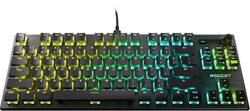
ROCCAT - Vulcan TKL Pro Compact PC Gaming Keyboard with Linear Optical Titan Switch, AIMO RGB Lighting and Detachable USB-C Cable - Black
Model: ROC-12-572
SKU: 6424763
This item is no longer available in new condition. See similar items below
Note: I purchased the wrist rest separately elsewhere I loved the keyboard itself, but I ended up replacing it for reasons I’ll cover in the Cons below. PROS - Incredibly buttery smooth switches and stabilizers. I’m not sure if they’re factory lubed or something, but I would bet money that you won’t find any non-custom keyboard with keys that feel this frictionless. - Beautiful keyboard in-person. However, you’ll see hotspots out of the corners of your eyes if you shift around in your seat too much, since there’s nothing diffusing the LEDs on the switches, and they’re mostly exposed. - Very vivid RGB. CONS - The software is extremely limited in what kind of control it allows you to have over the board. You can’t actually remap anything. You can change what some of the keys do when “Game Mode” is enabled in the sense that you can disable the key during Game Mode. You can also change the Caps Lock to function as “Easy Shift”, which is just Roccat’s version of something like Hyper Shift or G Shift. Holding this key down allows you to have access to alternate keys for part of the board, but only letter keys, and only as far over as the F key for some reason (So, QWERT, ASDF, ZXC. I don’t remember if V, G, and T are included or not, but I don’t think so.). They don’t let you change the Easy Shift functions of any other key. Actually, 1-5 might also be included, but I can’t remember. I was hoping I could remap my Caps Lock to something like CTRL, as I really didn’t find holding Easy-Shift (Caps Lock) down and pressing something like E as something that felt practical. When I first got the board, Easy Shift seemed to work across brands, and essentially holding it would activate Hyper Shift on my Razer MMO mouse, but they patched that out in any update for some reason, and it never worked again. This is a really terrible and convoluted solution to remapping keys. - The software felt like you bought a cheap knockoff keyboard at a premium price. It was super dated-looking and feeling. - The keys are a semi-glossy ABS, which shows natural hand oils very easily. I didn’t have the keyboard long enough for it to develop any permanent “shine”, or for any of the legends to wear off/down, so I can’t really confirm or deny anything to that nature. It’s not worth replacing the keys with normal PBT keycaps since it really ruins how good the switches underneath the keycaps feel (I tried it with some keycaps I had because I was curious). Roccat doesn’t seem to sell replacement keycaps for these Vulcan boards either as far as I could tell. They might be replaceable through your warranty, but they don’t give you any Avenue to get white keycaps for their TKL boards, for example (they don’t make a white version of the TKL keyboards for whatever reason). - Some like the volume knob, but I always felt like I was forcing myself to use it to justify its existence. Also, the keyboard’s backplate was metal, but the knob was a rigid plastic, and it felt kind of tacked on as a result. - The mute button that’s next to the volume knob can’t be remapped to anything else and didn’t really seem like something I wanted on the board after initially feeling like it would be nice to have. Also worth noting, after about a month of having it, i came over to my desk after a workout, but before getting a shower, and reached across the keyboard and I saw a single drop of sweat land on the mute button and got worried about it, but told myself there was no way it was enough to get down into the board, so it’ll be fine… Sure enough, the mute button would randomly toggle every once in a while and mute my sound periodically… I ended up replacing the keyboard mainly because I didn’t like that I wasn’t able to just remap keys (especially since I never use caps lock and that’s prime real estate when it comes to gaming). It felt like Roccat was actively limiting the usefulness of the board through the software. Eventually, I would have had to replace the keyboard regardless due to the issue with the mute button, but the missing ability to remap was the reason I chose to get a different brand entirely. Coincidentally, as it turns out, Logitech doesn’t let you remap their keyboards anymore either, so I returned that one and got a Corsair one, since they let you remap anything all the way down to the hardware level. Of note, if you care about remapping, Razer has onboard hardware profile storage and allows you to store most key remappings to the profiles, but the remaps don’t actually work without their software running in the background anyway… that’s a whole other topic though.
Posted by
I purchased this on a recommendation from a friend and I'm glad he did. I thought I would miss the num pad but I don't. It saves room on my not so big desk which gives me better mousepad room in return. The keys are soo smooth when pressed and sometimes I forget how smooth and how easy it is to type. I was able to download the software and easily customize my key colors. Feels nice and sturdy as well. I don't regret this purchase at all.
Posted by BigE
WOW! This is a pretty sweet keyboard! It's low profile, but the keys are tall so it doesn't feel too low. The volume is fast and easy mixer style knob and a mute button beside it. I really like the style. The keys have linear optical switches and it rates at 100 million stroke life cycle! That's pretty fantastic!!! The travel distance is super nice too with a very satisfying click with each touch and the keys just feel good. They are full size keys with decent spacing and doesn't feel crowded at all. It comes with a detachable USB-C cable if you're into custom cables. Oh, and this one is TKL: ten key less, giving more room for mouse movement. The really awesome lighting is AIMO intelligent so that it will sync with other devices that are AIMO compatible. The transparent switch housing makes the lighting on this keyboard gorgeous! The one downside I see with this keyboard: the oils on my fingers show on the keys a lot more than I would like. (No, I haven't eaten around my keyboard yet.) I love the closed off system so that it's easy to clean, just by tilting it to allow crumbs to slide right off (if you do eat while you game.) Overall This is a pretty solid keyboard and I'm very happy to have it.
Posted by mskelbel
The vast majority of our reviews come from verified purchases. Reviews from customers may include My Best Buy members, employees, and Tech Insider Network members (as tagged). Select reviewers may receive discounted products, promotional considerations or entries into drawings for honest, helpful reviews.
Customers are delighted by the high-quality build, responsive keys, and vivid RGB lighting of the Vulcan TKL Pro keyboard. Many appreciate the convenient volume control knob and detachable USB-C cable, finding the compact size ideal for their workspace. Positive feedback consistently highlights the enjoyable typing experience and customizable features. The keyboard's design and functionality are frequently praised.