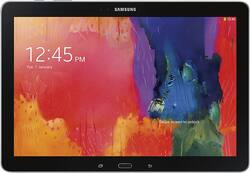
Samsung - Galaxy Tab Pro - 12.2" - 32GB - Black
- Key Specs
- Screen Size: 12.2 inches (Size of the screen, measured diagonally from corner to corner.)
- Screen Resolution: 2560 x 1600 (Screens come in a range of resolutions (measured in pixels, horizontal x vertical). The higher the resolution, the greater the picture quality.)
- Processor Model: Samsung (Your computer's processor is like its brain. Working in combination with system memory, the power of the processor determines the complexity of software you can run, how many programs you can have open at the same time, and how fast those programs will run. Most computers feature an AMD, Intel or Snapdragon processor.)
- Total Storage Capacity: 32 gigabytes
- Operating System: Android 4.4 KitKat (The operating system manages all software and hardware, including files, memory and connected devices. Most importantly, it lets you interact with your device and your programs in a visual way; otherwise, you'd be typing computer code to get anything done.)
- Wireless Connectivity: Bluetooth, Wi-Fi (The manner in which a device sends data to another device over a short distance without the use of wires or cables.)
- General
- Product Name: Galaxy Tab Pro - 12.2" - 32GB
- Brand: Samsung
- Model Number: SM-T9000ZKAXAR
- Model Family: Samsung Galaxy
- Year of Release: 2014
- Color: Black
- Display
- Screen Size: 12.2 inches (Size of the screen, measured diagonally from corner to corner.)
- Screen Resolution: 2560 x 1600 (Screens come in a range of resolutions (measured in pixels, horizontal x vertical). The higher the resolution, the greater the picture quality.)
- Processor
- Processor Brand: Samsung
- Processor Model: Samsung (Your computer's processor is like its brain. Working in combination with system memory, the power of the processor determines the complexity of software you can run, how many programs you can have open at the same time, and how fast those programs will run. Most computers feature an AMD, Intel or Snapdragon processor.)
- Storage
- Total Storage Capacity: 32 gigabytes
- Compatibility
- Operating System: Android 4.4 KitKat (The operating system manages all software and hardware, including files, memory and connected devices. Most importantly, it lets you interact with your device and your programs in a visual way; otherwise, you'd be typing computer code to get anything done.)
- Operating System Compatibility: Android
- Connectivity
- Wireless Connectivity: Bluetooth, Wi-Fi (The manner in which a device sends data to another device over a short distance without the use of wires or cables.)
- Network Connectivity: None (The manner in which a device sends data to another device over a long distance using a cellular network.)
- Power
- Charging Interface(s): Micro-USB (The connection for transmitting power to charge the device.)
- Camera
- Front-Facing Camera: true
- Front Facing Camera Megapixels: 2 megapixels (The more megapixels, the more detail that the camera facing the user can capture.)
- Rear-Facing Camera: true
- Rear Facing Camera Megapixels: 8 megapixels (The more megapixels, the more detail that the camera facing away from the user can capture.)
- Dimensions
- Product Height: 0.3 inches (The out of box height of the item. Height is measured as the vertical distance from the bottom of the item to the top as it would be primarily used or placed.)
- Product Width: 11.6 inches (The out of box width of the item. Width is measured as the horizontal distance from one side of the item to the other as it would be primarily used or placed.)
- Product Weight: 25.6 ounces (The out of box weight of the item.)
- Included
- Included Software: Android OS
- Other
- UPC: 887276677675
Samsung Galaxy Tab Pro - 12.2" - 32GB: Whether you're working on the go or simply enjoying your favorite streaming entertainment, this tablet helps you multitask effectively by displaying up to four apps side by side across its expansive HD touch screen.
- Android operating system: Productivity and entertainment at your fingertips. Download apps, games, movies, music and eBooks from Google Play. Cloud integration provides a seamless experience across all Android devices.
- 12.2" screen with 2560 x 1600 resolution: High pixel density and stunning detail make this screen ideal for Web browsing, studying, reading and streaming HD content.
- 32GB internal storage plus microSD slot: Store your software, apps, music, movies, photos and more. Expand storage up to 64GB with a microSD card (sold separately).
- Quad-core processor: The right combination of fast performance and power efficiency. It allows rapid multitasking, delivers smooth response and unleashes stunning graphics.
- Dual cameras for photos and face-to-face chat: 2.0MP front camera and 8.0MP rear camera with geo-tagging, built-in photo sharing options and panoramic shots.
- Bring your office on the go: Share your screen with your co-workers using Samsung e-Meeting, even when WiFi isn't available, and create and edit documents with the included suite of office apps.
- Increased productivity: Use up to four apps side by side for simple, streamlined multitasking.
Whats Included
- Samsung Galaxy Tab Pro - 12.2" - 32GB
- 9-cell lithium-polymer battery
- Power cord
- Owner's manual
Q: can you use a s pen on this model?
A: You can use a stylus but you CANNOT use an s pen.
Q: How many gigs of RAM does this device have?
A: It has 3 gb of ram which makes it fast. My other tablet is just about as fast but has 1 gb of ram so that is a choke. By the way....I have the 32 gb version and while I have Lots of apps that are power hungry it still has plenty of room. Having a micro SD card (I use a 64 GB) means I have LOTS of space to store programs...many can be run from the SD card using the app control within the Android system. Warning though...if you place all your apps on the SD card you will not be able to run them if you swap out the SD card to put in another one for additional space. But 64 is a LOT of space. One way to add lots of additional memory is to get the Samsung adaptor cable that plugs in the proprietary port and has a USB female port...you can add flash drive....you can even get a flash drive splitter so you can add a few additional flash drives at the same time (think the limit is around 4-5 but that is tons of space).
Q: do this product have a sim card slot to get data in a non wifi area.
A: Stephen, This model does not contain a SIM card for carrier services. Thanks for your interest in Samsung products. --Mr.Samsung
A: I bought a Samsung hdmi adapter. As long as your projector has an hdmi input, it will mirror your tablet screen onto it. It's pretty cool. My kids like me hooking it up to the tv and turning on the tablet's camera and point it at them.They can look at themselves on the big screen.
Q: Will I be able to watch video content online?
A: No Android device is flash-compatible. Netflix, Hulu, Youtube, and most other streaming content providers have released Android-native versions that work well, and some are bundled with the device.
Q: Is this tablet factory unlocked?
A: This tablet is not unlocked as it operates on Wi-Fi for an internet connection. There is no phone capability or SIM card.
Q: Is the Galaxy pro user friendly for photo albums
A: Works great for pictures and albums. Just transfer from your Windows machine to the micro SD card or use a cloud transfer which I prefer. You can also get a Samsung port to female USB cord so you can plug int a regular USB flash drive and transfer pics back and forth. The included apps work fine for that although there are some other free apps that you might want to consider also that have additional features.
Q: 1
A: I am almost sure you can. When I purchased my tablet the minute I logged to my google account all my apps from my Samsung Galaxy S5 migrated automatically into the table. There was no need for me to reload my apps like dropbox, chase, etc. Some how my devices sync or communicated with each other. That was cool. I hope this was helpful