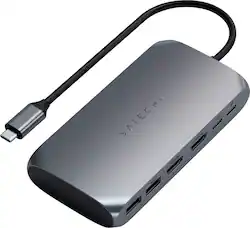
Satechi - USB-C Multimedia Adapter for M1/M2 with 2 4K HDMI, USB C PD (85W), USB-C, 2 USB-A for MacBook, iPad, Mac & Windows - Space Gray
Customers are saying
Customers recognize the USB-C Multimedia Adapter's dual 4K HDMI ports as a significant advantage, praising its compatibility with various devices and ease of use. However, some users experienced the adapter running warm, and others found the price to be a drawback. Concerns were also raised regarding the refresh rate limitations on one of the HDMI ports.
Customer Images
The vast majority of our reviews come from verified purchases. Reviews from customers may include My Best Buy members, employees, and Tech Insider Network members (as tagged). Select reviewers may receive discounted products, promotional considerations or entries into drawings for honest, helpful reviews.
- Rated 5 out of 5 stars
Connects Macbook Air M2 to two External Displays
A few weeks ago I was ready to buy a new MacBook, but was holding off because I needed the ability to connect it to two external displays via HDMI to help me when I work from home. Since the new MacBooks all have the M1 or M2 chips made by Apple silicon, they can't do this natively without upgrading to the nearly twice as expensive M1Pro/M2Pro Macbook Pros. I finally decided to just go for the new Macbook Air M2 in Midnight and purchased this the same night I picked up the computer. This was super easy to install and use, and it's worked great for me for regular business needs and personal use. Between the built-in display, my two external monitors connected to this, and SideCar/Connectivity on my iPad, this gives me the ability to have up to four displays going at once. If you're hesitant to buy an M1/M2 Macbook because you have two monitors to connect via HDMI, this is a solution to that problem. My only complaint is that $100+ for something like this seems a little high (I would think more like $60-$80), but beggars can't be choosers.
Posted by CodyH
- Rated 4 out of 5 stars
Nice Adapter!
The Satechi USB-C Multimedia Adapter for M1 is a nice-looking and well-made device in appearance and feel. I tried using it with one of my 17” 4k laptops that has an NVIDIA GeForce RTX 3060 and four USB-C Thunderbolt ports with two 4k monitors. When I first plugged it in both of the screens were on and working. Then I read the instructions and it said to download and install the driver and then plug it in. So I did that and afterwards my left monitor would not display anything full screen. It was like the laptop or the Satechi device saw it as a smaller monitor than it was and it had black bars on each side of the screen. So I uninstalled the driver in the Windows apps and features section and then went to look in my C: drive for any residual files and could not find a folder relating to the Satechi device. I also noticed that my second monitor would only work at 30hz while the first one ran at 60hz and the laptop was running at 60hz as well. Windows would only allow me to extend to the second monitor and the first one duplicated the laptop and I still have not been able to get the first screen to display full screen with the Satechi but when I unplugged the second monitor and used the adapter that came with the laptop that has one HDMI port the screen displayed fully again. I will have to try again to see how I can get the generic Windows driver back that Windows installed on it’s own. At least that way it displayed both monitors in full screen. If you are buying it for a Windows set up you may want to stick with the driver that Windows installs automatically until Satechi updates their driver for Windows. It does say it is made for the Apple M1 to be fair but it is supposed to be able to work with Windows as well and they have a driver download for it. I think it is a good device that just needs a driver update for Windows 10 to work out a couple of issues.
Posted by Androidaholic
- Rated 5 out of 5 stars
Exactly what I needed to run 2 monitors on M1 Mac
Are you struggling with an M! processor MacBook and not being able to run 2 external monitors? If so, then get this, set-up is simple and it works very well. Initially I was regretting my decision of going with a Mac instead of a PC at my new job - once I discovered the absurdity of my new machine not being able to accommodate two external monitors. I tried a MOKiN USB-C hub as well as a B3 Big Three USB-C hub, and neither of them worked. I also tried the J5Create Ultra Hub USB-C hub from BestBuy (sku 6402119), which based on the reviews should have worked...well, it didn't. I noticed this hub from SATECHI that actually had "M1" in the name of the device, so I figured this would be my best and last attempt. I opened the box, and I noticed the device was well built; plus it actually had useful and simple instructions. After wasting half a day trying to figure out why I couldn't run both of my monitors, and failing to remedy the situation with three other devices, I was up and running within 5 minutes with the SATECHI USB-C Multimedia M! adapter. Great Product!
Posted by AgentOmega