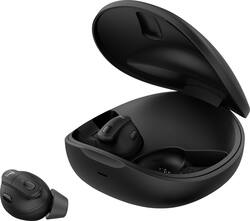
Sennheiser - Conversation Clear Plus - True Wireless Hearing Solution with Speech Enhancement & Active Noise Cancellation - Black
Model: ConCPlus1
SKU: 6532264
This item is no longer available in new condition. See similar items below
Customers find value in the Conversation Clear Plus hearing solution for its exceptional noise cancellation capabilities that enhance clarity, providing a comfortable fit that doesn't feel like wearing hearing aids, and an impressive battery life of approximately 8 hours. Customers also appreciate the reliable Bluetooth connection and earbud functionality.
So, I recently tried out the Sennheiser Conversation Clear Plus and here's my review: Let’s start with the fit. These earbuds come with 3 sizes of ear tips and ear fins. I used the large for both and they fit well. The fin is a great idea, these earbuds never feel like they will fall out. They are pretty comfortable to wear. I did find my ears a little sore after using them for 7-8 hours. However, it's getting better over time as my ears adjust. Pairing / Connecting: I did have a bit of trouble pairing these to my phone (Galaxy S22 Ultra) initially, but after closing and opening the app, and patience, it eventually worked. Also, when you open the App (Called ‘Conversation Clear’) it shows you the connection of both earbuds in the top right-hand corner of the screen by indicating the battery life, I have noticed that at times the app has trouble connecting to one of the earbuds. It seems like this has also got better, perhaps the app updated. No Problem connecting to my computer to use with Microsoft Teams. Worked perfectly in this environment. My favorite so far as they don’t lose the connection by going into any kind of standby mode. These ear buds are designed to be able to switch from a streaming environment to a communication environment to provide the user better clarity of speech and their surroundings. I would say they do a pretty good job with that. They are just a little clumsy switching from this communication feature to the streaming feature. Example; When in the communication mode, and I receive a text or notification, the earbuds temporarily switch to streaming mode and go from amplified sounds to noise cancellation mode, which can make it hard to hear the person you're talking to for that couple of seconds it takes to switch back to communication mode. I had to turn off notifications on my phone when using the communication feature to avoid this from happening. Hopefully this can be addressed down the line with an App or firmware update allowing the phone notifications to come through without affecting the conversation. The App contains three tabs on the top, Relax, Communication and Stream. In Communication mode you have the option to turn speech volume from 0 - 15. There is also a toggle to turn on/off the Clarify Boost mode to further enhance the clarity of speech. (you can further move a slider from smooth to clear to dial in your best sounds according to your hearing.) The Stream mode provides a slider which allows you to choose how much outside noise you want to let in. (more or less NC) The Relax mode essentially closes off the world around you, providing you a quite relaxing environment. You can adjust the outside sound hear as well from 0-100% 100% in this mode reminds me of Transparency modes of other earbuds I own. I recently used these in a Bar (Very noisy) environment, and it did enhance the sound around me. I also felt like I could hear the conversations a bit better at my table. Noice Cancellation works well when in streaming mode. I would say on a scale of 10 they are 8 out of 10. They work great for the office or even airplane style environment, but not as well with a real loud environment such as cutting my grass on my tractor. I do have another set of earbuds that did a better job at cancelling out that engine noise. I realize that is not a need for many but wanted to provide that input. NOTE – Instructions not super clear on this next issue: I was having trouble getting the Play/Pause to work on the right earbud and the assistant to activate using the left earbud. You are supposed to be able to double tap to trigger these functions, but it is not working for me. I then found that these earbuds have both Mechanical buttons and touch sensitive buttons. Once I figured that out, everything works well. Sound for music is good. I do wish they had a bit more bass and a way to adjust that. I was able to get a little bit more out of them using the sound settings within my phone. They do have crisp well balanced mids and highs. I'm just kind of a snob when it comes to bass. Sound on calls / communications are very clear and concise. The battery life is impressive. I get a full day out of them and can put back in the case to quickly recharge. I only charge the case maybe once a week.4 Overall, I think the Sennheiser Conversation Clear Plus is a solid choice for those that need a little help due to mild hearing loss. They are very versatile for all your audio needs.
Posted by Mukman
Received the ConCPlus1 true wireless earbuds with speech enhancement, set them up to charge. Charging is completed by placing the rechargeable earbuds into their case and using the USB-C (to the case) and the USB-A into a USB port. I’m assuming the earbuds came with a good charge, within one hour the earbuds were charged to full capacity. Due to the lack of accompanying instructions you’ll need to go into the Sennheiser Conversation Clear app to learn more about the ConCPlus1 wireless earbuds. The app states up to 3 hours for a full charge. Apparently, I was a little out of order with the set up because I downloaded the Sennheiser Conversation Clear app, to my phone, out of order with the instructions, didn’t appear to make a difference. To start the Bluetooth pairing you will have to remove the earbuds from their charging case and follow the instructions in the app. Pairing established a connection quickly. Next you will select the best ear tips and ear fins to suit your needs and for the most comfort. Initial set up was very simple. I found the instructions for adjusting between Relax mode, Communication mode, and Audio Stream mode slightly confusing however it doesn’t take long to learn the controls on the earbuds. Still not sure, that I’m happy with the control processes between the earbud controls and the Sennheiser Conversation Clear app. One of my concerns is with the volume control synchronization between the earbud’s controls and the music streaming device. You want to be cautious when moving the Ambient Balancing Control, when moving the balancing control to the right, of the center position, the volume can increase a great deal, so you need to be cautious. The earbuds will automatically adjust to your surrounding sounds which can be disturbing at times. The ConCPlus1 is like many wireless earbuds, they are comfortable once you attach the best earpieces. Using the Communication mode, with no incoming streaming music, is like many hearing enhancement devices, you will experience a slight hollow sound. The relax mode (ANC) is fair, however not as stealthy as a few other wireless earbuds that I use. When listening to music the volume control on the earbuds will depend on the volume of incoming music device. Using the earbud controls, you can convert from Stream mode (music) to Relax mode or the Communication mode, however, you cannot use the earbud controls to convert back to your music without going into your music device (phone) and restarting the music. Adjusting the music volume using the earbud volume control will move the Stream mode resulting in an increased or decreased ambient sound. Using the music source volume (phone volume) button will not affect the ambience. Incoming calls are simple to respond to and the sound is clear, the caller said the sound was good. Ending the call was not as simple as the directions stated. According to the instructions you can end a call by holding either the left or right earbud button for 2 seconds or tap the right or left earbud button 2x to end the call. Tapping the right or left earbud button would not end the call. The sound customization is limited, however may be suitable for your needs. Remember that the ConCPLus1 wireless earbuds will self-adjust to the surrounding environment. Multiple times there were situations, and specific sounds or sound sources, that caused a different (almost muffled) sound quality. The ConCPlus1 earbuds process sound to improve the listener experience and the clarity of speech. One poor quality of this automatic switching is that you will occasionally hear an abrupt change as the earbuds automatically shift from one setting to another. Not sure that this is a favorable process for me. When I set the earbuds in the charging case for the night both earbuds showed to be seated correctly however the right earbud must have shifted when I set the charging case down. In the morning I placed the wireless earbuds in my ears and the right earbud was not charged. 15 minutes of charging did supply the right earbud with 18% charge. Overall, the Sennheiser ConCPlus1 True Wireless Earbuds are a little expensive when compared to other Wireless Earbuds and again depending on what you are looking for in use. They have great sound when streaming music, ANC is fair, and the Communication works OK for me except for the automatic adjustments to environment sounds. I’m sure with time I’ll find more valuable use for my liking.
Posted by djfr
I had the pleasure of experiencing the Sennheiser Conversation Clear Plus Wireless Earbuds, and as someone who feels like his hearing has gotten worse lately, I was eager to give these a test. First and foremost, the Speech Enhancement feature on the Conversation Clear Plus is nothing short of remarkable. If I had to describe it, it would be like those old cartoons where they would use extendable ears in order to hear a conversation from across the room. That being said, conversations were rendered with clarity, and every word was delivered with precision, and at times I was shocked how well I could hear things. It was almost too good in that I could hear coworkers getting chatty from a good distance away from my desk, to the point I had to switch over to the Stream function where I could then listen to my podcast and block my chatty coworkers out with the Active Noise Cancellation that they come with. The Active Noise Cancellation (ANC) on these earbuds is a true blessing for anyone on the go or in a noisy work environment. It creates a serene bubble, allowing me to block out the world with music, podcasts. The design of the Sennheiser Conversation Clear Plus is where I have some issues in that while the actual earbuds do fit snugly, and are comfortable in the ear for long usage and come with extra tips to properly fit your ears. The actual look of these earbuds resembles too much like normal wireless earbuds and had two interactions where the people I was talking with found it rude that I didn't take my earbuds to have the conversation with them and had to explain that they were hearing enhancer earbuds and also bluetooth earbuds for listening to music, which in the moment was a little awkward. Then my other complaint would have to be the button controls not being intuitive and responsive, in that I had several issues with the "Long tap” and the “Double Tap” not registering. Where when in stream mode to play/pause a song you’re supposed to “double tap” the right earbud button, and everytime I would try to do this, it would not register and it would just increase the sound levels causing me to go into the Conversation Clear app to change the volume levels back down. The button prompts are not customizable in the app, so you have to use what Sennheiser assigned as the “Short Press”, “Long Press” and “Double Press”. Note: I did make sure that I was on the most recent firmware update, so going forward I would like to see some updates that will allow button customization. Battery life on these are impressive, lasting about 8 hours. The charging case is on the bulkier side and seems like it could be slimmed down a little. Pairing these earbuds with my device was easy, and the Bluetooth connectivity had zero bluetooth connection issues, delivering a stable connection. Overall, the Conversation Clear Plus does come with a premium price tag, and does a good job with the hearing enhancement, along with being good earbuds for your audio entertainment, but it just doesn't do an overall great job. The app software is truly holding this product back and brings it down. There needs to be some big updates on the software side to truly make this a great product. That being said if you’re someone who has some slight hearing issues who doesn't want to break the bank for hearing aids and still wants to be able to hear things better along with being able to listen to music you might want to check these out.
Posted by Ian L
The vast majority of our reviews come from verified purchases. Reviews from customers may include My Best Buy members, employees, and Tech Insider Network members (as tagged). Select reviewers may receive discounted products, promotional considerations or entries into drawings for honest, helpful reviews.