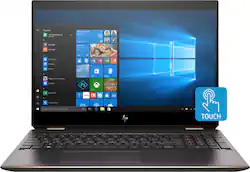
The HP Spectre x360 2-in-1 is a premium looking and performing laptop. It has an eye-catching design, and solid specs to back it up. It comes loaded with a 4K touchscreen, NVME SSD storage, and an 8th gen Intel i7.
Specs
CPU – Intel (8th Gen) i7-8565U Quad Core 1.80 GHz processor w/ integrated Intel 620 graphics
Memory – 16GB DDR4-2400
Graphics – Nvidia GeForce MX150 2GB
Screen – 15.6” 3840 x 2160p UHD (4K) IPS w/ anti-glare
Storage – 512GB NVME SSD
Ports – 1X USB C / 1X Thunderbolt / 1X USB 3.0 / 1X HDMI 2.0 / 1X microSD Slot / TRRS 3.5mm Jack (headphone and mic support)
Audio – Bang & Olufsen quad speakers
Webcam – 1080P with dual microphone
Dimensions – 14.21 x 9.84 x 0.76”; 4.78lb
Other – Fingerprint Reader / HP Digital Pen / Leather Carrying Pouch
Design
The design of the Spectre x360 2-in1 is stunning. The packaging that the laptop came in was elegant, and well designed. I was impressed before I even slid the cover of the box to reveal the laptop. Pulling the laptop from its packaging reveals a sturdy feeling heft – it feels expensive. The shell is metal (aluminum I’d assume) with a sandblasted finish that resists smudges. The finish looks dark grey with bronze-chrome accents on the sides and hinges. Overall the design looks really sharp and professional. Opening the laptop, you are greeted by the same color scheme as the outside. The bronze-chrome shows up around the edge of the trackpad and around the entire screen lid. Sticking with the sandblasted metal inside, it again completely resists smudges and fingerprints.
The conversion from laptop to tablet is seamless. Like other HP 2-1 products I have used, the hinge provides the right amount of resistance to allow the main body and screen to be used at any number of angles and configurations. The keyboard and trackpad are disabled early enough in the transition to keep errant clicks and button pushes from happening. In tablet mode, the thickness of the machine increases to 0.79” at its thickest points (furthest from the hinges). Sometimes 2-in-1’s take time to figure out how you want to hold them – clicking keys, covering speakers, etc.The Spectre x360 didn’t seem as bad though. The off-center trackpad helped with the initial clumsiness, and the speaker locations aren’t easy covered up.
I was initially a bit dismayed by the lack of storage location for the pen. I honestly found the magnetic areas for it while measuring the thickness of the laptop in tablet mode with my calipers. The locations are on either side of the palm rest below the control key (on the left) and the enter key on the number pad. It would have been nice to have a location on the side of the laptop (like the Surface Book) for when the laptop is closed. The leather carrying pouch has a pocket to store the pen, which is better than nothing.
The ports have an OK layout. The USB’s, Thunderbolt, and microSD are all located on the right side of the body. The HDMI, AC port, and 3.5mm port are on the left. I would have liked to see some additional USB ports located on the other side – 1) for more ports and 2) for flexibility on plugging things in. I am sad that a networking port was not included – instead I will have to pick up a USB C/Thunderbolt to ethernet dongle at some point.
Performance
The quad core i7 is a fast, and efficient processor. At only 15W TDP, it is kind to the battery life of the system while still getting the job done quickly. I didn’t notice too much of a performance bottleneck from the processor or the GPU under normal browser/productivity-based activities. Switching programs was seamless, and I never felt any hesitation from the computer to complete a task. The only way I could make the computer feel loaded down was with several tabs in Firefox running Youtube videos, while installing a game from Steam. This is a pretty bogus workload just to get it to feel slow. If you installed some heavy productivity software, or graphic design/modeling software, you could slow it up but that’s about it. In all reality the Spectre x360 has plenty of power and speed thanks to the 16 GB of RAM, and its NVME SSD.
The GPU is on the low end, but it is better than the on-die Intel 620 graphics. The MX150 is akin to a GTX 1030 in terms of power, which is still enough to watch/stream 4K Netflix. I tried some limited gaming. I loaded up DiRT Rally (circa 2017) from my Steam library. With the MX150 I had to knock the settings down to low with the resolution set to 1080p (V-Sync off). I was able to get a playable 57/74/100 (min/avg/max) fps with these settings. The x360 should be able to play most games low-med settings and dialed back resolutions. I do have to mention that this was achieved while plugged into AC power. On battery my minimum frames plunged to 25fps and made it unplayable.
This version of the Spectre x360 comes with 16GB of RAM and a 512GB NVME drive for its primary (and only) storage. The 16GB of RAM should be plenty (it can go up to 32, but it is not easily accessible to swap out). The NVME drive is very fast – sequential read/write is 3122.7 / 529.4 Mbs in CrystalDiskMark with 5s intervals and 16GB test file size. 512GB may not be a large enough drive size for some but it should be adequate for the vast majority. If you need more space go for an external drive that can connect via the Thunderbolt port or use cloud storage.
Display
The 15.6” 3840 X 2160p UHD IPS touchscreen display looks great. It has a high gloss finish like you would expect in today’s touchscreens. HP lists it as an anti-glare screen as well, which I don’t fully agree with. The screen is glossy enough that you can see the reflection of the keyboard in the screen if the background is dark. The screen is beautiful. This is my first 4K screen period, but I was amazed at how good everything looked. I loaded up several 4K shows on Netflix (Altered Carbon, Planet Earth 2, Blue Planet 2), and they looked great. The screen images were very sharp, colors looked great, and the refresh rate didn’t induce any motion blurring. Even at laptop viewing distance I could not discern individual pixels (282.42 PPI for this screen).
The multipoint touchscreen is very responsive, and easy to use. Whether using my finger or the pen, I had no problem interfacing with the OS via the touchscreen. The touch locations were accurate, and it didn’t have any difficulty responding to my inputs. I let my kids have a go at it with a few touchscreen games (Fruit Ninja and Angry Birds), and it didn’t have a problem with their frantic swiping.
Keyboard and Trackpad
The keyboard is a ten-key design (number pad included – Hooray!) with body color match keys. The keys have a white backlight (adjustable high/low/off). The backlight times out after 30 seconds, even on AC power - this is somewhat annoying and would be nice if I could force it to stay on. The keys have a relatively short throw with a full travel length of 0.04” and low to mid force requirement. The key actuation is soft with the actuation point is right in the middle of the key travel. My HP Chromebook has a similar keyboard setup, but its actuation felt closer to the top of the key travel. Either way, the Spectre’s keyboard felt a little more fluid to type on and was nice to use.
The trackpad is one of the better ones I have used – and I usually dislike trackpads. It is also body color matched with a satin surface texture, so your fingers glide across it. The multipoint touch was accurate, and the trackpad was responsive.
HP Digital Pen
I don’t have a ton of use for the digital pen, but I can see its usefulness. I mostly used it to doodle in MS Paint to draw pictures for my kids. The pen was very easy to use. The included software lets you customize the 2 side buttons to perform whatever action you choose. The pen itself was very accurate – I could sign my name and it would look like my signature on paper. I can see how this pen would be great if you are a teacher grading (digital) papers, an editor marking up a manuscript, etc. For my use simple doodles are fine, and my kids have fun drawing me pictures and saving them (it’s a nice keepsake I guess). Also, 2 extra pen tips are included in the pen box – don’t lose them!
Sound
The sound from the B&O quad speakers is great. Like all laptops there is no bass or real low end. The mids and highs were bright and clear, and the speakers had enough sound to fill a room. Dialog sounds clear as well, so watching Netflix or listening to music isn’t a problem. The speakers radiate from the top (above the keyboard) and bottom front (L & R). The bottom front speakers keep the sound pumping out in tablet mode, so obscuring the speakers with your lap won’t be an issue.
Webcam
I thought the webcam in the Spectre would be similar to the one in my x360 Chromebook, but this is an improvement. In my x360 CB, the webcam was good in bright lighting but not so much in low light. The Spectre’s webcam is quite a bit better. The sensor is 1080p (FHD), and it performs well in a wide range of lighting. I was able to use it with just the backlight of the screen as the only light source. The mics are also a little better, but still a bit tinny. I can live with that since the picture quality is pretty good. Also, no need to put tape over the lens for privacy since there is a switch on the right side of the laptop that disables the camera.
Overall
I am impressed by the Spectre x360. It has plenty of speed and power. The Intel i7-8565U is a great current gen processor that should be able to keep up for years to come. The 512GB NVME drive is seriously quick. The 4K screen is very sharp, and the touch screen is precise. The design of the machine is very eye catching and professional looking. For The majority of use cases this laptop will be perfect and should not disappoint. Gaming is its only weak spot, so be prepared to crank the settings down.